

MeetingMind
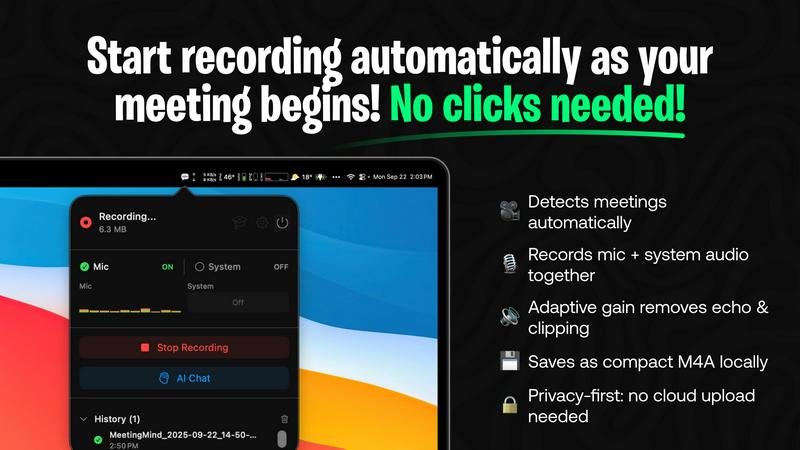
MeetingMind automatically records, transcribes, and summarizes your Zoom meetings, ensuring you never miss important.
About MeetingMind
MeetingMind is an advanced AI-powered meeting assistant specifically designed for macOS users. This innovative application acts as an intelligent recorder, automatically capturing, transcribing, and analyzing virtual meetings, particularly those conducted via Zoom. Its primary value proposition is to eliminate the need for manual note-taking, thereby ensuring that users never miss crucial insights, action items, or details from their discussions. MeetingMind is ideal for professionals, including remote workers, project managers, consultants, and executives, who require reliable and accurate meeting records to enhance accountability and productivity. A standout feature of MeetingMind is its privacy-first architecture, powered by on-device AI processing utilizing Apple Silicon. This ensures that all audio data, transcriptions, and analyses occur locally on the user's Mac, safeguarding sensitive meeting content. With optional integrations like local Ollama models or the OpenRouter API, users can choose between enhanced privacy and advanced cloud-based AI functionalities. The application operates seamlessly from the macOS menu bar, providing automatic meeting detection and recording without requiring any manual intervention, making it an indispensable tool for efficient and secure meeting management.
Features
Automatic Detection
MeetingMind features an automatic detection system that recognizes Zoom meetings without any user clicks. This ensures that users can focus entirely on their discussions without worrying about initiating recordings manually.
AI Assistant
Users have the option to select their preferred AI assistant, choosing between local processing with Ollama models or utilizing the cloud-based capabilities of the OpenRouter API. This flexibility allows users to balance privacy needs with advanced features and insights.
Markdown Export
After a meeting concludes, MeetingMind generates AI-driven summaries and transcriptions saved as formatted markdown files. This allows for easy sharing and integration into various documentation systems, enhancing workflow efficiency.
100% Private
All processing is conducted locally on the user's Mac, meaning that sensitive meeting data, including audio recordings and transcriptions, never leaves the device. This commitment to privacy ensures that users can conduct meetings without concerns about data breaches.
Use Cases
Remote Team Meetings
MeetingMind is perfect for remote team members who often conduct virtual meetings via Zoom. It captures every detail, allowing team members to refer back to important discussions and decisions made during the meeting.
Project Management
Project managers can utilize MeetingMind to ensure that all action items and deadlines discussed in meetings are accurately recorded. The automatic transcription and summary features make it easier to track project progress and responsibilities.
Consultancy Sessions
Consultants can benefit from MeetingMind by capturing client meetings and discussions in detail. This ensures that they have a clear record of client needs and feedback, which can be referenced in future consultations and proposals.
Executive Briefings
Executives can use MeetingMind to record high-stakes briefings and strategy sessions. The ability to generate concise summaries and action items helps in maintaining clarity and focus on key decisions and objectives.
Frequently Asked Questions
How does MeetingMind ensure my data privacy?
MeetingMind processes all data locally on your Mac, meaning that your audio recordings and transcriptions never leave your device. This architecture is designed to protect sensitive information and maintain user privacy.
Can I use MeetingMind with platforms other than Zoom?
Currently, MeetingMind is optimized for Zoom meetings. However, future updates may expand compatibility with additional conferencing platforms, enhancing its utility for various users.
What if I only need to record short meetings?
MeetingMind offers a free tier that allows 60 minutes of recording per day, which is perfect for short meetings and daily standups. You can upgrade to an unlimited plan when you require more extensive recording capabilities.
Is there a mobile version of MeetingMind?
As of now, MeetingMind is exclusively available for macOS and does not have a mobile version. This focus allows for robust features optimized for desktop use, particularly for professional environments.
Similar to MeetingMind
AI Email Filter
AI Email Filter sorts incoming mail into folders using plain-language prompts you write. Works with any IMAP mailbox; bring your own LLM if you want.
Egmatic
No-code 2D game editor: visual node logic, drag-and-drop scenes, live preview. Exports to Windows, macOS, Linux, Android, iOS, Web.
Kody Tools
Free collection of online developer utilities, code formatters, and digital converters designed to streamline your daily workflow.

layahost
Moderation, routing, intent and scoring for any text over one Jev-compatible API, hosted in the EU.
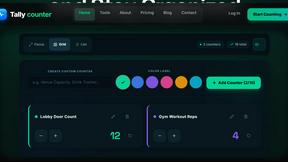
Tally Counter
Online tally counter for tracking attendance, workouts, inventory, visitors, sports scores, habits, and everyday counting tasks.


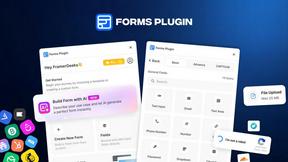
Forms Plugin
The #1 Native Form Builder Plugin for Framer - No Code, No Embeds, No External Platforms.