tool Details
Explore More
Alternatives
About ProcessSpy
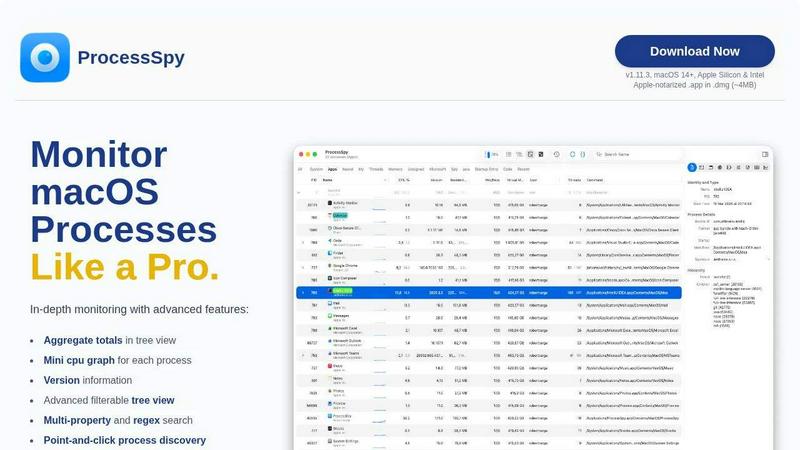
ProcessSpy is a sophisticated process monitoring tool designed specifically for macOS, providing users with an advanced alternative to the built-in Activity Monitor. It empowers developers and IT professionals to gain deeper insights into running processes, enabling them to visualize process trees, inspect open files, and view environment variables. Unlike Activity Monitor, which may hide crucial details, ProcessSpy reveals full command-line information, including version details and paths, making it invaluable for managing multiple applications, especially those with similar names. With its intuitive user interface and robust features like advanced filtering and real-time monitoring, ProcessSpy ensures that you can manage system resources effectively, diagnose issues quickly, and optimize performance with ease.
Features
Advanced Tree View
ProcessSpy's advanced tree view allows users to visualize process relationships in real time while providing filter and search functionalities. Users can see aggregate totals for CPU, Memory, and Threads, enhancing the understanding of resource usage across processes.
JavaScript Filters
Utilizing JavaScript for filtering, ProcessSpy enables users to create complex, multi-condition filters that allow for precise process discovery. This feature is particularly useful for developers needing to identify specific processes or patterns in command-line usage.
Process History Recording
With the ability to record historical values for CPU, Memory, and Threads, ProcessSpy offers insights into process performance over time. Users can export this data to CSV format for further analysis, making it easier to track application behavior and resource consumption.
Environment Variables Inspection
The tool offers a paid feature that allows users to inspect the environment variables of any running process. This capability is essential for developers who need to understand the context in which their applications are running, facilitating better debugging and optimization.
Use Cases
Development and Debugging
Developers can utilize ProcessSpy to monitor their applications during development, allowing them to track how processes interact with system resources. This capability is crucial for identifying bottlenecks and optimizing performance.
System Resource Management
IT professionals can use ProcessSpy to manage system resources effectively, identifying resource-heavy applications and making informed decisions about process termination or optimization. This ensures smoother system operations and improved user experiences.
Security Audits
With its ability to display detailed process information, ProcessSpy is a valuable tool for security professionals conducting audits. By identifying unusual processes or unauthorized applications, users can enhance system security and integrity.
Performance Analysis
Analysts can leverage ProcessSpy to conduct performance analysis on macOS applications, collecting historical data on resource usage. This data can inform performance tuning efforts and help predict future resource needs.
Frequently Asked Questions
Is ProcessSpy safe to install on my Mac?
Yes, ProcessSpy is Apple-notarized and distributed as a signed .app inside a .dmg. It is verified and safe to use on both Intel and Apple Silicon Macs, ensuring a secure installation process.
Does ProcessSpy support older versions of macOS?
ProcessSpy is specifically designed for macOS 14 and newer versions. Users operating on older macOS versions will not be able to utilize this application.
What is the license model?
The license for ProcessSpy is valid for one user across unlimited devices. It includes lifetime updates and new features, providing great value for users who need to keep their toolset current.
How can I unlock paid features in ProcessSpy?
Users can unlock advanced features by purchasing a license on Gumroad for $24.99. This single payment ensures lifetime updates and access across all devices, enhancing the overall functionality of the tool.
Similar to ProcessSpy

Enlisted
Search 20,000+ open-source and SaaS tools by the job you need done or the app you want to replace.

Egmatic
No-code 2D game editor: visual node logic, drag-and-drop scenes, live preview. Exports to Windows, macOS, Linux, Android, iOS, Web.

layahost
Moderation, routing, intent and scoring for any text over one Jev-compatible API, hosted in the EU.

laya.tools
A free directory of 950+ projects built on Laya, the open-source decision model. Updated daily.

Sprite Sheet Maker
A free browser-based toolkit for creating, cutting, converting, and previewing sprite sheet animations.

Forms Plugin
The #1 Native Form Builder Plugin for Framer - No Code, No Embeds, No External Platforms.