tool Details
Explore More
Alternatives
About ProspectBuddy
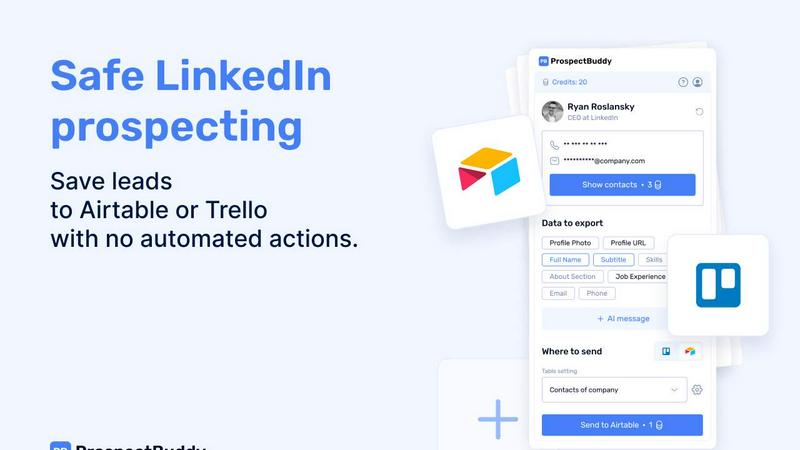
ProspectBuddy is an advanced LinkedIn prospecting tool crafted to optimize the way sales teams, recruiters, founders, and operators manage their leads. By allowing users to save LinkedIn profiles with a single click, it effectively removes the tedious and error-prone manual copy-pasting process. This process of transforming LinkedIn profiles into structured records helps teams utilize their lead data efficiently. Unlike standard automation tools that perform actions on behalf of the user, ProspectBuddy emphasizes manual prospecting, giving users complete control over their outreach efforts. This focus not only enhances safety and compliance with LinkedIn's policies but also supports best practices in prospecting. Key features include verified email and phone number discovery, the ability to generate personalized AI-driven outreach messages, and the flexibility to capture only the essential LinkedIn data. ProspectBuddy integrates seamlessly with Airtable and Trello, ensuring that teams can maintain an organized and consistent workflow throughout their prospecting activities.
Features
One-Click Data Saving
ProspectBuddy allows users to save LinkedIn profiles to Airtable or Trello with a single click. This feature significantly improves efficiency, eliminating the need for manual data entry and ensuring that lead information is captured accurately and swiftly.
Manual Prospecting Focus
Designed for safe, manual prospecting, ProspectBuddy does not employ automation or bots to perform tasks on behalf of the user. This ensures that users remain compliant with LinkedIn's guidelines while retaining full control over their prospecting efforts.
Verified Contact Information Discovery
The tool provides users with the ability to find verified business emails and direct phone numbers. This capability enhances communication potential with leads, allowing for more effective outreach strategies tailored to specific contact preferences.
AI-Powered Outreach Messaging
ProspectBuddy leverages AI technology to generate personalized outreach messages based on LinkedIn profile information. This feature allows users to craft tailored messages quickly, increasing the likelihood of engagement and positive responses from potential leads.
Use Cases
Streamlined Sales Processes
Sales teams can utilize ProspectBuddy to efficiently manage their lead generation efforts on LinkedIn. By capturing essential profile information and storing it directly in their CRM, teams can streamline their outreach and follow-up processes, resulting in higher conversion rates.
Efficient Recruitment Management
Recruiters can integrate ProspectBuddy into their hiring pipelines, using it to save potential candidates’ profiles to Trello or Airtable. This integration enables a structured approach to candidate management, making it easier to track applicants and streamline the hiring process.
Enhanced Lead Qualification
Founders and operators can use ProspectBuddy to enhance their lead qualification processes. By quickly gathering necessary data from LinkedIn profiles, they can assess leads more effectively and prioritize outreach based on verified contact information and profile details.
Consistent Data Organization
ProspectBuddy allows users to maintain organized databases of leads. By capturing only the necessary fields from LinkedIn and sending them to Airtable or Trello, users can ensure that their data remains clean, consistent, and easy to navigate.
Frequently Asked Questions
How do I connect Airtable?
To connect Airtable, click “Airtable” on the Connect screen or in your Profile. Select the desired bases or workspaces you wish to grant access to and click “Grant access.” The connected status will appear on your Profile page, and you can disconnect at any time.
How do I send LinkedIn data to Airtable?
First, create a new setting in the Settings menu. Choose your Airtable base and table, then map the LinkedIn fields to the corresponding Airtable fields. Once saved, open a LinkedIn profile, parse it, select the fields, and use the setting to click “Send to Airtable.”
Is ProspectBuddy safe to use with LinkedIn?
Yes, ProspectBuddy is designed for safe, manual LinkedIn prospecting. It does not perform automated actions, allowing users to work directly from profiles while maintaining compliance with LinkedIn's policies, making it a safer alternative to bulk scraping tools.
Why don’t I see some Airtable fields?
ProspectBuddy only supports specific compatible field types for integration with Airtable. If a field type is not supported, it will not appear in the dropdown. Supported types include attachments for photos, text for names and skills, and designated formats for emails and phone numbers.
Similar to ProspectBuddy
CleanSmart
CleanSmart removes duplicates, fixes formatting, fills gaps, and flags anomalies in one automated pass. No code. No data engineers.

Enlisted
Search 20,000+ open-source and SaaS tools by the job you need done or the app you want to replace.

Slide-Easy
A Mac app that turns your App Store link into a week of Instagram Reels and carousels, written from your real reviews.
TrackMedia
Your Social Media Content Engine That Drives Revenue. Distribute your content to every social media platform and track it in real time. Use Ai agents
Forms Plugin
The #1 Native Form Builder Plugin for Framer - No Code, No Embeds, No External Platforms.