

QuickSigner
QuickSigner is an ISO 27001 certified eSignature platform with a robust API for legally binding, AATL-compliant document signing.
tool Details
Explore More
Alternatives
About QuickSigner
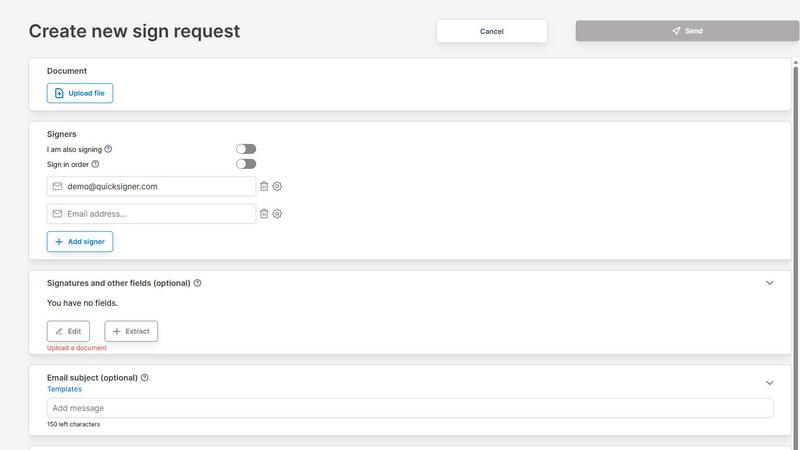
QuickSigner is a comprehensive, end-to-end electronic signature platform engineered to accelerate the signing, sending, and finalization of documents. It transforms what traditionally involves days of back-and-forth communication into a process completed in minutes. The platform is designed for individuals, small teams, and organizations across various industries that require a legally binding, secure, and efficient method for obtaining signatures on agreements, contracts, and other critical documents. QuickSigner integrates Adobe Approved Trust List (AATL) electronic signatures, ensuring that all signatures are legally valid and compliant with global eSignature regulations. Additionally, the platform holds ISO 27001 certification, demonstrating its commitment to robust information security management systems. The service supports document uploads in PDF and Word formats, allows for the placement of signature, date, text, and initial fields, and enables recipients to sign from any device via a secure link without needing to create an account or install software. QuickSigner also provides real-time tracking of signing progress, automated finalization of completed documents, and a powerful API for integration into existing workflows. With a focus on simplicity, cost-effectiveness, and capability, QuickSigner serves as a direct replacement for larger, more expensive platforms like DocuSign, particularly for small to medium-sized teams.
Features
AATL and ISO 27001 Certified Signatures
QuickSigner employs Adobe Approved Trust List (AATL) electronic signatures, which are globally recognized and legally binding, ensuring compliance with stringent eSignature laws. The platform is also ISO 27001 certified, meaning it adheres to an internationally recognized standard for managing information security. This dual certification provides users with the highest level of legal security and data protection, making it suitable for handling sensitive contracts and agreements across regulated industries. The signatures are backed by a robust audit trail and cryptographic evidence, guaranteeing the authenticity and integrity of every signed document.
Multi-Format Document Support and Field Placement
The platform supports direct upload of both PDF and Word documents, allowing users to work with their existing file formats without conversion. Users can drag and drop documents into the system and then precisely place various interactive fields, including signature, date, text, and initial fields, exactly where they are needed. This granular control over field placement ensures that documents are completed accurately and according to specific requirements. The ability to handle multiple documents per sign request, up to three on the Business plan, further streamlines complex agreement workflows.
Secure, Account-Free Signing for Recipients
Recipients of a QuickSigner signing request do not need to create an account or install any software to sign a document. They receive a secure, unique link via email that allows them to access the document from any device, including desktops, tablets, and smartphones. This frictionless experience significantly reduces barriers to completion and accelerates the overall signing process. The secure link ensures that only the intended recipient can access and sign the document, maintaining confidentiality and security throughout the transaction.
Real-Time Tracking and Automated Finalization
QuickSigner provides a comprehensive dashboard for monitoring the signing progress of every sent document. Users can see exactly who has opened the document, who has signed, and who is still pending. Once all required parties have signed, the system automatically finalizes the document, making the completed, legally binding version instantly available for download. This automation eliminates manual follow-up and ensures that no step in the signing process is missed, providing a clear and auditable trail from initiation to completion.
Use Cases
Small Business Contract Management
Small teams, such as accounting firms or boutique agencies, can use QuickSigner to replace expensive enterprise eSignature solutions. By creating preset templates for common agreements like service contracts, invoices, or non-disclosure agreements, teams can standardize their processes. The platform allows for tracking which team members are sending which documents, providing visibility and control. This use case directly addresses the need for a cost-effective, scalable solution that simplifies contract management without sacrificing functionality or legal validity.
Client Onboarding and Service Agreements
Businesses in service-oriented industries, such as travel agencies or consulting firms, can dramatically accelerate their client onboarding process. Instead of printing, scanning, and mailing physical documents, they can send a single secure link for a service agreement. The client can sign on their mobile device while on the go, and the business receives the finalized agreement instantly. This reduces the time to close a deal by up to 90%, as noted by customers, improving cash flow and client satisfaction. The AATL signatures ensure the agreement is legally enforceable.
Human Resources and Internal Documentation
Human Resources departments can leverage QuickSigner for a wide range of internal documents, including offer letters, employment contracts, policy acknowledgments, and performance review forms. The ability to add multiple signers per request, up to ten on the Business plan, facilitates multi-party approvals. The ISO 27001 certification provides the necessary assurance for handling sensitive employee data. The platform’s audit trail creates a clear record of when each document was signed, which is critical for compliance and record-keeping.
Legal and Compliance Document Execution
Law firms and legal departments can use QuickSigner to execute complex legal documents that require multiple signatures from various parties. The precise field placement allows for the accurate positioning of signature and initial blocks on multi-page contracts, amendments, and closing documents. The AATL certification ensures the electronic signatures meet the highest legal standards, providing the same validity as wet ink signatures. The automated finalization and secure storage of completed documents streamline the closing process and reduce administrative overhead.
Pricing
QuickSigner offers two primary pricing tiers designed to accommodate different usage levels. The Personal plan is free and suitable for occasional use, providing 3 documents per month with up to 3 signers and 1 document per sign request, a 5 MB maximum document size, and support for PDF documents with signature and stamp fields. The Business plan is priced at $5 per month per user, with a 14-day free trial, and offers a 20% discount with yearly payment ($48 per user per year). This plan is designed for small teams that sign regularly and includes unlimited documents per month, up to 10 signers per sign request, up to 3 documents per sign request, a 10 MB maximum document size, and support for both PDF and Word documents with all field types including signature, stamp, date, text, and initials.
Frequently Asked Questions
What is the Adobe Approved Trust List (AATL) and why is it important?
The Adobe Approved Trust List (AATL) is a globally recognized program that establishes the trustworthiness of digital signature certificates. When a document is signed using an AATL-certified signature, the signer’s identity is verified by a trusted Certificate Authority. This ensures the signature is legally binding and compliant with eSignature regulations in many jurisdictions, including the ESIGN Act in the U.S. and eIDAS in Europe. It provides a higher level of security and legal defensibility compared to simple click-to-sign methods.
Is my data secure with QuickSigner?
Yes, QuickSigner is ISO 27001 certified, which is an internationally recognized standard for information security management systems (ISMS). This certification means that QuickSigner has implemented a comprehensive framework of policies, procedures, and controls to protect your data from unauthorized access, disclosure, alteration, and destruction. The platform uses encryption for data in transit and at rest, and signing links are secure and unique to each recipient, ensuring confidentiality throughout the signing process.
Do recipients need to create an account to sign a document?
No, recipients do not need to create an account or install any software. They simply receive a secure link via email. Clicking the link opens the document in their web browser, where they can place their signature and any other required fields. This frictionless experience is designed to maximize completion rates and minimize delays, as signers can complete the process from any device without any prior setup.
What file types can I upload to QuickSigner?
QuickSigner supports the two most common document formats: PDF and Word (.docx). You can drag and drop these files directly into the platform to begin the signing process. This compatibility allows you to work with existing contracts, agreements, and forms without needing to convert them to a different format first. The platform also supports sending up to three documents in a single sign request on the Business plan.
Similar to QuickSigner

@fuck.it - email with attitude
Private email. Pure. Secure. Exclusive. No ads, no tracking, no data selling. GDPR compliant, EU-hosted.
Novastart
Apps and files on an infinite canvas where people and AI agents work together.
Memorable Contact
AI-powered relationship memory that helps you remember people, the context behind your connections, and reconnect

Panzoe
Panzoe is an all-in-one AI platform for personal productivity, business automation, AI assistants, content creation, and custom AI solutions.
FontGenerate
Stylish Font Generator: 150+ Stylish Fonts to Copy & Paste (Free)
Stefan Supply
Ready-to-use Notion templates for personal planning and small business workflows, with realistic example data.
