SLABCALC
SlabCalc provides 34 free concrete calculators plus AI tools for crack diagnosis, quote analysis, and instant volume, bag, and cost estimates for any.
About SLABCALC
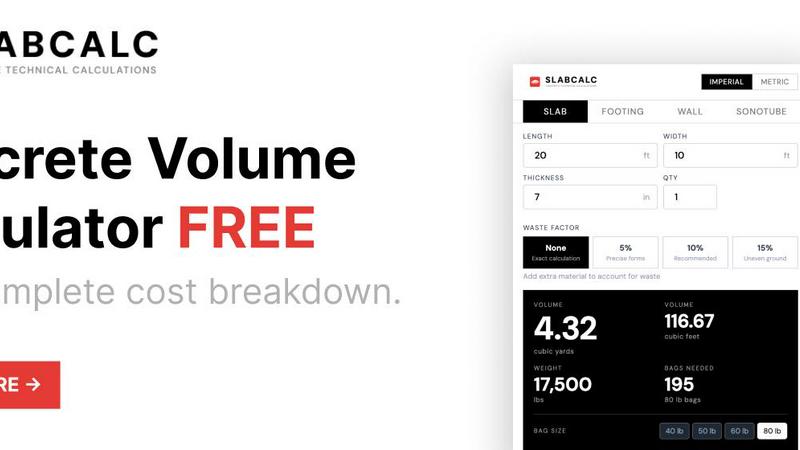
SLABCALC is a comprehensive, free, and no-signup concrete planning platform engineered for contractors, builders, and DIYers who require precise material estimates and project analysis. At its core, the platform hosts 34 specialized calculators covering a vast array of concrete structures including slabs, driveways, patios, footings, foundations, walls, CMU block, columns, curbs, stairs, sonotubes, rebar, gravel, garage floors, and basement floors. Each calculator returns critical specifications: volume in cubic yards and cubic meters, pre-mix bag counts for 40, 50, 60, and 80-pound bags, total estimated weight, and a comprehensive cost estimate. Users can adjust the waste factor from 0% to 15% and toggle between imperial and metric units for global applicability. Beyond pure estimation, SLABCALC integrates two AI-powered diagnostic tools: a Concrete Crack Analyzer that diagnoses damage from a photo, assigning a severity rating from 1 to 5 and providing DIY or engineer-level repair advice, and a Quote Analyzer that dissects contractor bids into labor, materials, and site preparation costs while flagging potential red flags. The platform is further enriched with cost-by-city pricing pages, expert guides, a concrete glossary, a Chrome extension, and embeddable widgets, making it a one-stop platform for every phase of concrete planning from initial design to final cost verification.
Features
34 Specialized Project Calculators
The platform includes 34 distinct calculators, each tailored to a specific concrete structure type such as slabs, cylinders, curbs, stairs, columns, walls, footings, circles, and tubes. Each calculator returns volume in cubic yards and cubic meters, bag counts for 40, 50, 60, and 80-pound bags, total weight in pounds, and a cost estimate for bagged concrete, ready-mix, and professional installation. Users can adjust the waste factor to account for spills, uneven ground, or precise formwork, ensuring the final order quantity is accurate for any job size.
AI-Powered Concrete Crack Analyzer
This feature allows users to upload a photo of a cracked concrete surface for instant AI-driven diagnosis. The analyzer identifies the failure mode, assigns a severity score from 1 (minor) to 5 (critical structural failure), and provides actionable advice on whether the issue can be handled with DIY methods or requires a professional structural engineer. This tool helps contractors and homeowners make informed repair decisions quickly without waiting for an on-site inspection.
AI-Powered Quote Analyzer
Contractors and homeowners can upload or input a contractor bid, and the Quote Analyzer breaks down the line items into labor, materials, and site preparation costs. It then cross-references these figures against local market data to flag potential red flags such as inflated material costs, missing line items, or unusually low bids that may indicate scope gaps. This feature empowers users to negotiate fair quotes and avoid costly surprises during a project.
Cost-by-City Pricing Pages and Expert Guides
SLABCALC provides localized cost estimates through dedicated cost-by-city pricing pages, giving users a realistic sense of material and labor rates in their specific area. Complementing this are expert guides covering topics like slab thickness standards, the 10% waste rule, and bagged versus ready-mix concrete comparisons. These resources help users make informed decisions on material selection, project scope, and budget planning.
Use Cases
Residential Patio and Sidewalk Planning
A homeowner planning a 10x10 foot patio at 4 inches thick can use the Slab Calculator to determine that the project requires 0.62 cubic yards of concrete, which translates to approximately 28 bags of 80-pound mix. The calculator provides a cost estimate for bagged concrete versus ready-mix, and the waste factor can be set to 10% to account for spills and uneven ground. The user can then use the Quote Analyzer to verify any contractor bid for the same work.
Commercial Driveway and Parking Lot Estimation
A contractor bidding on a 20x40 foot driveway at 5 inches thick can use the calculator to find that the project requires 4.94 cubic yards of concrete, or 224 bags of 80-pound mix. The platform provides a ready-mix cost estimate and compares it to bagged concrete, recommending ready-mix for projects over 1 cubic yard. The contractor can also use the Crack Analyzer to assess any existing pavement damage before beginning the new pour.
Foundation and Footing Design for New Construction
A builder designing a deck with 12-inch diameter footings at 48 inches deep can use the Column Calculator to determine that each footing requires about 6 bags of 80-pound concrete. The platform provides volume in cubic feet and cubic meters, total weight, and a cost estimate for bagged versus ready-mix. The builder can also consult the expert guides for standard footing depth recommendations and rebar reinforcement requirements.
Contractor Bid Verification and Negotiation
A homeowner receiving a quote for a 200 square foot slab installation can input the bid into the Quote Analyzer. The tool breaks down the costs into labor ($600 to $1,600), materials ($448 to $657 for ready-mix), and site preparation, then flags any line items that are significantly above or below local averages. The homeowner can then use the cost-by-city pages to verify the fair market rate and negotiate a more accurate price.
Frequently Asked Questions
How do I calculate the volume of concrete needed for a rectangular slab?
Use the formula: Length (feet) x Width (feet) x Thickness (feet) divided by 27 equals cubic yards. First, convert thickness from inches to feet by dividing by 12. For example, a 4-inch thick slab is 4 divided by 12 equals 0.333 feet. A 10x10 foot slab at 4 inches thick would be 10 x 10 x 0.333 divided by 27 equals 0.62 cubic yards. SLABCALC automates this calculation and also provides bag counts and cost estimates.
Should I use bagged concrete or ready-mix for my project?
For projects under 1 cubic yard, bagged concrete is the practical choice as it is available at any hardware store and requires no truck coordination. Once you cross the 1-yard mark, ordering ready-mix from a plant is faster, cheaper per unit, and results in a more consistent mix. SLABCALC automatically makes this recommendation based on your calculated volume and provides cost estimates for both options.
What waste factor should I use for my concrete order?
The industry standard is to order 10% more concrete than your calculated volume to account for subgrade irregularities, spillage, and slight over-excavation. SLABCALC offers adjustable waste factors: 0% for exact calculation, 5% for precise forms, 10% as the recommended default, and 15% for uneven ground. Running short on a pour is expensive because the truck has to return, and a cold joint in a finished slab is difficult to repair cleanly.
How does the AI Crack Analyzer work and what information does it provide?
Upload a photo of a cracked concrete surface, and the AI analyzes the image to identify the failure mode, such as shrinkage, settlement, or structural overload. It then assigns a severity rating from 1 (minor cosmetic) to 5 (critical structural failure) and provides tailored advice. For low severity issues, it recommends DIY repair methods. For high severity issues, it advises contacting a structural engineer. This analysis helps users prioritize repairs and avoid unnecessary professional fees for minor cracks.
Similar to SLABCALC

AIPetGen
AIPetGen turns a photo of your dog, cat, or other pet, or a written description, into a new picture or a short animation.

AI Object Remover
Remove unwanted people, objects, text and watermarks from photos with AI


Image to Layers AI
Turn any image into editable transparent PNG/PSD layers with AI
screenRIG
Signage and kiosk infrastructure for AI agents. Your agent publishes images, video, streams, web pages and apps to screens via one plugin.screenRIG is

layahost
Moderation, routing, intent and scoring for any text over one Jev-compatible API, hosted in the EU.

Sprite Sheet Maker
A free browser-based toolkit for creating, cutting, converting, and previewing sprite sheet animations.