

Square Face Generator
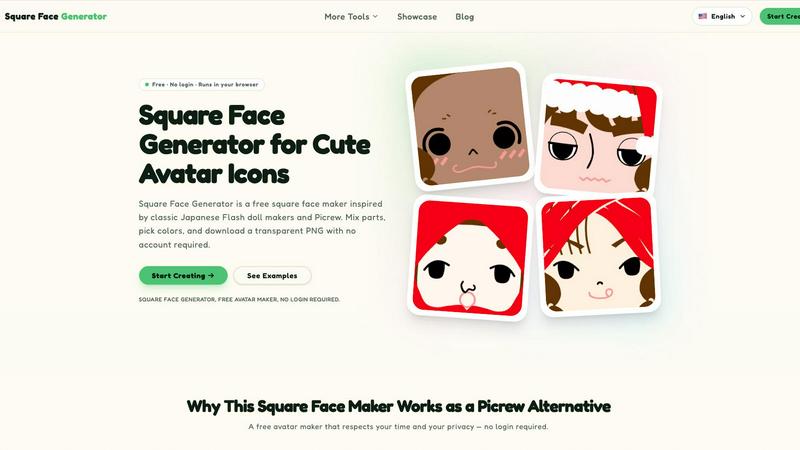
Square Face Generator is a free browser-based avatar maker inspired by classic Flash doll makers that lets you mix parts, pick colors, and download.
tool Details
Explore More
Alternatives
About Square Face Generator
Square Face Generator is a browser-based, Picrew-style avatar maker focused on charming square-shaped faces. It is a free, no-login-required tool that allows users to create custom avatar icons by assembling parts from 12 distinct categories, including skin tones, bangs, side hair, eyes, nose, mouth, brows, lashes, blush, glasses, hats, and outfits. The product features a library of over 200 unique, hand-crafted pieces, enabling the generation of more than one million possible combinations. The entire application runs locally within the user's browser, leveraging Ruffle technology to emulate classic Flash-based doll makers without requiring any plugins or software installation. This architecture ensures that all user data, selections, and rendered images remain on the device, providing a high degree of privacy and security. The interface is designed to be responsive and touch-friendly, functioning seamlessly across desktop, tablet, and phone platforms. The primary value proposition is delivering a simple, fun, and private alternative to online avatar creation services, with instant export of transparent 256x256 pixel PNG files suitable for social media profiles, game development assets, community branding, and creative projects. It is specifically designed for users seeking a quick, free, and unrestricted tool that respects their time and data, offering no paywalls, watermarks, or mandatory account creation. The product is developed and maintained by Z-Image, with a clear focus on providing a respectful user experience that prioritizes accessibility and ease of use over monetization or data collection.
Features
Extensive Customization Library
Square Face Generator provides over 200 unique, hand-crafted pieces organized into 12 distinct categories. These categories include skin tones, bangs, side hair, eyes, nose, mouth, brows, lashes, blush, glasses, hats, and outfits. Each piece is designed to be visually consistent, allowing for seamless mixing and matching. The sheer volume of parts, combined with the ability to adjust colors using a built-in color picker that supports HEX input, enables the creation of more than one million unique avatar combinations. This extensive library ensures users can achieve a high degree of personalization, from subtle facial feature adjustments to complete wardrobe and accessory overhauls.
Local Browser Rendering and Privacy
All image rendering and processing occur entirely within the user's browser using Ruffle technology. This means no user data, selected parts, or generated images are transmitted to any external server. The application does not require any account creation, login, or personal information to function. This architecture provides a significant privacy advantage over cloud-based avatar makers, as no data leaves the device at any point during the creation or download process. Users can create and export avatars with confidence that their choices and creative output remain completely private and secure.
Instant Transparent PNG Export
The tool allows for one-click downloading of completed avatars as transparent 256x256 pixel PNG files. This specific resolution and format are optimized for use as profile pictures across various platforms, including Discord, X/Twitter, Instagram, and TikTok. The export process is instantaneous, with no processing delays or watermarks applied to the final image. The transparent background ensures the avatar integrates cleanly into any interface or design project without requiring additional image editing. This feature is designed for maximum convenience, allowing users to go from a blank canvas to a finished, downloadable avatar in under a minute.
Responsive and Touch-Friendly Interface
The user interface is fully responsive and optimized for touch interaction, ensuring consistent functionality across desktop computers, tablets, and mobile phones. On desktop, users can navigate categories and select parts with a mouse. On touchscreen devices, all controls are sized and spaced for finger-based interaction, eliminating the need for precise clicking. The live preview updates in real-time as users make selections, providing immediate visual feedback. This cross-platform compatibility ensures that the avatar creation experience is equally fluid and accessible regardless of the device being used, making it suitable for on-the-go creation as well as dedicated desktop sessions.
Use Cases
Social Media Profile Pictures
The primary use case for Square Face Generator is creating custom profile pictures for social media platforms such as Discord, X/Twitter, Instagram, and TikTok. The 256x256 pixel transparent PNG export is directly compatible with the avatar requirements of these services. Users can generate a unique, personalized icon that stands out from generic or default avatars. The tool's extensive customization options allow for the creation of a distinct visual identity that can be consistently used across multiple platforms, helping individuals establish a recognizable online presence without resorting to photographs or copyrighted images.
Game Development and Indie Projects
Indie game developers can utilize Square Face Generator as a rapid prototyping tool for creating NPC portraits and player avatar placeholders. The square format is particularly useful for dialogue boxes, inventory screens, and character selection menus in 2D games. The ability to generate millions of unique combinations allows developers to quickly populate a game world with visually diverse characters without the immediate need for custom art assets. The transparent PNG export simplifies the integration process into game engines like Unity, Godot, or GameMaker, saving development time during the early stages of a project.
Team and Community Branding
Online communities, guilds, clubs, and classes can use Square Face Generator to create a unified visual style for their members. The tool allows for the establishment of a shared aesthetic by using a consistent set of base features, while still permitting individual members to personalize their own avatars through color choices and accessory selection. This approach provides room for individual personality within a cohesive group identity. The no-login, free nature of the tool makes it easy for all members to participate, regardless of their technical skill level or willingness to create accounts.
Creative and Educational Projects
Educators, students, and content creators can incorporate Square Face Generator into various creative and educational projects. Teachers can use it for classroom activities related to character design, digital art, or identity exploration. Content creators can generate avatars for use in slides, posters, stickers, school work, or zines. The tool's simplicity and lack of learning curve make it accessible for younger users or those new to digital creation. The transparent export format allows the generated avatars to be easily placed into other documents, presentations, or composite images for use in a wide range of creative outputs.
Frequently Asked Questions
Is it really free?
Yes, Square Face Generator is completely free to use. Every part, every color option, and every download is available at no cost. There are no paywalls, no watermarks, no hidden fees, and no subscription requirements. You do not need to create an account or provide any personal information to access any feature of the tool.
What size are the exports?
The tool exports avatars as 256x256 pixel transparent PNG files. This specific resolution is optimized for use as profile pictures on most social media platforms and messaging applications. The transparent background ensures the image integrates seamlessly into any interface without requiring additional cropping or background removal.
Can I use my icon commercially?
You are free to use the avatars you create for any purpose, including commercial projects. There are no usage restrictions or licensing fees associated with the generated images. However, you may not resell or redistribute the individual part assets themselves. The final combined avatar image is yours to use as you see fit.
Do I need to install anything?
No installation is required. Square Face Generator runs entirely in your web browser. It uses Ruffle technology to emulate the creation interface, but no plugins, software downloads, or browser extensions are needed. The tool works on any modern browser with JavaScript enabled. Simply navigate to the website and start creating immediately.
Similar to Square Face Generator

Design.com AI Image Generator
Turn text prompts into polished, copyright-safe visuals that plug directly into branded templates
Nano AI
Create and edit AI images, generate videos, and compare models in one creative workbench.
Screen Issues
Free Online Screen Test Tool - Instantly diagnose dead pixels, lines, color issues, and flickering. Multiple test modes, no download needed.
Tip Toe AI
Upload a Dancer photo and a Partner photo and get your own AI Tip Toe barn-dance video. Free 5s preview, 12s HD from $4.90. No subscription.
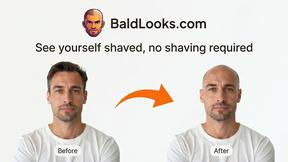
BaldLooks
See yourself shaved, no shaving required
ImageGenerator
Create and edit AI images online with multiple models, text-to-image, image-to-image, background removal, and upscaling.
SightRadar
Face recognition API, a drop-in replacement for AWS Rekognition. Index, search, compare and detect faces, billed per photo with no subscription.
nanobanana 2.1
A fast, simple image studio powered by Nano Banana 2.1. Create and edit high-quality images with accurate details and readable text.