

URL to Any
URL to Any transforms web content into various formats and languages for seamless accessibility and sharing.
tool Details
Explore More
Alternatives
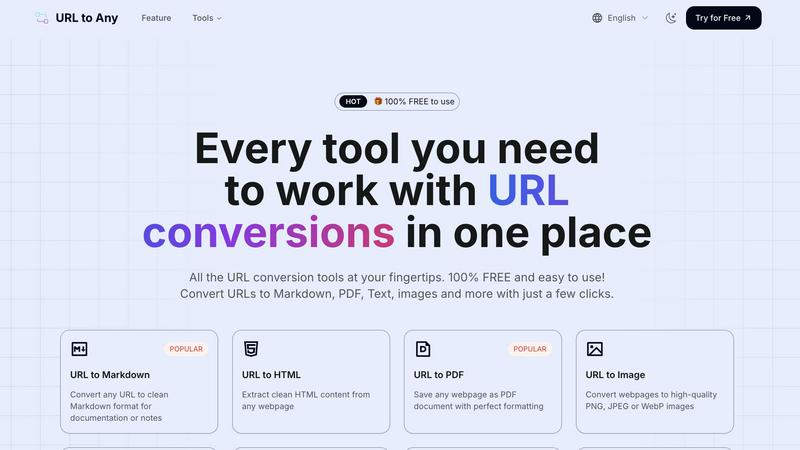
About URL to Any
URL to Any is a robust, cloud-based web content conversion engine that empowers users to transform any accessible webpage into multiple practical formats quickly and efficiently. This tool is designed for a diverse user base, including content creators, researchers, developers, and administrative personnel who seek to extract and reformat online information seamlessly. By simply inputting a URL, users can circumvent cumbersome procedures like manual copying or using browser extensions, receiving a converted output in mere seconds. The primary value proposition lies in its comprehensive, no-cost interface that consolidates various conversion tasks into one accessible platform. Users can convert URLs into clean text documents, formatted PDFs, Markdown files for content management systems, high-quality images, and much more, all while maintaining the structural and contextual fidelity of the original content. With its user-friendly design and powerful capabilities, URL to Any serves as an essential utility for anyone needing to archive, edit, or repurpose web content efficiently.
Features
URL to Markdown
This feature allows users to convert any webpage into clean Markdown format, making it ideal for documentation or personal notes. The output preserves the essential structure of the original content, enabling easy integration into Markdown-based systems.
URL to PDF
With the URL to PDF feature, users can save any webpage as a well-formatted PDF document. This capability is perfect for archiving important content or sharing it in a universally accepted format, ensuring that formatting and layout are preserved.
URL to Image
Users can convert webpages into high-quality images in formats such as PNG, JPEG, or WebP. This feature is particularly useful for capturing visual representations of content, making it easy to share or use in presentations without losing detail.
URL to JSON
This feature transforms webpage content into structured JSON format, facilitating data integration and manipulation for developers and data analysts. The output is organized and ready for immediate use in various applications that support JSON.
Use Cases
Content Creation
Writers and content creators can use URL to Any to quickly convert online articles or resources into formats like Markdown or PDF, streamlining their research and documentation processes.
Academic Research
Researchers can benefit from the tool by converting webpages into structured formats like JSON or XML for data analysis, ensuring that all relevant information is easily accessible and well-organized.
Web Development
Developers can utilize the URL to Any tool to extract clean HTML or JSON from webpages, enabling them to integrate content more effectively into their projects without the hassle of manual extraction.
Social Media Sharing
Marketers and social media managers can convert URLs into images or QR codes for easy sharing on various platforms, enhancing engagement through visually appealing and easily accessible content.
Frequently Asked Questions
What formats can I convert a URL to?
You can convert a URL to multiple formats, including Markdown, PDF, text, images, JSON, XML, and more, making it a versatile tool for various tasks.
Is there a limit to the number of URLs I can convert?
There are no specified limits on the number of URLs you can convert. The tool is designed to handle a large volume of conversions, making it suitable for both individual and professional use.
How secure is my data when using URL to Any?
URL to Any processes all data securely and does not store any information on its servers, ensuring user privacy and data protection during conversions.
Do I need to install any software to use URL to Any?
No, URL to Any operates entirely in the cloud, meaning you can access and use all features directly from your web browser without the need for software installation.
Similar to URL to Any

Memorable Contact
AI-powered relationship memory that helps you remember people, the context behind your connections, and reconnect
screenRIG
Signage and kiosk infrastructure for AI agents. Your agent publishes images, video, streams, web pages and apps to screens via one plugin.screenRIG is

layahost
Moderation, routing, intent and scoring for any text over one Jev-compatible API, hosted in the EU.



Hailuo AI
Create Hailuo AI videos from text or images with guided prompts, motion and camera controls, flexible settings, and downloadable results.


amaze.directory
A directory of AI tools where somebody actually used the tool.