

vaethat
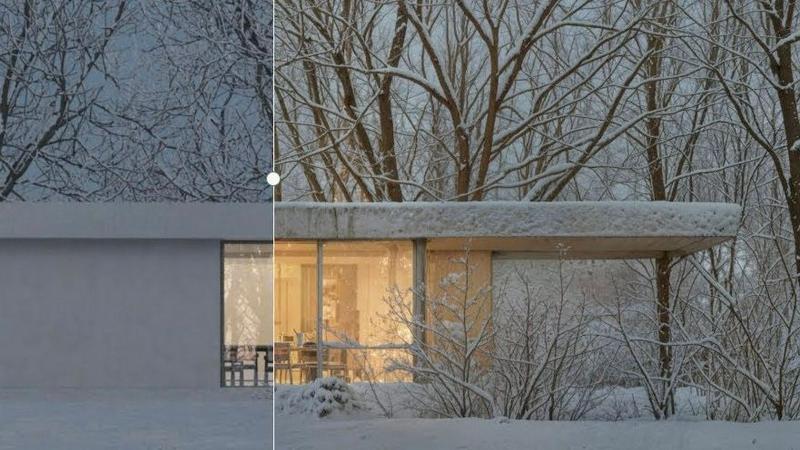
Vaethat is an AI tool that effortlessly enhances architectural renders, improving detail and clarity while preserving.
tool Details
Explore More
Alternatives
About vaethat
Vaethat AI is a cutting-edge tool designed specifically for architectural visualization professionals seeking to enhance the quality of their 3D renders. By leveraging advanced AI technology, Vaethat allows users to upscale and refine their architectural images, improving clarity, sharpness, and overall realism. This tool is tailored to meet the needs of architects, designers, and visualizers, enabling them to present their concepts with exceptional fidelity and detail. The main value proposition lies in its ability to transform standard renders into visually striking representations without the complexity typically associated with image enhancement tools. With a user-friendly interface and a streamlined process, Vaethat minimizes time spent on manual edits, allowing for a focus on creative design rather than technical adjustments.
Features
AI Render Upscaling
Vaethat employs sophisticated AI algorithms to increase the resolution and sharpness of 3D architectural renders. This feature ensures that the geometry remains clean and consistent, enhancing the overall visual impact of the project while avoiding pixelation or distortion.
Detail Refinement
With detail refinement capabilities, Vaethat enhances fine textures, edges, and small architectural elements. This feature delivers a crisper and more polished look to images, making architectural details stand out and impressing clients and stakeholders alike.
Material and Lighting Enhancement
Vaethat improves the perceived realism of renders by enhancing material definitions and adjusting lighting balances. This feature allows for greater contrast and depth in images, helping to create a more immersive representation of the architectural vision.
Noise and Artifact Cleanup
This feature focuses on reducing noise and common rendering artifacts that can detract from the quality of presentation-ready images. By producing cleaner visuals, Vaethat ensures that the final output is professional and ready for client presentations or portfolios.
Use Cases
Architectural Presentations
Professionals can use Vaethat to create stunning images for architectural presentations. The enhanced clarity and detail help convey design intent effectively, making it easier to impress clients and stakeholders.
Portfolio Development
Vaethat serves as a powerful tool for architects and visualizers looking to build impressive portfolios. By enhancing 3D renders, users can showcase their best work with high-quality images that highlight their skills and design sensibilities.
Marketing Materials
Real estate developers and architects can utilize Vaethat to produce visually striking marketing materials. Enhanced images can attract potential buyers and investors by showcasing properties in their best light, ultimately driving sales.
Project Approvals
Vaethat helps streamline the approval process for architectural projects. By providing high-quality renders that clearly communicate design elements, users can facilitate discussions with clients, stakeholders, and regulatory bodies, leading to quicker approvals.
Frequently Asked Questions
How does the AI render enhancer calculate credits?
The AI render enhancer calculates credits based on the complexity and number of images processed. Each enhancement consumes a specific amount of credits, allowing users to manage their resources effectively.
Can I use the archviz AI upscaler with V-Ray, Lumion, Enscape, 3ds Max, and SketchUp?
Yes, Vaethat is compatible with various rendering engines including V-Ray, Lumion, Enscape, 3ds Max, and SketchUp, making it a versatile tool for any architectural visualization workflow.
What makes this AI post-production tool different from manual editing?
Unlike manual editing, which can be time-consuming and requires technical skills, Vaethat automates the enhancement process, allowing for quick adjustments with minimal input. Users can focus on creativity rather than technicalities.
Can I upgrade or downgrade my AI enhancement plan anytime?
Yes, Vaethat offers flexible subscription plans that allow users to upgrade or downgrade their AI enhancement plan according to their needs at any time, ensuring that they can adapt their usage to project demands.
Similar to vaethat

PavoAI
PavoAI brings 20+ leading AI video models into one workspace for text-to-video, image-to-video, editing, avatars, music, subtitles, and upscaling.

AppScreenshots
Create professional App Store and Google Play screenshots with 3D device frames, templates and batch export.

Hop Hop Hop Dance AI
AI: 1–2 photos → 8s Hop Hop Hop squash-and-swap (pets OK).

Skull Cap Trend AI
AI: one selfie → 11s skull-cap glow-up (goofy → cold stare).

Basketball Middle Finger AI
Same dunk trend as Middle Finger Dunk AI (alt domain).

Middle Finger Dunk AI
AI: two photos → 12s middle-finger dunk 1v1 (playful).

Party Viral Dance AI
AI: one photo → 12s Iraqi party “viral dance” floor clip.