

xyOps
xyOps is a comprehensive workflow automation system for job scheduling, monitoring, and alerting, designed for scalable infrastructure management.
tool Details
Explore More
Alternatives
About xyOps
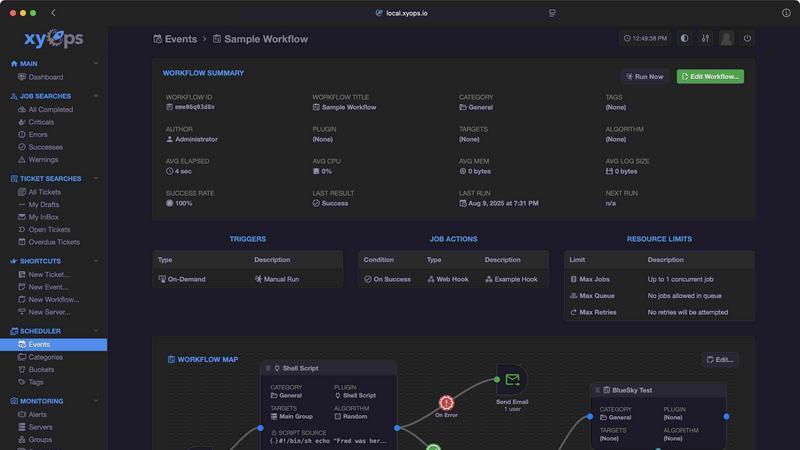
xyOps™ is an innovative, next-generation platform designed for job scheduling, workflow automation, server monitoring, alerting, and incident response, all integrated into a single cohesive system. Tailored for developers and operations teams, xyOps offers unparalleled control over the automation stack while ensuring that users maintain data sovereignty, operational freedom, and visibility. Unlike many competing solutions, xyOps does not restrict features behind paywalls, nor does it funnel telemetry to third parties. This open, extensible platform is designed to run seamlessly in any environment, making it ideal for organizations of all sizes. With xyOps, teams can orchestrate their entire infrastructure effortlessly, enabling efficient job scheduling, real-time performance tracking, and proactive alerting, all from a singular interface. By emphasizing an accessible and powerful toolset, xyOps empowers teams to streamline their operations without compromising on flexibility or control.
Features
Job Scheduling Reimagined
xyOps offers advanced job scheduling capabilities that extend far beyond traditional cron jobs. Users can schedule tasks across an entire fleet of servers, track their performance in real-time, and set custom alerts to proactively manage operations. With the ability to target individual servers or groups and support for multiple schedules and blackout ranges, xyOps provides an unparalleled level of flexibility in job management.
Visual Workflow Builder
The graphical workflow editor in xyOps allows users to create complex workflows visually. By connecting events, triggers, actions, and monitors, teams can build meaningful pipelines that automate intricate processes. The editor facilitates the chaining of jobs with conditional logic, enabling users to pass data and files between workflow steps while integrating actions based on specific events, such as notifications or webhooks.
Smart Alerts
xyOps features rich alerting capabilities that can be fully customized. Users can set up complex trigger expressions to receive notifications through various channels, including email, webhooks, and custom notifications. Each alert provides a snapshot of the server's state, and alerts can be configured to automatically create tickets or trigger jobs, ensuring rapid incident response and issue management.
Integrated Ticketing System
With an integrated ticketing system, xyOps streamlines incident response by automatically generating tickets for alerts and failed jobs. This system allows users to attach files, run jobs for CI/CD systems, and fully script ticketing actions via an API. Such capabilities enhance communication and collaboration among team members, ensuring that issues are tracked and resolved efficiently.
Use Cases
Efficient Infrastructure Management
Organizations with expansive IT infrastructure can leverage xyOps to manage job scheduling and monitoring across multiple servers. By centralizing these tasks, teams can improve operational efficiency, reduce downtime, and enhance the reliability of services.
Automated Incident Response
xyOps empowers teams to respond to incidents swiftly by utilizing its integrated ticketing system and smart alerts. When an issue arises, alerts can automatically generate tickets, allowing teams to track and resolve problems in real-time, minimizing service disruption.
Visual Workflow Automation
Development and operations teams can benefit from xyOps' visual workflow builder to automate complex processes. By designing workflows visually, teams can create automated pipelines that enhance collaboration and reduce the need for manual intervention, thereby increasing productivity.
Scalability in Job Handling
For organizations experiencing growth or fluctuating workloads, xyOps provides scalability and redundancy by managing thousands of worker servers efficiently. This flexibility ensures that jobs are executed without interruption, even during failover scenarios, allowing businesses to adapt to changing demands seamlessly.
Frequently Asked Questions
What makes xyOps different from other automation tools?
xyOps stands out due to its open-source nature, allowing users to maintain control without hidden fees or restrictive licenses. It combines job scheduling, monitoring, alerting, and ticketing into a single platform, providing comprehensive functionality without compromising user freedom.
Is xyOps difficult to set up and deploy?
No, xyOps is designed for a simple setup process, allowing users to transition from download to deployment within minutes. This ease of use is particularly beneficial for teams looking to quickly implement automation solutions.
Can xyOps integrate with existing systems and tools?
Yes, xyOps supports a wide range of plugins and can integrate with various tools and platforms. This extensibility allows users to enhance their workflow automation and monitoring capabilities seamlessly, adapting xyOps to fit their existing infrastructure.
How does xyOps handle server monitoring?
xyOps offers robust server monitoring features, allowing users to define custom metrics and receive notifications when issues arise. With comprehensive dashboards and historical performance graphs, teams can track CPU, memory, network, and disk usage, ensuring optimal performance across their infrastructure.
Similar to xyOps

MetaMuse
MetaMuse video generator and image generator for real creative workflows

amaze.directory
A directory of AI tools where somebody actually used the tool.

benchmark.directory
An independent directory of 145 AI tools across 20 categories. Every listing was paid for, set up and used on real work. No sponsored placements, ever
Tools Network
saasgrow.ai lists SaaS growth tools that founders actually use. Listing is free, screened on submission, and goes live the moment you verify our badge

UseWok
Done-for-You SaaS Visibility for Search & AI | UseWok

Postqued
Schedule and publish social content across 10 platforms with one dashboard, API, and MCP built for teams and AI agents.

EntreDash
Turn daily annoyances and raw ideas into inventions, products, and businesses. EntreDash provides a virual personal advisory board using AI automation

Luffy
Luffy is an AI employee in Slack that remembers your workspace and executes tasks across every app.