

Alternatives to LoadTester
LoadTester delivers distributed HTTP and API load tests with live analytics, p95 thresholds, and CI/CD integration, requiring zero infrastructure.
Explore 20 alternatives to LoadTester. Compare features, pricing, and find the best fit for your needs.


JsonTranslate
Translate JSON, Markdown, and TXT files while preserving keys, paths, and project structure.



GPT Image 2 API
Generate and edit production-ready images with GPT Image 2 API, detailed prompts, reference images, clear text, and developer-friendly workflows.

Firma.dev
Pay-as-you-go e-signature API and no-code sending. €0.049 per envelope, no monthly minimums, legally valid in 55+ countries.

Minimax H3
Turn raw prompts into polished videos and images with Minimax H3’s swift creative engine.

Ornold
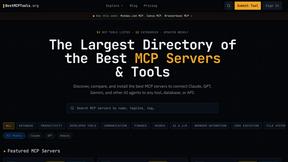
Ornold MCP lets AI agents control Chromium and antidetect browsers: click, type, read screens, record workflows, replay profiles without scripts.

AIQualityHQ
AIQualityHQ provides deterministic evaluations across six prompt quality dimensions with instant scores and actionable fixes.

RedLinz
RedLinz turns screenshots into AI prompts by letting you circle and annotate exactly what you want an LLM to change.

Locai
Locai lets you run powerful AI models on your own hardware, keeping data private and cutting cloud costs.

Best Face Swap
Best Face Swap offers a dedicated video and photo AI workflow for frame-consistent face replacement with reserved API access.
Clearcote
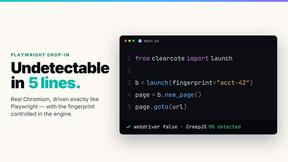
Clearcote is an open-source, de-Googled Chromium drop-in for Playwright and Puppeteer that gives you engine-level fingerprint control for a single.

JustLaunched
JustLaunched schedules your SaaS launch, submits to curated directories, and connects you with buyers discovering new tools daily.

Buildlist
Buildlist transforms any AI API key into an instant SaaS directory listing for discovering, launching, and improving tools.

Push My App
Push My App is an AI-powered dashboard that writes ASO metadata, detects rejection risks, and submits directly to Apple and Google stores.

MCPize
MCPize is a marketplace for discovering, installing, and managing 1,000+ premium MCP servers with unified billing and 80% publisher revenue share.

EasyDoFollow
EasyDoFollow simplifies backlink building by allowing users to list their site and obtain verified dofollow links for enhanced SEO exposure.
About LoadTester Alternatives
LoadTester is a developer-focused tool within the Dev Tools category designed to streamline HTTP and API load testing by eliminating the need to provision and manage dedicated infrastructure. It enables teams to define a test scenario, specify a target load either by virtual users or requests per second, and immediately observe live metrics such as latency and error rates. This positions it as a practical solution for continuous performance validation, sitting at the intersection of load generation, monitoring, and regression prevention. Users often begin searching for alternatives due to constraints around pricing models for higher concurrency levels, a desire for more granular protocol support beyond HTTP/API, or specific platform requirements such as on-premise deployment or integration with a particular CI/CD ecosystem. When evaluating alternatives, the primary criteria should be the fidelity of the load generation engine and the depth of the metrics it provides. Look for tools that offer clear control over concurrency models, support for both ramp-up and steady-state testing, and the ability to export raw latency distributions rather than just averages. Consider the breadth of integrations available; while LoadTester offers scheduled tests and API access, an alternative might provide deeper hooks into your existing observability stack or support for multi-region distributed testing. Finally, assess the learning curve and the ease of defining test scenarios, as the most powerful tool is useless if it cannot be adopted by your entire development team for routine performance checks.
FAQs about LoadTester Alternatives
What is LoadTester?
LoadTester is a developer tool for running HTTP and API load tests without requiring users to set up or manage any underlying load testing infrastructure. It allows teams to define a test, choose a target load in terms of virtual users or requests per second, and then monitor live latency and error rates during the test execution. After a test completes, it provides detailed results for review and comparison against previous runs to identify performance regressions.
Who is LoadTester for?
LoadTester is designed for developers and engineering teams who need to perform routine performance checks on their HTTP and API endpoints. It is particularly suited for teams that want simple, repeatable load tests integrated into their workflow without the overhead of managing dedicated testing infrastructure. The tool is valuable for anyone looking to catch performance regressions before they impact end users, from individual developers to larger DevOps teams.
What are the main features of LoadTester?
Key features include the ability to create tests with configurable virtual user counts or requests per second targets, live monitoring of latency and error rates, and comprehensive result review with run comparison capabilities. The tool also supports exports of test data, scheduled test execution, a programmatic API for automation, and workflow integrations to embed performance checks into existing development pipelines. These features enable teams to perform consistent and repeatable performance validation.
Is LoadTester free?
The provided content does not specify the pricing model of LoadTester, so you should consult the official LoadTester website or documentation for the most accurate and current pricing information. Typically, tools in this category offer a tiered pricing structure that may include a free tier with limited concurrency or test duration, along with paid plans for higher loads and additional features. It is recommended to review the pricing page directly to understand what is available at no cost versus what requires a subscription.