

Alternatives to Smart Comparison Widget
Smart Comparison Widget automatically imports and updates product specifications to power side-by-side comparisons that boost conversions and reduce.
Explore 20 alternatives to Smart Comparison Widget. Compare features, pricing, and find the best fit for your needs.

VD6S
VD6S is a free online YouTube video downloader that supports HD, 4K and up to 8K downloads. Save videos in MP4 or audio in multiple formats.
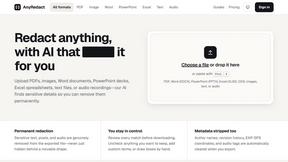
AnyRedact
Free online auto redaction tool with AI for PDFs, images, Word, PowerPoint, Excel, text and audio. Files are never stored.

FeatQ
Feature request boards for software teams. Customers vote with just an email; your coding agent pulls the top request over MCP.

ButterShare
Realtime peer-to-peer file transfer in the browser. Send files directly between devices, no account and no upload to a server.

Save X post
A clean, ad-light X video downloader: one link, one click, and your video is saved. No login required.

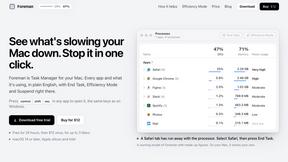
Foreman
See every app and what it's using in plain English, and end or slow down the one that's hogging your Mac.

Notchpals
Little characters peek out of your Mac's notch to remind you to drink water, eat, sit up and get to bed. Quiet during calls. $4.99 once.

LightScreen
Free light screen tool online. Turn any display into a flashlight, ambient light, or solid-color screen. No download or sign-up.
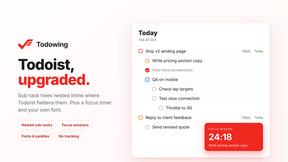
Todowing
Chrome extension that shows nested sub-tasks inline in Todoist's Today, Upcoming, Filters and Labels views. Free tier, $19.99 lifetime unlock.


Screen Issues
Free Online Screen Test Tool - Instantly diagnose dead pixels, lines, color issues, and flickering. Multiple test modes, no download needed.

Basalt
Eighteen PDF tools in one native Mac window: merge, split, compress, OCR, Bates numbering, forms, signing and redaction. Offline. $29 once.

Voice Keyboard Pro
Hold a key, say what you mean, let go. Clean, punctuated text lands at the cursor in any app on your Mac or iPhone.

Mainspring
Mainspring turns the settings macOS hides into 90+ one-click, fully reversible power-ups for Finder, Dock, screenshots and more. $29 once.
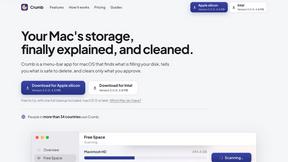
Crumb
A Mac menu bar app for a full disk. See what is using your space, read whether it comes back on its own, and remove only what you tick.

Woodpecker
Make your Mac sound like a real mechanical keyboard. Every key plays its own recording, 22 switches, quiet on calls. $4.99 once.

Everywhere
Fast file search for the Mac. Results as you type, files inside Mail and Photos, works with Wi-Fi off. $19 once.


About Smart Comparison Widget Alternatives
Smart Comparison Widget is a platform-independent software tool designed for e-commerce websites, falling under the category of product comparison and decision-support widgets. It enables online retailers to present multiple products side-by-side, automatically importing feature specifications from existing product pages to help customers make informed purchasing decisions. Users commonly seek alternatives due to specific pricing constraints, the need for deeper customization of the comparison interface, or compatibility requirements with less common or legacy e-commerce platforms that may not be fully supported by the widget’s integration method. Others may look for alternatives if they require advanced analytics on comparison behavior, A/B testing capabilities, or a more lightweight solution that does not automatically import all product data. When evaluating an alternative, you should prioritize solutions that offer robust API access for custom data mapping, ensuring accurate feature extraction regardless of your product taxonomy. Consider the widget’s latency impact on page load times, as heavy comparison tools can degrade user experience. Examine the flexibility of the comparison table’s layout, including the ability to hide or reorder features based on product category, and verify that the tool supports your specific platform’s templating system without requiring manual code injections. Additionally, assess the vendor’s data handling practices, particularly regarding product information security and compliance with data privacy regulations like GDPR or CCPA.
FAQs about Smart Comparison Widget Alternatives
What is Smart Comparison Widget?
Smart Comparison Widget is a platform-independent software tool that allows e-commerce websites to display multiple products side by side, automatically comparing their key features. It imports product specifications directly from existing product pages without manual data entry, ensuring the comparison data remains accurate and up-to-date. The widget is designed to help customers make faster, more confident purchasing decisions by presenting feature differences in a clear, side-by-side format. It is built to integrate seamlessly with any webshop technology, including Shopify, WooCommerce, Magento, WordPress, Drupal, and Wix.
Who is Smart Comparison Widget for?
Smart Comparison Widget is designed for any business running an online store that wants to improve its conversion rates and reduce product returns. It is particularly valuable for e-commerce operators who sell products with multiple technical specifications or variations, such as electronics, appliances, or apparel. The tool is suitable for users of major e-commerce platforms like Shopify, WooCommerce, Magento, and WordPress, as well as those with fully custom-coded solutions. It requires no technical expertise from the store owner to maintain, as product data is automatically synchronized from existing catalog pages.
Is Smart Comparison Widget free?
The provided product content does not specify pricing details, so it cannot be confirmed whether Smart Comparison Widget is free or requires a paid subscription. Typically, such specialized comparison widgets are offered as premium SaaS products with tiered pricing based on the number of products or monthly page views. You should consult the official product documentation or vendor website for current pricing plans and any available free trial options. The widget’s value proposition centers on reducing returns and boosting sales, which may justify an investment for high-volume stores.
What are the main features of Smart Comparison Widget?
Smart Comparison Widget’s main features include automatic import and updating of product specifications from existing product pages, eliminating manual data entry. It provides a side-by-side comparison interface that highlights feature differences to help customers quickly identify the right product. The widget generates personalized advice automatically based on the compared features, guiding the shopper toward a decision. It is fully platform-independent, meaning it integrates with virtually any e-commerce technology stack without requiring platform-specific modifications.