
AI Formatter vs Never Drop
Side-by-side comparison to help you choose the right tool.
AI Formatter
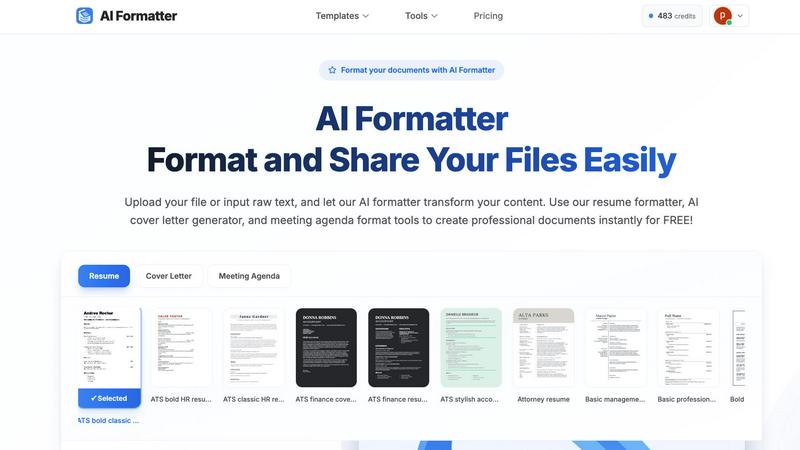
AI Formatter transforms raw text into polished, professional documents using 162 ATS-optimized templates instantly.
Last updated: March 1, 2026

Never Drop
NeverDrop captures contacts instantly and drafts personalized follow-ups, ensuring you never lose a lead at events.
Last updated: February 28, 2026
Visual Comparison
AI Formatter
Never Drop

Feature Comparison
AI Formatter
Extensive Template Library
AI Formatter provides access to over 162 professional templates specifically designed for various document types, including resumes, cover letters, and meeting agendas. These templates are optimized for ATS compatibility, ensuring that your documents not only look professional but also meet industry standards.
Automated Formatting Process
The platform allows users to upload existing documents or input raw text, which the AI then processes to apply professional formatting automatically. This feature significantly reduces the time spent on manual adjustments, enabling users to focus on content rather than structure.
Real-Time Editing and Customization
AI Formatter includes a fully-featured real-time editor, allowing users to review and edit their formatted documents easily. Users can make adjustments, customize content, and ensure that their documents meet specific requirements before downloading them in multiple formats.
Multi-Format Support
The AI Formatter supports various file formats, including PDF, DOC, DOCX, and TXT, making it versatile for different user needs. This feature allows users to effortlessly format documents from various sources without worrying about compatibility issues.
Never Drop
Instant Business Card Scanning
Never Drop allows users to scan business cards within seconds using their smartphones. The app's AI-powered Optical Character Recognition (OCR) technology extracts crucial contact details—name, company, title, phone number, and email—without requiring any manual input. This feature eliminates the hassle of typing and ensures that no information is lost due to misplaced cards.
Automatic Email Enrichment
Understanding that business cards often contain generic or incomplete email addresses, Never Drop enhances the captured profiles by automatically finding verified work emails based on the name and company. This feature removes guesswork and manual searches, ensuring that users have accurate contact information ready for follow-up.
AI-Generated Follow-Up Emails
With Never Drop, users can generate personalized follow-up emails in under two minutes. By utilizing the voice notes and conversation context provided by the user, the app drafts unique emails that reflect the tone and content of the interaction. This feature ensures that every follow-up feels personal and engaging, rather than being a generic template.
Team Collaboration and Management
Never Drop is designed for teamwork, allowing sales representatives to organize scanned leads by event and reassign contacts among team members. The dashboard provides an overview of activity, ensuring that everyone remains aligned and no leads fall through the cracks, even in high-pressure scenarios.
Use Cases
AI Formatter
Job Seekers
Job seekers can use AI Formatter to create ATS-optimized resumes and cover letters that stand out to recruiters. By utilizing professional templates and automated formatting, candidates can enhance their chances of landing interviews.
Business Professionals
Business professionals can leverage AI Formatter to generate polished meeting agendas and professional reports. The platform ensures that all documents are well-structured and visually appealing, enhancing communication in the workplace.
Academics
Academics can benefit from AI Formatter by formatting research papers, theses, and presentations according to institutional guidelines. This simplifies the often-complex formatting requirements, allowing researchers to concentrate on their content.
Enterprises
Enterprises can utilize AI Formatter for bulk formatting needs, such as creating compliant invoices, contracts, and marketing materials. The platform's ability to quickly process multiple documents helps streamline workflow and maintain brand consistency.
Never Drop
Trade Shows and Conferences
Sales teams can use Never Drop at trade shows and conferences to capture leads efficiently. By scanning business cards on-site, enriching contact information, and sending personalized follow-ups before leaving the booth, teams can enhance their chances of converting leads into clients.
Networking Events
At networking events, where interactions are fast-paced, Never Drop enables users to quickly scan and manage multiple contacts. The ability to add context and generate immediate follow-ups ensures that connections made during the event are not forgotten.
Business Dinners and Meetings
During business dinners or meetings, sales professionals can utilize Never Drop to capture leads from informal settings. The app allows them to document conversations and follow up with personalized emails, making a lasting impression on potential clients.
Lead Management and Organization
Never Drop serves as a central hub for lead management across various events. Users can categorize leads by event, track interactions, and monitor team activities, ensuring a streamlined approach to nurturing relationships and closing deals.
Overview
About AI Formatter
AI Formatter is a sophisticated, cloud-based Software-as-a-Service (SaaS) platform designed to revolutionize document formatting through advanced artificial intelligence. The primary goal of AI Formatter is to automate the transformation of unstructured or poorly formatted input, such as raw text and uploaded files in Word, PDF, and TXT formats, into professional-grade documents within seconds. Users save an average of two hours per document, thanks to the elimination of tedious manual formatting. Furthermore, AI Formatter boasts a documented pass rate of over 95% on Applicant Tracking System (ATS) scans, making it an invaluable tool for job seekers, business professionals, academics, and enterprises. The platform provides a centralized solution for creating industry-specific, visually consistent, and ATS-optimized documentation. Its robust value proposition is anchored in advanced AI-driven content structuring, an extensive library of over 100 professional templates, and a fully-featured real-time editor that allows for granular customization, all accessible via an intuitive online interface.
About Never Drop
Never Drop is a cutting-edge lead-capture application meticulously crafted for sales teams operating in dynamic environments such as trade shows, conferences, and networking events. It revolutionizes the lead management process by enabling users to effortlessly scan business cards using their smartphones. Once a card is scanned, users can enhance the captured data by adding voice notes or text context regarding their interactions, ensuring essential details about each lead are preserved. The app leverages advanced artificial intelligence to generate tailored follow-up emails within two minutes, significantly reducing the chances of leads being overlooked. With seamless integration into popular Customer Relationship Management (CRM) systems like HubSpot, Never Drop maintains a clean and organized sales pipeline, empowering teams to convert leads into successful deals. Say goodbye to lost opportunities and embrace efficient follow-up processes that foster meaningful relationships with potential clients.
Frequently Asked Questions
AI Formatter FAQ
How does AI Formatter ensure ATS compatibility?
AI Formatter utilizes a library of templates specifically designed to meet ATS requirements. This includes proper formatting of sections, use of keywords, and structured layouts that improve the chances of passing automated screenings.
Can I edit my document after formatting it?
Yes, once the AI has formatted your document, you can use the real-time editor to make any necessary adjustments. This feature allows for customization to ensure your document meets your specific needs and preferences.
What file formats does AI Formatter support?
AI Formatter supports a variety of file formats, including PDF, DOC, DOCX, and TXT. This versatility allows users to upload documents from different sources without compatibility issues, simplifying the formatting process.
Is there a limit on the size of files I can upload?
Yes, AI Formatter allows uploads of files with a maximum size limit of 10MB. This ensures that users can format standard documents efficiently while maintaining optimal performance on the platform.
Never Drop FAQ
What is Never Drop?
Never Drop is a lead-capture application designed for sales teams attending events. Users can scan business cards, add context, and generate personalized follow-up emails, all while integrating seamlessly with CRMs like HubSpot.
How does business card scanning work?
To scan a business card, users take a photo with the Never Drop mobile app. The app's AI-powered OCR technology quickly extracts essential contact information such as name, company, title, phone number, and email, simplifying the data entry process.
What types of events is Never Drop suitable for?
Never Drop is ideal for various events, including trade shows, conferences, networking events, meetups, and business dinners. It helps users capture and manage leads efficiently in any situation where new contacts are made.
Do I need the mobile app to use Never Drop?
Yes, the mobile app is essential for scanning business cards, recording voice notes, and triggering follow-ups on the go. Additionally, the web dashboard allows users to manage their team, review scans, and configure settings, providing a comprehensive solution for lead management.
Alternatives
AI Formatter Alternatives
AI Formatter is a cloud-based Software-as-a-Service (SaaS) platform designed to automate document formatting using advanced artificial intelligence. It transforms unstructured text and various file uploads into polished, professional documents through a robust AI engine, making it a valuable tool for job seekers, professionals, and organizations alike. Users commonly seek alternatives to AI Formatter for reasons such as pricing constraints, specific feature requirements, or compatibility with particular platforms. When evaluating alternatives, it is essential to consider factors such as template variety, ease of use, integration capabilities, and overall effectiveness in optimizing documents for Applicant Tracking Systems (ATS).
Never Drop Alternatives
Never Drop is an innovative lead-capture app that enhances productivity and management for sales teams, particularly in dynamic environments such as trade shows, conferences, and networking events. It allows users to effortlessly scan business cards with their smartphones, capturing essential contact information while providing tools to enrich this data with contextual notes for better follow-up. Users often seek alternatives to Never Drop due to various factors, including pricing structures, feature sets, and compatibility with existing platforms. When exploring alternative solutions, it is crucial to consider aspects such as ease of use, integration capabilities with popular CRMs, and the effectiveness of lead management and follow-up processes to ensure that the chosen app meets specific sales needs efficiently.