ClipMake vs Gleem.AI Studio
Side-by-side comparison to help you choose the right tool.

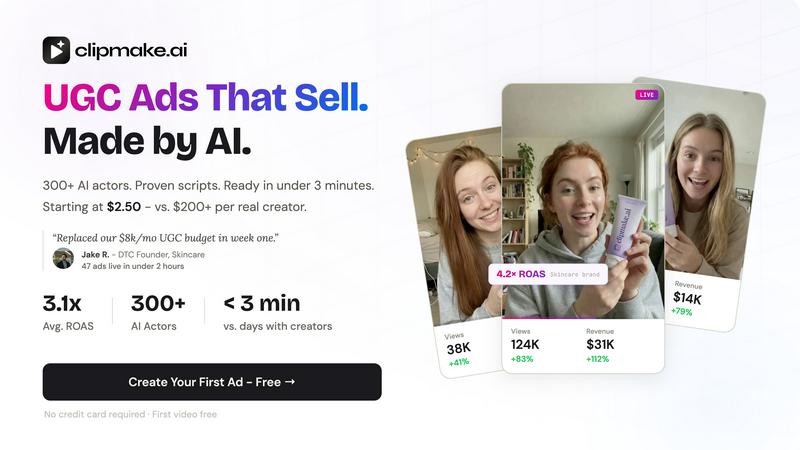
ClipMake is an AI video generator that creates hyper-realistic UGC ads with 300+ AI actors for Meta, TikTok, and YouTube in under three minutes.
Last updated: April 13, 2026

Gleem.AI Studio
Gleem.AI Studio is a unified workspace for generating and editing stunning visuals effortlessly with AI-powered tools.
Last updated: February 26, 2026
Visual Comparison
ClipMake
Gleem.AI Studio

Feature Comparison
ClipMake
Hyper-Realistic AI Actor Library
ClipMake provides access to a curated library of over 300 licensed AI actors, each with distinct appearances, demographics, and performance styles categorized as energetic, aesthetic, or professional. The underlying AI model generates advanced human realism, including precise lip synchronization to the audio track, naturalistic facial expressions, and believable body language. This feature ensures the digital presenters exhibit the authenticity and relatability required for effective UGC-style advertising, all without the logistical and financial overhead of human talent.
Intelligent Script & Hook Generation
The platform incorporates an AI script generator trained on high-performing ad formats and conversion frameworks prevalent across major social advertising platforms. By analyzing proven DTC and e-commerce ad structures, it automatically suggests compelling hooks and full scripts tailored to the user's product. This capability removes creative block and ensures that the generated video content is engineered for performance from a copywriting perspective, saving significant time in the conceptual and writing phases of ad creation.
Voice-Matched Multilingual Dubbing
Beyond standard text-to-speech, ClipMake's VocalMatch technology performs voice-matched dubbing in over 20 languages. This system preserves the unique vocal characteristics, tone, and timbre of each selected AI actor, translating and delivering the script in a target language while maintaining the actor's natural, non-robotic voice quality. This feature is critical for global brands seeking to maintain creative consistency and localize ad content authentically without reshooting with different talent.
Batch Generation for Multivariate Testing
A core technical capability is batch generation, allowing users to produce dozens of video variations in a single session. Users can systematically test different combinations of AI actors, script hooks, scene templates, and value propositions. This functionality is designed for rigorous multivariate testing, enabling data-driven creative optimization at scale. It transforms creative testing from a costly, slow process into a rapid, systematic operation, fundamental for identifying top-performing ad assets.
Gleem.AI Studio
Text-to-Image Generator
Gleem.AI Studio's text-to-image generator allows users to transform their ideas into stunning visuals simply by inputting descriptive text. This feature is enhanced by the Prompt Enhance tool, which refines user prompts for optimal image generation. Users can select various dimensions and styles to perfectly align with their vision, making the creative process both intuitive and efficient.
AI Image Editing
The platform's AI image editing capabilities empower users to make modifications directly within the same workspace used for generation. With simple, natural prompts, users can add or remove objects, adjust poses, apply filters, and even restore old images. This integrated approach ensures that all editing tasks are straightforward, fostering a seamless creative experience.
AI Avatars
Gleem.AI Studio allows users to generate and personalize AI avatars that can be placed into any scene. This feature enables creators to appear in photos, adjust their avatars’ poses, or experiment with different outfits—all without the need for additional photoshoots. This enhances the versatility of visual content, making it easier to engage audiences.
Project Organization
The platform keeps user projects neatly organized by allowing each idea to reside in a dedicated space. This includes saved prompts, edits, and version histories, ensuring that everything remains accessible for quick iterations and reuses. This feature enhances productivity and helps maintain a structured workflow, allowing creators to focus solely on their artistic endeavors.
Use Cases
ClipMake
High-Velocity Creative Testing for Performance Marketers
Performance marketers managing significant ad spend on Meta and TikTok can use ClipMake to systematically de-risk and optimize campaigns. By generating 40+ unique ad variations per product at a minimal cost, marketers can rapidly iterate on creative angles, messaging, and presenters. This volume allows for statistically significant A/B testing to identify winning combinations that lower cost-per-acquisition (CPA) and improve return on ad spend (ROAS), as evidenced by user-reported average ROAS increases of 3.2x.
E-commerce Brand Creative Production at Scale
Direct-to-consumer and e-commerce brands with extensive product catalogs can leverage ClipMake to produce professional ad creatives for every SKU without proportional increases in budget or time. The process of pasting a product link, selecting an AI creator, and generating a ready-to-publish video in minutes enables brands to maintain a constant refresh of ad content, combat ad fatigue, and promote new products instantly, effectively cutting traditional production costs by up to 90%.
Localized Global Campaign Launch
Brands expanding into new international markets can utilize the voice-matched dubbing and diverse AI actor library to create localized video ads rapidly. Instead of coordinating shoots with local creators in each region, teams can generate culturally relevant content featuring appropriate actors speaking in the local language, all from a single original script. This accelerates global go-to-market strategies and ensures brand consistency across regions.
TikTok Shop & Short-Form Content Saturation
Sellers on platforms like TikTok Shop, where the algorithm rewards consistent, high-volume content posting, can use ClipMake to maintain a relentless stream of fresh creatives. The ability to quickly produce numerous variations of product demonstration, unboxing, and testimonial videos allows sellers to "test into" viral trends and angles, increasing the probability of content being amplified by the platform's discovery engine.
Gleem.AI Studio
Marketing Campaigns
Marketers can leverage Gleem.AI Studio to create high-quality visuals for campaigns without the hassle of complicated tools. The ability to rapidly generate and edit images allows for quick adaptation to market trends and audience feedback.
Social Media Content
Content creators can use the platform to produce engaging social media visuals that capture attention. Whether crafting promotional graphics or unique posts, the streamlined workflow supports fast turnaround times and consistent branding.
Product Imagery
Businesses can generate and edit product images for their online stores or catalogs. The AI editing tools facilitate enhancements, ensuring that product visuals are always polished and visually appealing, which can drive sales.
Creative Variations
Artists and designers can experiment with different creative variations using the integrated capabilities of image generation and editing. This flexibility encourages innovation and exploration, allowing creators to push the boundaries of their ideas.
Overview
About ClipMake
ClipMake is an AI-powered video generation platform engineered to automate and scale the production of user-generated content (UGC) style video advertisements. It is specifically architected for e-commerce brands, direct-to-consumer (DTC) operators, and performance marketers who require a high volume of diverse, platform-optimized ad creatives to test and scale their campaigns efficiently. The core value proposition eliminates traditional production bottlenecks: there is no need to source, brief, or manage human creators, no physical shoots, and no manual video editing. Users can generate a finished, polished video advertisement in under three minutes. The platform operates by allowing users to select from an extensive library of over 300 licensed AI actors, input basic product details or a URL, and leverage pre-built, data-informed ad structures. The output is a complete video featuring a photorealistic AI presenter with natural lip sync and expressions, a contextually relevant voiceover, integrated product visuals, and dynamic scene composition tailored for platforms like Meta and TikTok. This technical approach enables unprecedented creative velocity and cost-efficiency, democratizing high-volume A/B testing for businesses of all sizes.
About Gleem.AI Studio
Gleem.AI Studio serves as a comprehensive AI image workspace tailored for creators who prioritize creativity over technical configurations. By offering a unified platform for image generation, editing, and remixing, Gleem.AI Studio simplifies the creative process, enabling users to focus on their artistic vision. Designed for marketers, content creators, and small teams, the platform eliminates the need to manage multiple tools, thereby streamlining workflows. Users can easily generate images from text, edit visuals with AI, and create personalized avatars—all within a single interface. The primary value proposition lies in its ability to enhance creative flow and speed, allowing users to iterate quickly without the burden of complex settings or fragmented processes.
Frequently Asked Questions
ClipMake FAQ
How realistic are the AI actors in ClipMake?
The AI actors in ClipMake are generated using advanced generative AI models focused on human realism. They exhibit natural lip sync that is precisely matched to the generated audio, nuanced facial expressions, and realistic body language. The platform also offers a "Pro Realism + VocalMatch" mode for ultra-realistic rendering. User testimonials from performance marketers indicate that the output quality is sufficient to perform competitively against real human UGC in controlled A/B tests.
What is the licensing and usage rights for videos created?
All videos generated using ClipMake's library of licensed AI actors are owned by the user for commercial use. There are no ongoing usage fees or royalties required to publish the ads on social media platforms, run paid campaigns, or use the content on websites. This provides full intellectual property control and predictable cost scaling compared to working with human influencers or agencies.
Can I use my own product images in the videos?
Yes, ClipMake features a dedicated product placement capability. Users can upload a product image, and the AI will dynamically integrate it into the scene. The AI actor can be shown holding, interacting with, or presenting the product realistically within the chosen template, such as an unboxing, tutorial, or lifestyle scene, creating a seamless and contextual showcase.
How does the script generation work?
The script generation AI is trained on a dataset of high-converting ad formats and structures from successful DTC and e-commerce campaigns. When you input your product details or URL, the engine analyzes the product category and features to propose relevant hooks and full scripts based on proven formulas like problem-agitate-solution, testimonials, and before/after narratives. Users can then edit this generated script to fine-tune the messaging.
Gleem.AI Studio FAQ
What types of images can I create with Gleem.AI Studio?
With Gleem.AI Studio, users can create a wide range of images, including marketing assets, social media visuals, product images, and personalized avatars. The platform supports diverse styles and dimensions.
Do I need technical skills to use Gleem.AI Studio?
No, Gleem.AI Studio is designed for users of all skill levels. The intuitive interface and natural language prompts eliminate the need for advanced technical knowledge, allowing anyone to create impressive visuals.
How does the Prompt Enhance feature work?
The Prompt Enhance feature refines user input to optimize image generation. By analyzing the natural language prompts, it improves clarity and specificity, leading to higher quality and more relevant visual outcomes.
Is there a limit to the number of projects I can create?
Gleem.AI Studio allows users to create multiple projects, each with its own dedicated space for prompts, edits, and version histories. This organization facilitates easy access and management of creative ideas.
Alternatives
ClipMake Alternatives
ClipMake is an AI-powered UGC video generator designed for performance marketing. It specializes in creating hyper-realistic video ads featuring a library of over 300 AI actors, targeting e-commerce brands and marketers who require high-volume ad creative without the logistical overhead of traditional production. Users may seek alternatives for various reasons, including budget constraints, specific feature requirements not covered by the platform, or a need for integration with different marketing tech stacks. The search often centers on finding a tool that balances cost, output quality, and workflow efficiency for scalable ad creation. When evaluating alternatives, key criteria include the realism and diversity of AI avatars, the quality of voice synthesis and lip-sync technology, the flexibility of scene templates and script generation, and the overall pricing model for volume production. The core objective is to identify a solution that delivers authentic-looking UGC-style videos at a sustainable operational cost.
Gleem.AI Studio Alternatives
Gleem.AI Studio is an all-in-one AI image workspace that caters to marketers, creators, and small teams by simplifying the process of creating and editing visuals. This platform integrates image generation and editing in a single, intuitive environment, allowing users to focus on their creative flow without the burden of complex setups or multiple tools. As such, it falls within the category of marketing tools aimed at streamlining visual content creation. Users commonly seek alternatives to Gleem.AI Studio for various reasons, including pricing considerations, feature sets, and specific platform requirements. When exploring alternatives, it is essential to look for tools that offer similar capabilities in terms of ease of use, integration of features, and support for the types of visual content one aims to produce. Additionally, evaluating customer support, customization options, and the overall user experience can significantly influence the decision-making process.