BRCKS vs Cosy
Side-by-side comparison to help you choose the right tool.

BRCKS streamlines construction project management by integrating WhatsApp for seamless updates, tasks, and collaboration in one platform.
Last updated: April 4, 2026

Cosy automates Slack community onboarding, member introductions, and content curation to enhance engagement and save.
Last updated: February 28, 2026
Visual Comparison
BRCKS

Cosy
Feature Comparison
BRCKS
Unified Communication Hub
BRCKS consolidates all project-related communications into one platform, allowing teams to manage updates, conversations, and documents seamlessly. This feature ensures that no critical information is lost, reducing reliance on multiple communication tools.
Free Subcontractor Access
With BRCKS, subcontractors can be invited to projects at no additional cost, providing them access to essential tools such as checklists, calendars, and files. This feature fosters collaboration and ensures that every team member can stay informed and engaged without extra expense.
Client Portal
The Client Portal feature allows homeowners and clients to view their project's progress through an intuitive interface. Clients receive updates, photos, and milestone information, keeping them informed while maintaining their distance from internal project management tools.
BRCKS Bot
The BRCKS Bot integrates with WhatsApp, allowing users to manage projects through simple text commands. This feature enables quick updates, task checking, and instant answers without the need to switch between applications, significantly enhancing user convenience and efficiency.
Cosy
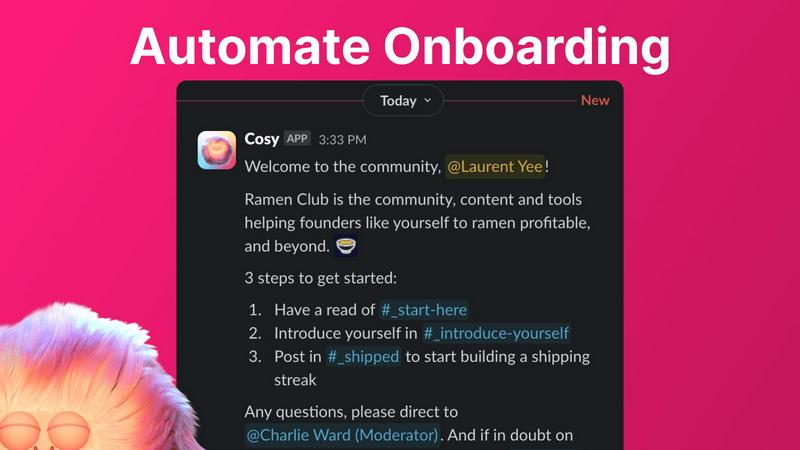
Automate Onboarding
Cosy allows community administrators to create and automate up to 10 distinct onboarding welcome DM sequences. When a new member joins the Slack workspace, they receive personalized onboarding messages either immediately or on a defined schedule. This feature is fully customizable, enabling the inclusion of the member’s name, relevant links, and emojis. With this automation, community managers can save hours of manual effort while ensuring that every new member receives a warm welcome, even during off-hours.
Connect Your Members
The platform excels in boosting member engagement through automated introductions. Community members who opt-in are regularly introduced to each other via direct messages, based on a customizable schedule. Administrators can define the frequency of introductions—every 1, 2, 3, or 4 weeks—along with the timing. This feature enhances community interaction by facilitating connections automatically, effectively increasing networking opportunities within the community.
Member Directory
Cosy offers a simple yet powerful member directory that is entirely searchable within Slack. Administrators can create a customizable directory with up to 10 fields for members to fill in, which can include text entries and multiple-choice options. Members can easily search for specific keywords and filter profiles, making it simpler to find individuals with shared interests or expertise. This feature encourages community connectivity without requiring members to leave the Slack platform.
Content Highlights
With Cosy, community managers can easily surface the top 10 most engaging posts or identify unreplied messages in any channel. This functionality is accessible via quick slash commands, allowing for immediate insights into community interaction. Administrators can use commands such as /most-engaged-messages and /unreplied-messages to boost visibility on important content, ensuring that valuable discussions do not go unnoticed and fostering a more interactive community environment.
Use Cases
BRCKS
Streamlined Daily Operations
Construction teams can use BRCKS to organize daily tasks and communications effectively. By having all relevant information in one location, teams can manage their operations more efficiently, saving time and reducing errors.
Enhanced Client Communication
Homeowners can rely on the Client Portal to receive timely updates on their projects, promoting transparency. This enhances client satisfaction and allows project teams to focus on execution rather than constant client inquiries.
Efficient Task Management
The checklist feature within BRCKS allows project managers to create and assign specific tasks to team members. This structured approach ensures that everyone knows their responsibilities, improving accountability and workflow.
Real-Time Updates and Notifications
BRCKS provides real-time notifications regarding project progress, ensuring that all team members stay informed about important changes. This immediacy helps in addressing issues promptly and maintaining project timelines.
Cosy
Enhanced Member Onboarding
Cosy streamlines the onboarding process for new members by automating personalized welcome messages. This ensures that every new member receives a warm introduction, helping them feel valued and more engaged from day one. By automating these interactions, community managers can focus on strategic initiatives rather than repetitive tasks.
Boosting Community Engagement
The automated member introduction feature fosters engagement by regularly connecting community members based on their preferences. This functionality encourages networking and relationship-building, which can lead to increased collaboration and a stronger sense of community among members.
Simplifying Member Interaction
With the searchable member directory, community members can easily find and connect with others who share similar interests or expertise. This feature not only enhances networking opportunities but also supports collaboration on projects, events, or discussions, enriching the overall community experience.
Highlighting Key Discussions
The content highlight feature allows community managers to quickly identify and amplify engaging posts, ensuring important conversations remain visible. By surfacing the most engaging content, community managers can encourage participation and interaction, leading to a more vibrant and active community.
Overview
About BRCKS
BRCKS is a revolutionary construction project management and communication software specifically designed for residential builders, trades, and homeowners. Its main purpose is to streamline project conversations, checklists, tasks, files, photos, and meeting notes, bringing them all into a single, cohesive platform. This eliminates the chaos of scattered communications often found in emails, WhatsApp, or various documents. BRCKS is tailored for real construction teams, making it practical and user-friendly, enabling daily site communication, action tracking, client updates, and maintaining a clear record of project decisions. With BRCKS, construction professionals can save valuable time, reduce miscommunication, and enhance overall project efficiency. The platform also offers free access to subcontractors, ensuring that every trade involved in a project can participate without incurring additional costs.
About Cosy
Cosy is an innovative Slack-native application designed to enhance the functionality of Slack workspaces by transforming them into thriving, self-sustaining communities. Tailored specifically for community managers, founders, and team leaders, Cosy automates manual engagement tasks, enabling users to foster deeper connections among members and extract valuable insights without leaving the Slack platform. The main value proposition of Cosy is its capability to save community administrators significant time and effort through intelligent automation, all while increasing member engagement and satisfaction. By seamlessly integrating with Slack's interface, Cosy eliminates the need for external tools, ensuring a frictionless experience for both administrators and community members. Key features include automated multi-step onboarding sequences, scheduled peer-to-peer introductions, a customizable and searchable member directory, and robust content moderation tools. Cosy also offers a free tier for communities with up to 250 members, along with a full-featured 30-day trial for larger groups, making it a compelling solution for managing and nurturing engaged communities directly within the Slack ecosystem.
Frequently Asked Questions
BRCKS FAQ
How does BRCKS improve project communication?
BRCKS centralizes all communications into one platform, reducing reliance on multiple channels. This leads to clearer, more efficient communication, minimizing misunderstandings and ensuring everyone is on the same page.
Is BRCKS easy to use for non-technical users?
Yes, BRCKS is designed with user-friendliness in mind. Its intuitive interface allows users, regardless of technical skill, to navigate the platform effortlessly and utilize its features without extensive training.
Can subcontractors access BRCKS for free?
Absolutely. BRCKS offers free access to subcontractors, allowing them to participate in project management without incurring any costs. This feature promotes better collaboration among all parties involved in the project.
What kind of support does BRCKS provide to its users?
BRCKS offers comprehensive support through various channels, including tutorials, FAQs, and responsive customer service. Users can easily access help and resources to maximize their use of the platform.
Cosy FAQ
How does Cosy automate the onboarding process?
Cosy automates onboarding by allowing administrators to create up to 10 distinct DM sequences that are triggered when a new member joins. These messages can be customized with the member's name and sent immediately or on a delay, ensuring a seamless onboarding experience.
Can members customize their profiles in the directory?
Yes, members can customize their profiles in the member directory by filling out up to 10 designated fields. Administrators can configure these fields to include various types of information, encouraging members to share relevant details about themselves.
How often are members introduced to each other?
Members who opt-in for introductions can be connected on a customizable schedule defined by the community administrator. Introductions can occur every 1, 2, 3, or 4 weeks, allowing for consistent networking opportunities without overwhelming members.
Is there a cost associated with using Cosy?
Cosy offers a free tier for communities of up to 250 members and a full-featured trial for 30 days for larger communities. This pricing structure makes it accessible for a wide range of community sizes, allowing managers to evaluate its capabilities without upfront investment.
Alternatives
BRCKS Alternatives
BRCKS is an innovative construction project management and communication software tailored specifically for residential builders, trades, and homeowners. It consolidates essential project elements like conversations, checklists, tasks, files, photos, and meeting notes into a single platform, ensuring that critical information is not lost amidst multiple communication channels such as WhatsApp or email. By streamlining site communication and tracking actions, BRCKS facilitates clear updates and decision records throughout the project lifecycle. Users may seek alternatives to BRCKS for various reasons, including pricing structures that better fit their budgets, feature sets that align more closely with their specific needs, or compatibility with different platforms. When considering alternatives, it's crucial to evaluate aspects such as ease of use, integration capabilities, customer support, and the overall scalability of the solution. These factors will help ensure that the chosen software effectively enhances productivity and meets the unique demands of construction projects.
Cosy Alternatives
Cosy is an innovative Slack-native application that automates community onboarding, member introductions, and content curation, aiming to enhance engagement within Slack workspaces. As a tool designed for community managers, founders, and team leaders, it seeks to streamline manual engagement tasks, allowing users to focus on building connections and providing valuable insights without leaving the Slack environment. Users often seek alternatives to Cosy due to various factors, such as pricing models, differing feature sets, or specific platform integration needs. When exploring alternatives, it is crucial to consider features that align with your community's goals, the scalability of the tool, ease of use, and the overall user experience it provides. Additionally, evaluating customer support and available resources can significantly impact the effectiveness of a chosen solution.