Filator vs Wisprs
Side-by-side comparison to help you choose the right tool.
Filator
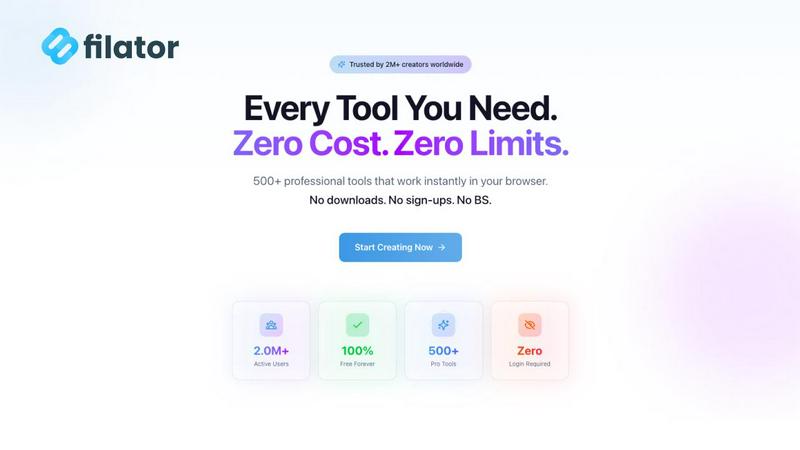
Filator is a free platform with over 500 AI, PDF, and image tools to create, convert, and automate tasks instantly.
Last updated: March 1, 2026

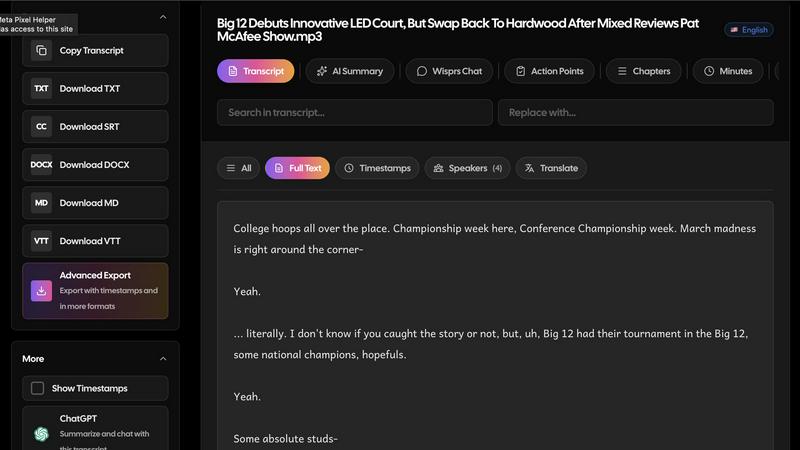
Wisprs offers accurate AI transcription for audio and video in 100+ languages with editable transcripts, speaker labels, and versatile export options.
Last updated: April 4, 2026
Visual Comparison
Filator
Wisprs
Feature Comparison
Filator
Privacy-First, Client-Side Processing
All tool operations on Filator are engineered to execute within the user's web browser through client-side JavaScript. This architecture ensures that files, documents, and data inputs are processed locally on the user's machine. No data is uploaded to external servers for processing, eliminating risks associated with data breaches, unauthorized access, or third-party logging. This feature is fundamental to the platform's commitment to user privacy and is a key differentiator from cloud-based SaaS tools that require file uploads.
Consolidated Suite of 500+ Professional Tools
The platform aggregates a vast and continuously expanding library of over 500 specialized digital utilities into one accessible interface. This eliminates the need to navigate between multiple websites, manage numerous bookmarks, or learn disparate interfaces. The suite is professionally curated, covering critical domains including AI toolkits, PDF editing, image conversion and manipulation, developer-focused code utilities, text processing, social media content creation, and business operations, providing a one-stop solution for diverse professional needs.
Zero-Friction Instant Access
Filator is designed for immediate productivity. Users can access and utilize any tool without any mandatory account creation, email verification, or login process. There are no artificial delays, waiting queues, or mandatory tutorials. This frictionless model allows professionals to open the platform, select their required tool, and begin working instantly, significantly reducing the time-to-result for urgent tasks and streamlining daily workflows.
Progressive Web App (PWA) with Offline Capability
Filator is built as a Progressive Web App, providing a native application-like experience directly from the web browser. Users can install it on their desktop or mobile device home screen for quick access. Crucially, over 20 core tools are fully functional without an active internet connection once the app is installed. This offline capability ensures reliability and uninterrupted access to essential utilities like basic text tools, calculators, and certain converters in environments with limited or no connectivity.
Wisprs
High Accuracy Transcription
Wisprs provides exceptional transcription accuracy, particularly with clear audio inputs. The AI is capable of recognizing speech with a high degree of precision, although quality may fluctuate based on language, accent, and recording conditions. This feature is crucial for users who require reliable text outputs for their audio and video content.
Automatic Speaker Identification
This feature automatically labels different speakers in a conversation, making it particularly useful for interviews and multi-person discussions. By distinguishing between speakers, Wisprs enhances clarity in transcripts, allowing users to easily follow dialogues and understand who said what, which is ideal for debriefs and podcasts with co-hosts.
AI-Powered Summarization and Insights
Wisprs goes beyond simple transcription by providing AI-generated summaries, topic extractions, and action items from the transcribed text. This functionality enables users to quickly glean key points and actionable insights from lengthy recordings, making it easier to share concise information with teams or audiences.
Multiple Export Formats
The platform allows users to export their transcriptions in a variety of formats, including TXT, SRT, VTT, MD, DOCX, and JSON. This flexibility ensures that users can seamlessly integrate their transcripts into different documentation tools or video subtitles, enhancing usability across various platforms.
Use Cases
Filator
Rapid Document Preparation for Freelancers
Freelancers and consultants frequently need to prepare client-ready documents under tight deadlines. Using Filator, they can seamlessly chain tools: compressing large PDF portfolios, merging multiple contract files into a single document, converting a client's image into a required format for a report, and generating a professional invoice—all within the same platform without uploading sensitive client data to various external services, ensuring both speed and confidentiality.
Developer Workflow Optimization
Software developers can streamline their debugging and data handling workflows. They can use the JSON formatter and validator to clean up API responses, encode or decode Base64 strings for data transmission tasks, generate secure passwords for testing environments, and use text diff tools to compare code snippets. Having these utilities consolidated saves time otherwise spent searching for reliable, standalone online tools.
Social Media Content Creation and Mockups
Digital marketers and social media managers can use Filator to create engaging visual content quickly. The platform allows them to generate realistic mockups for Instagram posts, Twitter (X) tweets, and other platforms to preview campaigns. They can also resize images to platform-specific dimensions, convert graphic formats, generate QR codes for marketing campaigns, and use AI tools to rewrite promotional copy, all within a unified workspace.
Academic and Research Paper Formatting
Students and researchers can efficiently manage their document workflows. They can merge multiple research PDFs, compress large files for email submission, convert images or documents into required formats (e.g., PDF to JPG for presentations), use the AI essay writer for structuring drafts, and employ the word counter for adhering to strict length guidelines. The privacy guarantee is particularly valuable when handling unpublished research data.
Wisprs
Podcast Production
Podcasters can leverage Wisprs to transcribe their episodes, enabling them to create show notes, highlight key moments, and improve accessibility for their audience. The ability to summarize and extract topics further enhances the content's shareability and engagement.
Team Meetings
Teams can document meetings by transcribing audio recordings, ensuring that all discussions are captured accurately. With speaker identification, team members can easily track who contributed to the conversation, facilitating better follow-up and action item management.
Interviews and Testimonials
Interviewers can capture verbal insights effectively by using Wisprs to transcribe their conversations. This allows them to extract quotes and key points, which can be used in articles, reports, or promotional materials, ensuring that critical information is not lost.
Educational Content Creation
Educators and trainers can utilize Wisprs to transcribe lectures and training sessions, making it easier to create study materials, guides, or supplementary learning resources. The AI summarization feature can highlight essential concepts, enhancing the learning experience for students.
Overview
About Filator
Filator is a comprehensive, privacy-centric online platform engineered to consolidate over 500 professional-grade digital tools into a single, unified workspace. It is designed for developers, designers, marketers, and professionals across all industries who require efficient, reliable utilities without encountering typical barriers such as mandatory signups, restrictive premium paywalls, or intrusive data collection practices. The platform's core architectural principle and primary value proposition is delivering maximum productivity through instant, client-side processing. This technical approach ensures that user data and files are processed directly within the user's web browser, guaranteeing that sensitive information never leaves their local device, thereby upholding a stringent standard for privacy and security. Tools are systematically organized into broad categories, encompassing essential functions like AI-powered generation (including content rewriting and image creation), comprehensive PDF manipulation (merging, compressing, converting), advanced image processing with conversion across 132 format combinations, developer utilities (JSON formatters, encoders/decoders), text tools, social media mockup generators, QR code creation, and business calculators. Supported by Progressive Web App (PWA) technology that enables offline functionality for 20+ core tools, Filator serves a global community exceeding 2 million users across 150+ countries, enabling seamless creation, conversion, and workflow automation directly from any modern web browser.
About Wisprs
Wisprs is a cutting-edge AI transcription software designed to convert audio and video recordings into accurate, editable speech-to-text formats. It caters to various users, including content creators, teams, interviewers, and anyone needing reliable transcripts for their recordings. With Wisprs, users can efficiently transcribe client calls, interviews, podcasts, and voice memos into actionable text. The platform boasts excellent accuracy for clear audio recordings, although results can vary depending on language, accent, and recording quality, such as background noise or microphone setup. Wisprs offers valuable features like speaker identification, allowing users to distinguish between multiple speakers, which is essential for debriefs and collaborative projects. Additionally, it transforms raw transcripts into organized summaries, chapters, topics, and action items, making the output not just a wall of text but a resource for sharing and action. Supporting over 100 languages, Wisprs enables users to export their transcripts in various formats, including TXT, SRT, VTT, MD, DOCX, and JSON, making it easy to integrate into different workflows and tools. Users can start for free without a credit card, making it accessible for those looking to elevate their transcription process.
Frequently Asked Questions
Filator FAQ
Is Filator completely free to use?
Yes, Filator offers a robust free plan that provides access to over 60 core tools without any cost. This includes many PDF, image, text, and developer utilities. The free plan also includes a monthly allocation of AI credits (10 credits) to experiment with AI-powered features. For users requiring high-volume AI processing, unlimited tools, and advanced features like dynamic QR codes, paid subscription plans (Starter, Pro, Premium) are available.
How does Filator ensure my data privacy?
Filator ensures privacy through its client-side processing architecture. When you use a tool, your files and data are processed entirely within your own web browser using JavaScript. They are never uploaded to Filator's servers or any third-party servers for the core tool operations. This means your documents, images, and data never leave your computer, providing a level of privacy and security superior to traditional cloud-based processing tools.
What are AI credits and how are they consumed?
AI credits are the currency used for processing requests within Filator's AI-powered tools, such as the AI Content Rewriter, AI Image Generator, and AI Chat. Each operation consumes a certain number of credits. For example, generating an image or rewriting a paragraph of text may cost one credit. The free plan includes a monthly allotment, while paid plans offer substantially higher or unlimited credits. Credit consumption is clearly indicated before you run an AI tool.
Can I use Filator tools offline?
Yes, for a selection of over 20 essential tools. By installing Filator as a Progressive Web App (PWA) on your device (desktop or mobile), you can use tools like the Password Generator, Text Case Converter, Basic Calculators, and certain converters without an active internet connection. This is ideal for use while traveling or in areas with poor connectivity. Note that AI tools and tools requiring significant processing libraries typically still require an online connection.
Wisprs FAQ
How accurate is Wisprs?
Wisprs delivers excellent transcription accuracy, particularly with clear audio recordings. While the quality may vary based on factors such as language, accent, and recording conditions, users can expect reliable results for most standard audio inputs.
What file formats do you support?
Wisprs supports a wide range of audio and video formats for transcription, including AAC, FLAC, M4A, MP3, MP4, MPEG, MPGA, OGG, WAV, and WEBM. This extensive compatibility allows users to upload files without the need for conversion.
How long does transcription take?
Most audio and video files are transcribed in under five minutes, depending on the length and complexity of the recording. Wisprs prioritizes efficiency to ensure users can quickly access their transcripts for further use.
Is my data secure?
Wisprs prioritizes user data security by ensuring that all recordings are processed privately. Users retain 100% ownership of their data, and it is never used to train AI models, providing peace of mind regarding data protection and privacy.
Alternatives
Filator Alternatives
Filator is a comprehensive, privacy-first online platform in the tech tools category, offering over 500 AI, PDF, image, and developer utilities. It consolidates specialized functions into a single, no-signup workspace for professionals seeking efficient task automation and conversion. Users may explore alternatives for various reasons. Some require a different feature mix, such as advanced collaborative functions or platform-specific integrations not covered by a generalist suite. Others might prioritize a different deployment model, like downloadable desktop software over a web app, or seek tools with a different focus, such as deep video editing or complex data analysis. When evaluating alternatives, key considerations include the core toolset alignment with your workflow, the underlying data processing architecture for security, and the overall access model regarding cost and registration. The ideal solution should match your specific technical requirements while providing reliable performance and a user experience that minimizes friction in your daily tasks.
Wisprs Alternatives
Wisprs is an AI transcription service that specializes in converting audio and video content into editable transcripts. This product fits within the categories of AI Assistants, Language & Translation, and Speech & Voice. Users often seek alternatives to Wisprs due to various factors, including pricing structures, specific feature sets, or compatibility with different platforms and workflows. When choosing an alternative, it is crucial to consider the accuracy of transcription, support for multiple languages, ease of editing, and the variety of export formats available. Ensuring that an alternative can integrate seamlessly into existing processes and meet specific user needs is vital for effective transcription management.