Gomotion vs Image3D AI
Side-by-side comparison to help you choose the right tool.

Gomotion
Gomotion is an AI-powered platform that instantly generates professional motion graphics and animated videos from text.
Last updated: February 28, 2026

Image3D AI
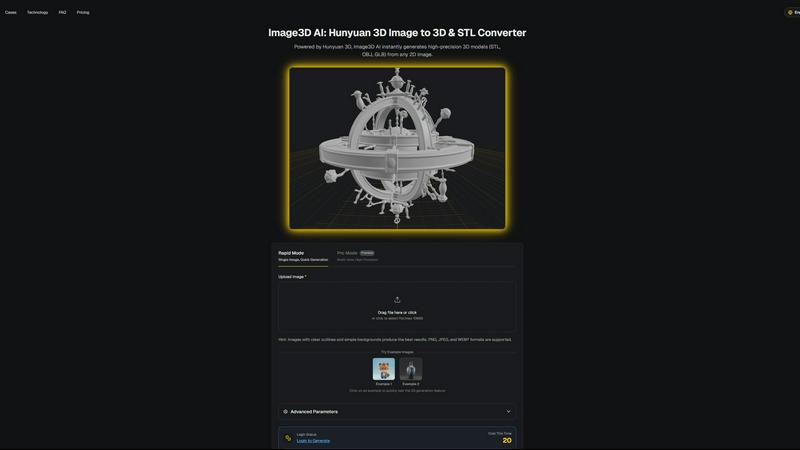
Image3D AI transforms any 2D image into precise 3D models for printing and gaming in just minutes without 3D skills.
Last updated: March 1, 2026
Visual Comparison
Gomotion

Image3D AI
Feature Comparison
Gomotion
AI-Powered Text-to-Motion Generation
This core feature allows users to generate cinematic animations from simple text prompts. By describing the desired motion in natural language, users can animate titles, captions, and logos without manually setting keyframes. The system interprets the prompt's intent to apply movements with professional flair, drastically simplifying the workflow for creating animated text elements commonly used in product demos and promotional content.
Narrative Mode for End-to-End Video Creation
Narrative Mode is a comprehensive workflow tool that transforms a written script into a complete, synchronized animated story. It automates the process of pairing script segments with relevant images, video clips, and animations, enabling the creation of ready-to-publish advertisements or short narrative videos in minutes. This feature is designed for producing cohesive visual stories with minimal manual editing and sequencing effort.
Multi-Platform Responsive Design Engine
Gomotion's rendering engine is specifically designed to create animations that are perfectly aligned for any display format. Users can design content with the confidence that it will render correctly across all screen sizes, from smartphone vertical feeds (Instagram Reels, TikTok) to tablet and desktop displays. This ensures brand consistency and visual integrity regardless of where the final content is published.
Advanced Data Visualization and Simulation
Beyond basic text and logo animation, Gomotion includes capabilities for creating complex animated charts and simulations directly from data inputs. This feature is engineered for explainer videos, business presentations, and educational content, transforming static data into engaging, dynamic visualizations that enhance comprehension and impact without requiring specialized data animation software.
Image3D AI
Rapid Mode
Rapid Mode offers a streamlined process for generating 3D models from a single image quickly. It is designed for users who need immediate results without the necessity of high precision, making it ideal for simple projects or quick iterations.
Pro Mode
Pro Mode enables users to upload multiple views of an object, enhancing the fidelity of the final 3D model. This premium feature is tailored for those requiring high precision and detail, such as game developers and artists who need intricate textures and geometries.
Advanced Export Options
Image3D AI supports various file formats, including STL for 3D printing, OBJ for traditional 3D editing, and GLB for web applications. This versatility allows users to select the most suitable format based on their specific project requirements, ensuring compatibility with a wide range of applications.
Best Practices Guide
The platform includes a comprehensive Best Practices Guide that provides users with tips to maximize the quality of their 3D conversions. By understanding the importance of image selection, generation modes, and file formats, users can significantly enhance their output quality and efficiency.
Use Cases
Gomotion
Rapid Social Media Ad Production
Marketing teams and solo creators can use Gomotion to rapidly prototype and produce high-volume social media advertisements. By inputting ad copy and brand assets, users can generate multiple animated ad variants optimized for platforms like Instagram, TikTok, and Facebook in a fraction of the time required for manual design, allowing for agile campaign testing and deployment.
Brand Identity and Promotional Video Development
Businesses launching new products or reinforcing brand identity can leverage Gomotion to create consistent promotional videos. The one-click brand import feature allows for quick integration of logos, color palettes, and fonts, enabling the rapid generation of on-brand animations for product teasers, launch announcements, and corporate overviews without constant designer intervention.
Educational and Explainer Content Creation
Educators, trainers, and B2B companies can utilize Gomotion's data visualization and Narrative Mode to produce engaging explainer videos. Complex concepts, processes, or data sets can be transformed into clear, animated stories, making them more accessible and memorable for audiences in e-learning modules, sales presentations, or internal training materials.
Agency Workflow Augmentation
Creative and digital agencies can integrate Gomotion into their workflow to handle routine animation tasks or create initial motion graphic concepts for client presentations. This tool allows agencies to increase throughput on projects requiring motion design, allocate senior designer time to more complex tasks, and provide clients with quick turnarounds on animation-heavy projects like website banners or digital ad campaigns.
Image3D AI
Game Development
Image3D AI is a valuable asset for game developers, allowing them to rapidly create 3D assets from concept art. With PBR material support, generated models can be directly imported into popular game engines like Unity or Unreal Engine, streamlining the asset creation process.
E-commerce Applications
For e-commerce platforms, Image3D AI transforms product images into interactive 3D models. This capability enhances online shopping experiences by enabling augmented reality previews or 3D showcases that engage customers and improve conversion rates.
3D Printing Projects
The software serves as a powerful image to STL converter, providing high-precision, print-ready files. This functionality is essential for 3D printing enthusiasts who require accurate and reliable models to bring their designs to life.
Architectural Visualization
Architects can use Image3D AI to quickly generate detailed architectural models from sketches or images. This capability saves significant modeling time and enhances workflow efficiency, allowing architects to focus on creative aspects rather than tedious modeling tasks.
Overview
About Gomotion
Gomotion is a sophisticated AI-driven motion design platform engineered to automate and streamline the creation of professional-grade animations. It functions as an AI Motion Designer, leveraging advanced algorithms, including models like Claude Sonnet 4, to interpret user inputs and generate complex motion graphics. The core functionality revolves around transforming textual prompts or static images into fully animated sequences, effectively bypassing the traditional, labor-intensive keyframing process associated with software like Adobe After Effects. This tool is architected for a broad spectrum of users, from marketing professionals and content creators seeking rapid ad production to businesses and agencies requiring consistent, high-quality brand animations. Its primary value proposition is a significant reduction in production time and technical barrier to entry, enabling users to focus on creative direction and narrative. Gomotion supports multi-platform design, ensuring outputs are optimized for every screen from mobile to desktop, and incorporates specialized modes for creating data visualizations and end-to-end animated stories directly from scripts.
About Image3D AI
Image3D AI is a cutting-edge software tool designed to revolutionize the way users create 3D models from 2D images. Leveraging Tencent's advanced Hunyuan 3D engine, this platform allows for the swift transformation of standard photographs or multi-view images into detailed, production-ready 3D assets in mere seconds. Its primary audience includes 3D printing enthusiasts, game developers, and digital artists, all of whom benefit from its ability to automate the complex process of 3D modeling. Image3D AI eliminates the need for extensive skill sets typically required in traditional 3D modeling software like Blender, making it accessible to users of all experience levels. With support for multiple export formats such as STL, OBJ, and GLB, the platform is tailored to meet diverse professional and creative demands, from creating watertight meshes for printing to generating textured assets for real-time applications. Image3D AI thus democratizes 3D content creation, allowing users to transform concepts, sketches, logos, and product images into usable 3D models with remarkable ease and efficiency.
Frequently Asked Questions
Gomotion FAQ
What is the primary technology behind Gomotion's animation generation?
Gomotion utilizes advanced AI algorithms, including large language and diffusion models, to interpret user prompts. Specifically, it employs systems like Claude Sonnet 4 to understand textual descriptions and generate corresponding motion paths, easing, and stylistic effects. This AI-driven approach automates the translation of creative intent into technical animation parameters.
Can I use my own brand assets within Gomotion?
Yes, Gomotion features a dedicated brand import function. Users can upload their logo, define brand colors, and select fonts in a centralized brand kit. Once imported, these assets can be automatically applied to new projects, ensuring all generated animations maintain consistent brand identity across social media, ads, and other promotional materials.
What output formats and resolutions does Gomotion support?
Gomotion is engineered for multi-platform use and supports standard video output formats suitable for web and social media distribution. It specifically offers a 16:9 aspect ratio as a primary format and is built with a responsive design engine that ensures animations scale and render correctly for various resolutions, from mobile device screens to desktop monitors.
Is Gomotion suitable for users with no prior animation experience?
Absolutely. Gomotion is designed to democratize motion design by removing the technical complexity of traditional animation software. Its intuitive, prompt-based interface allows novices to describe their vision in words and receive professional-looking animations. However, it also provides enough depth and control to appeal to seasoned designers looking to accelerate their workflow.
Image3D AI FAQ
What types of images work best for 3D conversion?
High-contrast images with clear outlines and simple backgrounds yield the best results. Blurry, low-light, or occluded images should be avoided to ensure accurate model generation.
How long does it take to generate a 3D model?
Using Rapid Mode, a single image can be processed in approximately 60 seconds, while Pro Mode may take slightly longer due to the complexity involved in handling multiple views for high-precision results.
Can I use Image3D AI for 3D printing?
Yes, Image3D AI is specifically designed to generate STL files that are suitable for 3D printing. Its capabilities include producing high-precision, watertight meshes ideal for various printing requirements.
What is the difference between the different generation modes?
The Normal mode balances quality and speed for general use. Low Poly mode is ideal for game and AR assets with a reduced polygon count, while Geometry mode focuses solely on mesh generation, omitting textures for 3D printing purposes.
Alternatives
Gomotion Alternatives
Gomotion is an AI-powered motion design tool within the design software category. It specializes in generating professional-grade animations from text or image prompts, significantly streamlining the workflow for creators and marketers. This positions it as a solution for users seeking to produce high-quality motion graphics without extensive manual animation expertise. Users may explore alternatives to Gomotion for several practical reasons. Common considerations include budget constraints and specific pricing model requirements, such as subscription tiers versus one-time purchases. Other factors encompass the need for different feature sets, platform compatibility, advanced customization depth, or integration capabilities with existing software ecosystems. When evaluating an alternative motion design solution, key criteria should include the core AI generation capabilities, the quality and flexibility of the output formats, and the sophistication of real-time collaboration features. Additionally, assess the tool's template library scope, export options for various platforms, and the overall user interface complexity relative to the intended user's skill level.
Image3D AI Alternatives
Image3D AI is a cutting-edge software solution that falls under the category of design tools, specifically focused on 3D modeling. It leverages advanced technology to transform 2D images into high-precision 3D models, catering to a diverse range of users, from hobbyists to professional game developers. As users explore their options, they often seek alternatives due to factors such as pricing, feature sets, and compatibility with specific platforms or workflows. When searching for an alternative to Image3D AI, it is essential to consider several key factors. Look for platforms that offer similar capabilities in terms of 3D model generation from 2D images, as well as the ability to export in multiple formats. Additionally, evaluate the quality of the generated models, any unique features that may enhance your workflow, and user support or community resources that can aid in the design process.