dmaya vs Image3D AI
Side-by-side comparison to help you choose the right tool.

dmaya
dMaya is an AI design platform for agencies that generates production-ready UI designs and exports them to code.
Last updated: April 13, 2026

Image3D AI
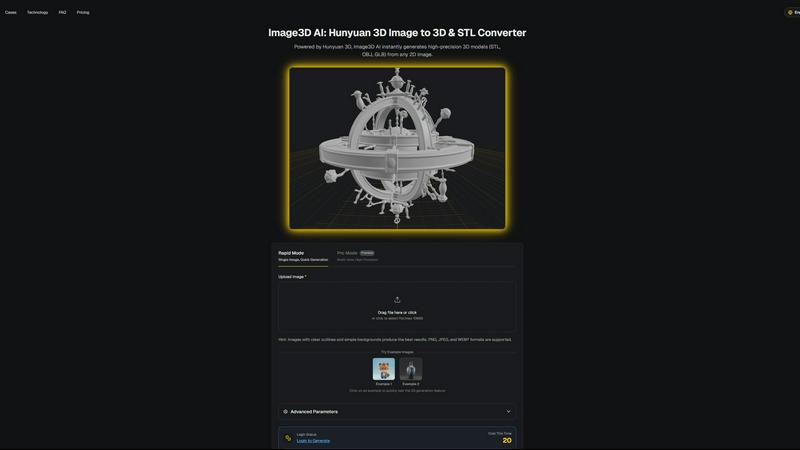
Image3D AI transforms any 2D image into precise 3D models for printing and gaming in just minutes without 3D skills.
Last updated: March 1, 2026
Visual Comparison
dmaya
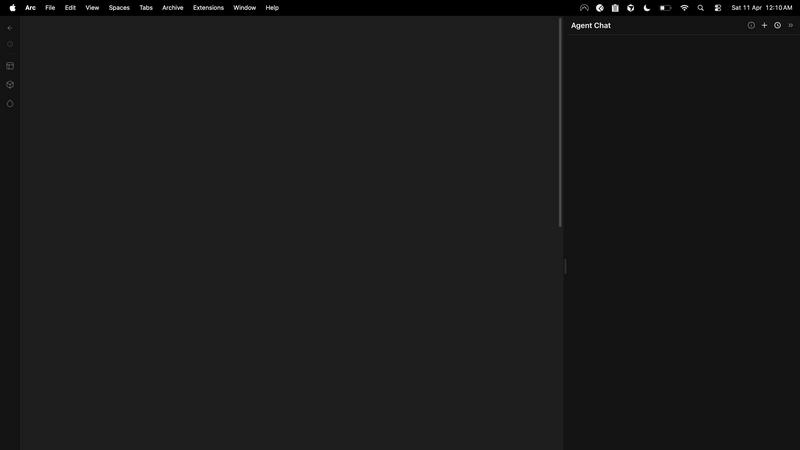
Image3D AI
Feature Comparison
dmaya
Conversational AI Design Generation
This core feature allows users to generate initial UI designs by describing their vision in plain English. Input a prompt for a specific interface, such as "a minimalist SaaS admin dashboard with dark mode," and dMaya's AI agent will produce a complete set of screens with coherent layouts, component systems, and responsive considerations. The generation process accounts for standard UI patterns and design principles, delivering a professional starting point in seconds, drastically reducing the time from concept to visual prototype.
Real-Time Conversational Iteration
Beyond initial generation, dMaya enables detailed refinement through an integrated chat interface. Designers can instruct the AI to make precise modifications using natural language, such as "swap the primary color to a blue palette," "convert this layout to a three-column grid," or "add a user profile section to the top navbar." Every change is applied instantly and accurately across the design, with underlying design tokens ensuring visual consistency is automatically maintained throughout all screens and components.
Client Presentation & Feedback Portal
dMaya streamlines the client review process by allowing designers to share projects via a simple, secure URL. Clients can view interactive, browser-based previews of the designs without needing to create an account. They can leave contextual feedback directly on the designs. This functionality consolidates the entire approval cycle within the platform, turning a process that traditionally takes days of email exchanges and meetings into one that can be completed in minutes, with all feedback tracked and actionable.
Design-to-Code Export for AI Development
Once a design is approved, dMaya provides a one-click export function that outputs production-ready front-end code. The export includes clean, well-structured HTML, CSS, and JavaScript that accurately reflects the visual design. This code is specifically formatted to be optimally consumed by AI coding assistants and agents like Claude Code, Cursor, or GitHub Copilot, enabling a seamless handoff for developers to build the final product in any modern framework like React, Next.js, or Flutter.
Image3D AI
Rapid Mode
Rapid Mode offers a streamlined process for generating 3D models from a single image quickly. It is designed for users who need immediate results without the necessity of high precision, making it ideal for simple projects or quick iterations.
Pro Mode
Pro Mode enables users to upload multiple views of an object, enhancing the fidelity of the final 3D model. This premium feature is tailored for those requiring high precision and detail, such as game developers and artists who need intricate textures and geometries.
Advanced Export Options
Image3D AI supports various file formats, including STL for 3D printing, OBJ for traditional 3D editing, and GLB for web applications. This versatility allows users to select the most suitable format based on their specific project requirements, ensuring compatibility with a wide range of applications.
Best Practices Guide
The platform includes a comprehensive Best Practices Guide that provides users with tips to maximize the quality of their 3D conversions. By understanding the importance of image selection, generation modes, and file formats, users can significantly enhance their output quality and efficiency.
Use Cases
dmaya
Agency Client Pitches and Concepting
Agencies can use dMaya to rapidly visualize client ideas during discovery calls or pitch meetings. By generating multiple high-fidelity design directions from a brief in real-time, agencies can demonstrate capability and align on visual direction faster. This accelerates the sales cycle, improves win rates, and provides tangible assets for proposals and statements of work, all before committing significant internal resources to detailed design work.
Product Team UI Exploration and Prototyping
Product managers and designers can leverage dMaya to explore diverse UI solutions for new features or products without extensive manual design work. The platform allows for quick A/B testing of different layouts, color schemes, and information architectures. This enables data-informed visual decisions early in the product lifecycle, ensuring engineering resources are only committed to building well-validated and stakeholder-approved interfaces.
Freelancer Project Delivery and Scalability
Freelancers and independent contractors can utilize dMaya to increase their project throughput and service offerings. The tool enables a single designer to handle the ideation, iteration, and client approval phases for multiple projects concurrently with greater speed. This efficiency allows freelancers to take on more work or deliver higher-fidelity results in less time, directly increasing their earning potential and competitive advantage.
Cross-Functional Team Alignment and Handoff
dMaya serves as a single source of truth for design concepts within cross-functional teams. Designers, product managers, and engineers can collaborate in the shared workspace, review iterations, and leave comments. The definitive, approved design and its accompanying exported code package create a clear, unambiguous handoff point from design to development, reducing misinterpretation and rework.
Image3D AI
Game Development
Image3D AI is a valuable asset for game developers, allowing them to rapidly create 3D assets from concept art. With PBR material support, generated models can be directly imported into popular game engines like Unity or Unreal Engine, streamlining the asset creation process.
E-commerce Applications
For e-commerce platforms, Image3D AI transforms product images into interactive 3D models. This capability enhances online shopping experiences by enabling augmented reality previews or 3D showcases that engage customers and improve conversion rates.
3D Printing Projects
The software serves as a powerful image to STL converter, providing high-precision, print-ready files. This functionality is essential for 3D printing enthusiasts who require accurate and reliable models to bring their designs to life.
Architectural Visualization
Architects can use Image3D AI to quickly generate detailed architectural models from sketches or images. This capability saves significant modeling time and enhances workflow efficiency, allowing architects to focus on creative aspects rather than tedious modeling tasks.
Overview
About dmaya
dMaya is a professional AI-powered design platform engineered specifically for agencies, product teams, and freelancers who operate within a client-driven, design-first workflow. It addresses a critical gap in the current AI tool landscape, which often bypasses visual design to generate code directly. dMaya reinstates the essential design phase, enabling teams to make intentional visual decisions, align stakeholders, and secure approvals before any development begins. The core value proposition lies in its conversational AI interface that generates complete, professional UI designs from text descriptions. Users can describe a SaaS dashboard, e-commerce user flow, or mobile application and receive polished, multi-screen designs in seconds. The platform facilitates rapid iteration through natural language commands to adjust colors, layouts, typography, and components. Once a design is finalized, it can be shared via a client-ready preview link for feedback and approval, eliminating lengthy review cycles. Finally, approved designs are exported as clean, structured HTML, CSS, and JavaScript code, ready to be handed off to AI coding agents like Cursor or Claude Code for implementation in frameworks such as React, Next.js, or Flutter. dMaya is built for speed, collaboration, and precision, ensuring teams can present, approve, and ship with confidence.
About Image3D AI
Image3D AI is a cutting-edge software tool designed to revolutionize the way users create 3D models from 2D images. Leveraging Tencent's advanced Hunyuan 3D engine, this platform allows for the swift transformation of standard photographs or multi-view images into detailed, production-ready 3D assets in mere seconds. Its primary audience includes 3D printing enthusiasts, game developers, and digital artists, all of whom benefit from its ability to automate the complex process of 3D modeling. Image3D AI eliminates the need for extensive skill sets typically required in traditional 3D modeling software like Blender, making it accessible to users of all experience levels. With support for multiple export formats such as STL, OBJ, and GLB, the platform is tailored to meet diverse professional and creative demands, from creating watertight meshes for printing to generating textured assets for real-time applications. Image3D AI thus democratizes 3D content creation, allowing users to transform concepts, sketches, logos, and product images into usable 3D models with remarkable ease and efficiency.
Frequently Asked Questions
dmaya FAQ
How does dMaya differ from other AI design tools?
dMaya is purpose-built for professional, client-facing workflows where design approval precedes development. Unlike tools that generate code directly, dMaya focuses on producing high-fidelity visual designs that can be presented, iterated upon, and formally approved. It includes client collaboration features like shareable preview links and feedback collection, which are essential for agencies and teams but absent in most AI tools aimed at solo builders.
What kind of code does dMaya export?
dMaya exports clean, vanilla front-end code consisting of semantic HTML, CSS (including Flexbox/Grid for layout), and JavaScript for basic interactivity. The code is not tied to a specific framework but is structured and commented to be easily interpreted and adapted by AI coding agents or developers into any target framework such as React, Next.js, Vue, or Flutter.
Can I collaborate with my team on dMaya?
Yes, dMaya includes built-in team collaboration features. You can invite team members to projects with role-based permissions, work together in real-time on the same canvas, and use comment threads for discussion. This makes it suitable for design teams, product squads, and agency groups needing a shared environment for creation and review.
Do clients need a dMaya account to review designs?
No, clients and external stakeholders do not require any account to review designs. Designers simply generate a shareable preview link from within a dMaya project and send it to their clients. Clients can view the design in their web browser, interact with it, and leave feedback directly on the design without any login or software installation.
Image3D AI FAQ
What types of images work best for 3D conversion?
High-contrast images with clear outlines and simple backgrounds yield the best results. Blurry, low-light, or occluded images should be avoided to ensure accurate model generation.
How long does it take to generate a 3D model?
Using Rapid Mode, a single image can be processed in approximately 60 seconds, while Pro Mode may take slightly longer due to the complexity involved in handling multiple views for high-precision results.
Can I use Image3D AI for 3D printing?
Yes, Image3D AI is specifically designed to generate STL files that are suitable for 3D printing. Its capabilities include producing high-precision, watertight meshes ideal for various printing requirements.
What is the difference between the different generation modes?
The Normal mode balances quality and speed for general use. Low Poly mode is ideal for game and AR assets with a reduced polygon count, while Geometry mode focuses solely on mesh generation, omitting textures for 3D printing purposes.
Alternatives
dmaya Alternatives
dmaya is an AI-powered vibe design platform that operates within the design-to-code software category. It enables agencies, teams, and freelancers to generate, iterate, and finalize professional UI designs through conversational AI before exporting clean, production-ready code. This process bridges the critical gap between conceptualization and development, ensuring visual and functional alignment before any engineering resources are committed. Users may explore alternatives to dmaya for various practical reasons. Common considerations include budget constraints and specific pricing models, the need for different feature sets or integration capabilities, and platform requirements such as operating system compatibility or collaboration tools. The search often stems from a need to find a tool that aligns precisely with a team's existing workflow, technical stack, or project scope. When evaluating an alternative design platform, key criteria should include the fidelity and control of the AI-generated output, the efficiency of the client review and approval cycle, and the quality and framework specificity of the exported code. The ideal solution should not only accelerate the initial design phase but also seamlessly integrate into the subsequent development pipeline without creating technical debt or requiring significant rework.
Image3D AI Alternatives
Image3D AI is a cutting-edge software solution that falls under the category of design tools, specifically focused on 3D modeling. It leverages advanced technology to transform 2D images into high-precision 3D models, catering to a diverse range of users, from hobbyists to professional game developers. As users explore their options, they often seek alternatives due to factors such as pricing, feature sets, and compatibility with specific platforms or workflows. When searching for an alternative to Image3D AI, it is essential to consider several key factors. Look for platforms that offer similar capabilities in terms of 3D model generation from 2D images, as well as the ability to export in multiple formats. Additionally, evaluate the quality of the generated models, any unique features that may enhance your workflow, and user support or community resources that can aid in the design process.