kirkify AI vs RemoveTexts
Side-by-side comparison to help you choose the right tool.

Kirkify AI transforms your images with a unique artistic style for entertaining, shareable content in seconds.
Last updated: March 3, 2026

RemoveTexts
RemoveTexts is an AI-powered tool that effortlessly removes text and watermarks from images in under 30 seconds, no design skills needed.
Last updated: March 11, 2026
Visual Comparison
kirkify AI
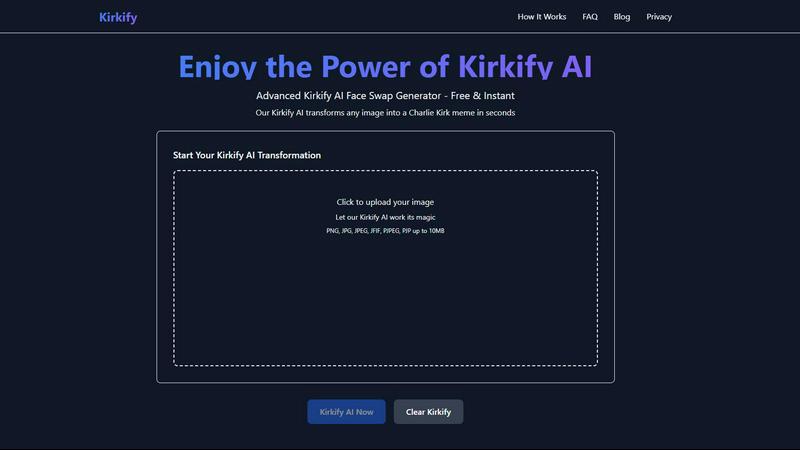
RemoveTexts

Feature Comparison
kirkify AI
Lightning Fast Processing
Kirkify AI is optimized to deliver rapid processing speeds, completing most image transformations in just 10 to 30 seconds. This efficiency allows users to create multiple variations quickly, making it ideal for those who need to generate content on the fly without sacrificing quality.
Privacy First
Kirkify AI prioritizes user privacy by ensuring that images are never stored on its servers. All processing occurs securely on the client side, and images are deleted immediately after transformation. This commitment to privacy means that users can enjoy the service without worrying about data tracking or storage.
100% Free
Kirkify AI is completely free to use, eliminating any hidden fees or premium tiers. Users can create an unlimited number of transformed images without any sign-up requirements, making it accessible to everyone. There are no watermarks, allowing users to share their creations freely.
Distinctive Style
The Kirkify aesthetic is characterized by a unique artistic transformation that sets it apart from other tools. This distinctive style enhances the visual appeal of images, making them perfect for social media, memes, and various creative projects, ensuring that content stands out and engages viewers.
RemoveTexts
Paint to Remove
This feature allows users to have precise control over the text removal process. By simply painting over the specific areas of text they wish to eliminate, users can effectively target unwanted elements without affecting the surrounding image, ensuring a clean and professional outcome.
Auto Remove All
For those looking for a quick and effortless solution, the Auto Remove All feature leverages AI to automatically detect and remove every instance of text in an image. This one-click solution is perfect for cleaning up large images or batch processing multiple files, saving significant time and effort.
Edit & Replace Text
RemoveTexts provides an Edit & Replace Text feature that allows users to change existing text in their images while maintaining the original style. This capability is particularly useful for modifying promotional graphics or correcting information without having to recreate the entire image.
Remove Objects
Beyond text removal, the Remove Objects feature enables users to erase unwanted visual elements, such as logos or people, from their images. This versatile tool broadens the editing capabilities, allowing for comprehensive cleaning and customization of images.
Use Cases
kirkify AI
Social Media Content
Kirkify AI is ideal for content creators looking to enhance their social media presence. By creating engaging and visually appealing images, users can attract more engagement on platforms like Instagram, TikTok, and Facebook, helping to grow their audience.
Meme Creation
The distinctive Kirkify style lends itself perfectly to meme creation. Users can transform their photos into entertaining and shareable memes that resonate with their audience, making it a popular choice for those looking to create humor-infused content.
Gaming & Discord
Gamers can leverage Kirkify AI to create unique avatars and profile pictures for platforms like Discord, Steam, and Twitch. This capability allows users to stand out in their gaming communities with personalized and creatively transformed images.
Creative Projects
Artists and designers can integrate Kirkify AI into their creative workflows. The tool provides a unique platform for experimentation and artistic expression, allowing users to explore innovative visual effects and incorporate them into their projects.
RemoveTexts
E-commerce Product Images
Online sellers can use RemoveTexts to enhance their product images by removing watermarks or text overlays, ensuring that their listings appear professional and appealing to potential buyers. Clean images can significantly impact sales conversions.
Social Media Posts
Content creators and marketers can quickly remove unwanted text from images used in social media posts. This ensures that visuals are eye-catching and free of distractions, helping to engage audiences more effectively.
Academic and Legal Document Redaction
Legal professionals and researchers can leverage RemoveTexts to redact sensitive information or annotations from screenshots or scanned documents. This feature allows for the secure sharing of documents while maintaining confidentiality and professionalism.
Presentation and Marketing Materials
RemoveTexts is an excellent tool for designers preparing presentations or marketing materials. It allows for quick adjustments to visuals, removing any extraneous text that might detract from the overall message and clarity of the content.
Overview
About kirkify AI
Kirkify AI is an innovative client-side web application designed to apply a unique artistic style filter to any uploaded image. Leveraging advanced AI processing algorithms, Kirkify transforms ordinary photographs into visually striking images that embody the distinctive "Kirkify" aesthetic. This style is intended for entertainment and creativity, making it highly appealing to a diverse audience. The application utilizes modern web technologies such as Next.js 15, React 19, and TypeScript, which ensures a robust, responsive, and type-safe user experience. Deployed globally via Cloudflare Pages, Kirkify AI offers impressive processing speed, typically completing transformations in under 10 seconds. It caters to a wide array of users, including content creators, digital artists, social media managers, and meme enthusiasts. The primary value proposition of Kirkify AI lies in its commitment to providing a powerful, privacy-first service that is entirely free of charge. It requires no user registration, processes images entirely client-side with immediate deletion after processing, and delivers high-quality, watermark-free results. This accessibility makes professional-grade AI style transformation available to anyone with internet access.
About RemoveTexts
RemoveTexts is an innovative AI-powered online tool designed to facilitate the effortless removal of unwanted text from images. By harnessing advanced deep learning inpainting technology, it allows users to eliminate watermarks, subtitles, captions, and any other text elements with a simple upload and a click. This tool is ideal for a wide range of users, including graphic designers, marketers, e-commerce sellers, and content creators, who often need to clean up images for professional use. The main value proposition of RemoveTexts lies in its ability to deliver high-quality, seamless results in under 30 seconds, eliminating the need for complex software like Photoshop or manual editing skills. With support for over 50 languages and a user-friendly interface, it democratizes image editing, making it accessible for anyone needing to enhance their visuals quickly and efficiently.
Frequently Asked Questions
kirkify AI FAQ
Is Kirkify AI really free to use?
Yes, Kirkify AI is entirely free to use with no hidden fees or premium tiers. Users can create unlimited transformations without any registration requirements.
How does Kirkify AI ensure my privacy?
Kirkify AI processes images client-side, meaning that images are never stored on its servers. All files are deleted immediately after transformation, ensuring user privacy is maintained.
What types of images can I upload?
Kirkify AI supports a variety of image formats, including PNG, JPG, JPEG, JFIF, PJPEG, and PJP. Users can upload images up to 10MB in size for processing.
How long does the transformation process take?
Kirkify AI is designed for speed, with most image transformations completing in just 10 to 30 seconds. This rapid processing allows users to create multiple images in a short amount of time.
RemoveTexts FAQ
How does RemoveTexts work?
RemoveTexts utilizes advanced deep learning inpainting technology to analyze surrounding pixels and reconstruct the background once text is removed. This ensures that the final image appears seamless and professional.
What file formats does RemoveTexts support?
RemoveTexts supports JPG, PNG, and WebP image formats, with a maximum file size limit of 10 MB. This ensures compatibility with most common image types used across various platforms.
Is there a limit to how many images I can process?
While specific limitations on the number of images processed at once may vary, RemoveTexts is designed for efficiency, allowing users to quickly edit multiple images in a short amount of time, especially with the Auto Remove All feature.
Can I use RemoveTexts for commercial purposes?
Yes, many users, including e-commerce sellers and marketers, utilize RemoveTexts for commercial projects. However, it is essential to ensure that any content modified adheres to copyright and trademark laws.
Alternatives
kirkify AI Alternatives
Kirkify AI is a cutting-edge web application that falls within the image and photo editing category, specifically designed to apply a unique artistic meme filter reminiscent of Charlie Kirk's style to any uploaded image. Users often seek alternatives to Kirkify AI for a variety of reasons, including the need for different features, varying pricing models, or compatibility with specific platforms. This search may stem from a desire for additional functionalities or unique artistic styles not offered by Kirkify AI. When considering alternatives, it's essential to evaluate the capabilities of each option, such as the quality of image processing, user privacy policies, and the overall user experience. Additionally, factors like ease of use, speed of processing, and the range of artistic filters available can significantly influence a user's choice. Prioritizing these criteria ensures that users find a tool that effectively meets their creative needs.
RemoveTexts Alternatives
RemoveTexts is an AI-powered image editing tool designed to efficiently remove unwanted text from images, falling under the category of image and photo editing software. Users often seek alternatives for various reasons, including pricing, feature sets, platform compatibility, and specific use cases that may not be fully addressed by one tool. When searching for an alternative, it's crucial to consider aspects such as the ease of use, the quality of output, language support, and the range of features offered, ensuring they align with your editing needs.