Looktara vs PhotoWeather
Side-by-side comparison to help you choose the right tool.
Looktara
Looktara generates professional, context-aware headshots from your photos in minutes, tailored to enhance your unique.
Last updated: February 28, 2026

PhotoWeather
Receive alerts for ideal photo conditions, ensuring you never miss the perfect moment for your outdoor photography.
Last updated: February 26, 2026
Visual Comparison
Looktara
PhotoWeather

Feature Comparison
Looktara
Personalized AI Model
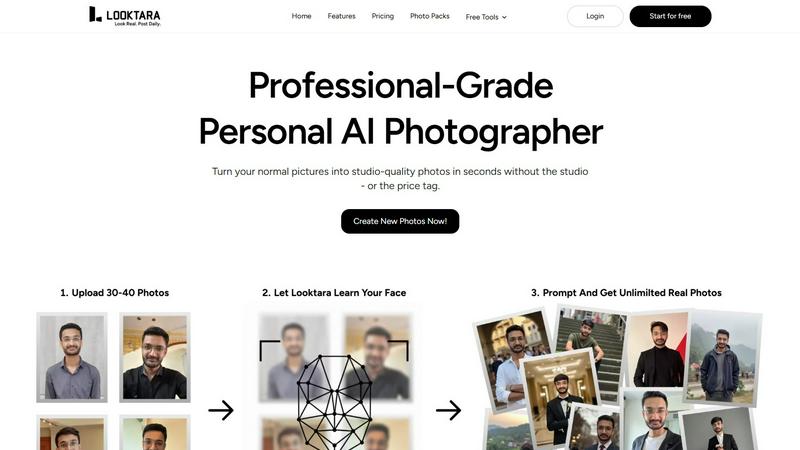
Looktara creates a unique AI model tailored to your likeness, requiring just 30 personal photos for training. This ensures that every generated image captures your true appearance and essence, providing a genuine representation that is crucial for professional use.
Rapid Image Generation
Once your personalized model is ready, Looktara allows you to generate high-quality solo photographs in approximately 5 seconds. This rapid turnaround time means you can quickly produce images for various needs, from social media updates to professional presentations.
Contextual Styling Options
Looktara offers adjustable tonal qualities for your images, enabling you to customize the style to fit different contexts. Whether you need an authoritative look for a keynote poster or a warm vibe for social media, you can tailor the output to match the intended message and audience.
Quality Control Over Outputs
Unlike many AI photo generators that provide limited customization, Looktara empowers users with control over the final output. This feature ensures that the generated images align with your professional standards, avoiding issues like awkward poses or irrelevant backgrounds.
PhotoWeather
Ready-Made Templates
PhotoWeather offers a variety of ready-made templates tailored for different photographic conditions. Users can select from options such as fog and mist, golden hour, aurora visibility, and storm intensity. These templates eliminate the complexity of rule creation, making it easy for photographers to get started and receive alerts based on specific weather scenarios.
Powerful Rule Builder
The rule builder in PhotoWeather is a standout feature that allows users to customize alerts based on over 80 different weather parameters. These include clouds, visibility, wind speed, humidity, and astronomy-related data. Photographers can create complex rules using AND/OR/NOT logic to ensure they receive notifications that precisely match their shooting criteria, such as "Golden hour + 20-60% clouds + wind <7 m/s".
Smart Notifications
PhotoWeather’s smart notification system keeps users informed with daily digests and real-time alerts. Users receive reminders before opportunities start and notifications when forecast conditions change. Integrating with calendars allows for auto-updating events, making it easy for photographers to stay organized and ready for their next shoot.
Trusted Forecast Sources
To ensure reliability, PhotoWeather aggregates data from leading weather services such as ECMWF, DWD, NOAA, MET Norway, and Météo-France. This multi-source approach provides photographers with accurate forecasts and confidence scores, allowing them to make informed decisions about their photography plans based on trustworthy weather information.
Use Cases
Looktara
Professional Networking
Looktara is ideal for professionals who need to maintain a polished image on platforms like LinkedIn. With personalized photos that reflect your brand, you can enhance your networking efforts and stand out in a competitive job market.
Content Creation for Social Media
Creators can leverage Looktara to produce high-quality images tailored for various social media platforms. The ability to quickly generate images that align with your branding allows for consistent and engaging content that attracts audience attention.
Marketing and Branding
Businesses can utilize Looktara to create personalized imagery for marketing materials. Whether for brochures, websites, or advertisements, Looktara ensures that the visuals resonate with target audiences while reflecting the brand's identity.
Event Promotion
For individuals or organizations promoting events, Looktara can generate stunning visuals that capture the essence of the occasion. From keynote speeches to informal gatherings, the platform provides the flexibility to create images that communicate the right vibe to potential attendees.
PhotoWeather
Landscape Photography
Landscape photographers can utilize PhotoWeather to set specific conditions for capturing stunning landscapes. By monitoring factors like fog density and cloud patterns, users can receive alerts that inform them when the scenery aligns perfectly with their artistic vision.
Astrophotography
For astrophotographers, PhotoWeather is invaluable. Users can set alerts for astronomical events, such as clear nights, moon phases, and low cloud cover. This allows them to plan their shoots with the confidence that they will have optimal conditions for capturing celestial phenomena.
Wildlife Photography
Wildlife photographers can benefit from PhotoWeather by establishing rules around weather conditions that influence animal behavior. Conditions such as calm winds, specific temperatures, and humidity levels can be monitored, maximizing the likelihood of encountering wildlife during their shoots.
Event Photography
Event photographers, such as wedding or outdoor event shooters, can use PhotoWeather to ensure they capture moments in the best lighting conditions. By setting alerts for golden hour and favorable weather patterns, they can plan their shots around the natural light, enhancing the quality of their images.
Overview
About Looktara
Looktara is a cutting-edge AI-powered platform that acts as a personal, on-demand photographer tailored for professionals and creators. It utilizes advanced technology to create a unique generative AI model based on the user’s own likeness, requiring an initial upload of around 30 personal photographs. This personalized model is trained within approximately 10 minutes, allowing users to generate new, high-quality solo images in just about 5 seconds by simply inputting a text prompt. Looktara is specifically designed to address the common shortcomings of generic AI image generation, such as unrealistic skin textures, awkward facial expressions, and inconsistent styling. By providing highly customized outputs that are unmistakably the user, Looktara ensures that individuals maintain a cohesive and brand-aligned visual presence across various platforms, including LinkedIn, Instagram, and Twitter, without the logistical complications and costs associated with traditional photoshoots. This makes Looktara an invaluable tool for anyone who requires consistent, professional imagery that resonates with their personal brand.
About PhotoWeather
PhotoWeather is an innovative weather alert system designed specifically for outdoor photographers. It eliminates the need for constant checking of weather apps by monitoring forecasts 24/7 and sending alerts tailored to individual photography goals. Photographers can set up specific conditions they wish to capture, such as sunrise fog, dramatic storms, or ideal golden-hour lighting. By utilizing powerful forecasting technology, PhotoWeather enables users to receive timely notifications that help them seize the perfect photographic opportunities without the guesswork. Designed for landscape, astrophotography, and wildlife photographers alike, PhotoWeather simplifies the planning process and enhances the chances of capturing compelling imagery in the right conditions.
Frequently Asked Questions
Looktara FAQ
How does Looktara ensure the authenticity of generated images?
Looktara trains a personalized AI model based on your own likeness, utilizing your unique photographs. This process guarantees that the generated images closely resemble your actual appearance, making them authentic representations.
What types of images can I create with Looktara?
You can create a wide range of images, from professional headshots suitable for LinkedIn to casual photos for social media. The platform's customization options allow you to adjust the style and tone based on your specific needs.
How long does it take to generate a personalized model?
The initial training of your personalized AI model takes approximately 10 minutes after uploading around 30 personal photos. Once trained, you can start generating images almost instantly.
Can I use Looktara for different professional contexts?
Yes, Looktara is designed to cater to various professional contexts. Its adjustable tonal qualities and styling options allow you to create images suitable for formal presentations, casual social media posts, and everything in between.
PhotoWeather FAQ
How do I get started?
To get started with PhotoWeather, simply sign up for a free account and add your favorite shooting locations. You can then choose from ready-made templates or create custom rules to set your desired weather conditions.
How accurate are the forecasts?
PhotoWeather aggregates data from multiple trusted weather services, ensuring high accuracy in forecasts. The confidence scores provided help users gauge the reliability of the weather predictions for their specific conditions.
Can I create my own rules?
Yes, PhotoWeather allows users to create custom rules using more than 80 different weather parameters. This feature provides flexibility and ensures that you can tailor alerts to match your specific photography needs.
Do you support calendar sync?
Yes, PhotoWeather supports calendar synchronization. Users can integrate their alerts with their calendars, allowing for auto-updating events that reflect the best photography opportunities based on their specified conditions.
Alternatives
Looktara Alternatives
Looktara is an innovative AI-powered platform that specializes in generating personalized, context-aware headshots for professionals and creators. By training a private AI model on users' own photographs, it provides a unique solution for those in need of high-quality, brand-aligned visual content without the hassle of traditional photography. Users often seek alternatives to Looktara for various reasons, including pricing, specific feature sets, or compatibility with different platforms. When searching for an alternative, it is essential to consider aspects such as model training privacy, image quality, customization options, and the ease of use of the platform. Finding the right alternative also hinges on understanding the unique needs of the user, such as whether they prioritize speed in image generation or require specific tonal qualities for their photographs. Evaluating the security measures in place for personal data and ensuring that the output aligns well with branding strategies are also crucial factors. Users should explore alternatives that not only meet their functional requirements but also provide a seamless and engaging user experience.
PhotoWeather Alternatives
PhotoWeather is a specialized tool designed for photographers, offering alerts for optimal shooting conditions such as golden hour, fog, and dramatic clouds. By continuously monitoring weather forecasts, it allows users to focus on their photography without the constant distraction of checking traditional weather apps. Users often seek alternatives to PhotoWeather for various reasons, such as pricing structures, specific feature sets, or compatibility with different platforms. When selecting an alternative, consider the range of features offered, ease of use, customization options, and the ability to receive timely notifications that align with your photography goals. A good alternative should not only provide accurate weather data but also cater to the specific needs of photographers, ensuring that they never miss the perfect shot due to unfavorable conditions.