
LuxSign vs MeetingMind
Side-by-side comparison to help you choose the right tool.

LuxSign enables secure, legally valid electronic signatures across the EU, streamlining document management in minutes.
Last updated: February 26, 2026

MeetingMind
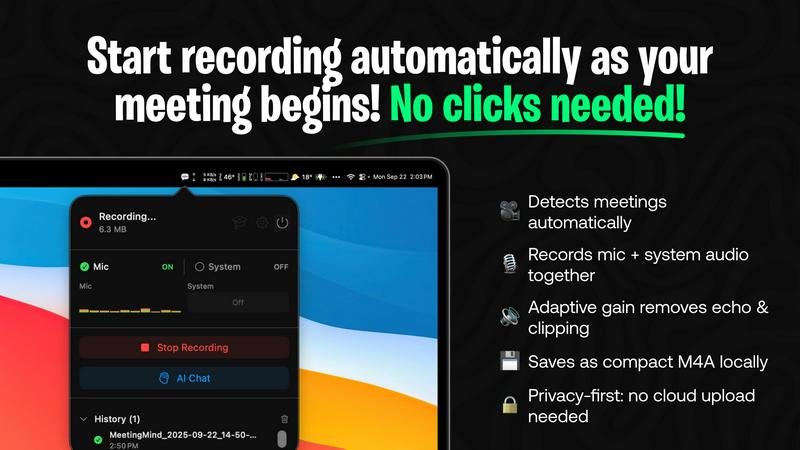
MeetingMind automatically records, transcribes, and summarizes your Zoom meetings, ensuring you never miss important.
Last updated: March 1, 2026
Visual Comparison
LuxSign

MeetingMind
Feature Comparison
LuxSign
Multiple Signature Methods
LuxSign offers a variety of signature methods to accommodate user preferences. You can draw your signature using a mouse or touchscreen, type your name, or upload a signature image. This flexibility allows for quick and personalized document signing, making it suitable for all users.
Advanced Security
The platform employs industry-standard encryption protocols to ensure the security of your documents during upload, storage, and transmission. With data hosted exclusively in Luxembourg, LuxSign guarantees compliance with EU data protection regulations, enhancing the trustworthiness of the platform.
Collaboration Workspaces
LuxSign includes collaboration workspaces that enable teams to share and manage documents effectively. Users can create shared folders, organize files, manage access rights for team members, and streamline the signing workflow, which is essential for collaborative projects and team-based tasks.
Complete Audit Trail
Every action taken on documents within LuxSign is logged in a comprehensive audit trail. This feature includes timestamps, IP addresses, and signer information, ensuring transparency and accountability. It is particularly valuable for compliance and verification purposes, allowing businesses to maintain detailed records of all document interactions.
MeetingMind
Automatic Detection
MeetingMind features an automatic detection system that recognizes Zoom meetings without any user clicks. This ensures that users can focus entirely on their discussions without worrying about initiating recordings manually.
AI Assistant
Users have the option to select their preferred AI assistant, choosing between local processing with Ollama models or utilizing the cloud-based capabilities of the OpenRouter API. This flexibility allows users to balance privacy needs with advanced features and insights.
Markdown Export
After a meeting concludes, MeetingMind generates AI-driven summaries and transcriptions saved as formatted markdown files. This allows for easy sharing and integration into various documentation systems, enhancing workflow efficiency.
100% Private
All processing is conducted locally on the user's Mac, meaning that sensitive meeting data, including audio recordings and transcriptions, never leaves the device. This commitment to privacy ensures that users can conduct meetings without concerns about data breaches.
Use Cases
LuxSign
Real Estate Transactions
In real estate, contracts often require multiple signatures from various parties. LuxSign simplifies this process by allowing parallel signing workflows, which accelerates the transaction timeline and ensures that all necessary approvals are gathered efficiently.
Legal Agreements
Law firms can utilize LuxSign to manage client agreements and retainers. The platform's multi-signer capabilities and detailed audit trails facilitate compliance with legal standards, ensuring that all signatures are valid and traceable.
HR Onboarding
Human resources departments can streamline the onboarding process for new employees by using LuxSign to send offer letters and contracts. Automatic email notifications keep both HR personnel and new hires informed about the signing status, enhancing the onboarding experience.
Business Partnerships
When entering into partnerships, businesses often need to sign multiple agreements. LuxSign allows companies to send and manage these documents easily, ensuring that all parties can sign from anywhere, reducing delays in starting collaborative efforts.
MeetingMind
Remote Team Meetings
MeetingMind is perfect for remote team members who often conduct virtual meetings via Zoom. It captures every detail, allowing team members to refer back to important discussions and decisions made during the meeting.
Project Management
Project managers can utilize MeetingMind to ensure that all action items and deadlines discussed in meetings are accurately recorded. The automatic transcription and summary features make it easier to track project progress and responsibilities.
Consultancy Sessions
Consultants can benefit from MeetingMind by capturing client meetings and discussions in detail. This ensures that they have a clear record of client needs and feedback, which can be referenced in future consultations and proposals.
Executive Briefings
Executives can use MeetingMind to record high-stakes briefings and strategy sessions. The ability to generate concise summaries and action items helps in maintaining clarity and focus on key decisions and objectives.
Overview
About LuxSign
LuxSign is an advanced electronic signature platform designed specifically for businesses that require high compliance and security for their document signing processes. Developed in Luxembourg, LuxSign ensures that all documents are encrypted end-to-end and stored securely within the country's borders, which upholds the stringent standards of GDPR compliance. The platform adheres to eIDAS SES standards, providing legal validity for contracts across the entire European Union. LuxSign is ideal for enterprises, small businesses, and professionals who need a reliable tool for managing electronic signatures. With capabilities such as parallel and sequential signing workflows, drag-and-drop signature field placement, and automated notifications, LuxSign streamlines the document signing process, making it efficient and secure. Advanced tiers offer additional features like document templates, detailed audit trails, bulk signing, and extensive API support, enabling seamless integration into existing workflows.
About MeetingMind
MeetingMind is an advanced AI-powered meeting assistant specifically designed for macOS users. This innovative application acts as an intelligent recorder, automatically capturing, transcribing, and analyzing virtual meetings, particularly those conducted via Zoom. Its primary value proposition is to eliminate the need for manual note-taking, thereby ensuring that users never miss crucial insights, action items, or details from their discussions. MeetingMind is ideal for professionals, including remote workers, project managers, consultants, and executives, who require reliable and accurate meeting records to enhance accountability and productivity. A standout feature of MeetingMind is its privacy-first architecture, powered by on-device AI processing utilizing Apple Silicon. This ensures that all audio data, transcriptions, and analyses occur locally on the user's Mac, safeguarding sensitive meeting content. With optional integrations like local Ollama models or the OpenRouter API, users can choose between enhanced privacy and advanced cloud-based AI functionalities. The application operates seamlessly from the macOS menu bar, providing automatic meeting detection and recording without requiring any manual intervention, making it an indispensable tool for efficient and secure meeting management.
Frequently Asked Questions
LuxSign FAQ
Is LuxSign compliant with GDPR?
Yes, LuxSign is fully compliant with GDPR and Luxembourg data protection laws. All documents are encrypted and stored securely within Luxembourg, ensuring that user privacy is maintained.
What types of documents can I sign with LuxSign?
LuxSign supports a variety of document formats, including PDF, DOC, and DOCX. Users can easily upload files up to 10MB for signing, making it versatile for different business needs.
Can I track the signing process in real-time?
Absolutely. LuxSign provides real-time tracking of the signing process. Users receive automatic email notifications when documents are sent, viewed, and signed, allowing for efficient management of document workflows.
What are the benefits of using the API and SDK?
The API and SDK offered in LuxSign's advanced tiers allow for seamless integration into existing systems. This enables businesses to automate workflows, enhance user experience, and customize the signing process according to their needs.
MeetingMind FAQ
How does MeetingMind ensure my data privacy?
MeetingMind processes all data locally on your Mac, meaning that your audio recordings and transcriptions never leave your device. This architecture is designed to protect sensitive information and maintain user privacy.
Can I use MeetingMind with platforms other than Zoom?
Currently, MeetingMind is optimized for Zoom meetings. However, future updates may expand compatibility with additional conferencing platforms, enhancing its utility for various users.
What if I only need to record short meetings?
MeetingMind offers a free tier that allows 60 minutes of recording per day, which is perfect for short meetings and daily standups. You can upgrade to an unlimited plan when you require more extensive recording capabilities.
Is there a mobile version of MeetingMind?
As of now, MeetingMind is exclusively available for macOS and does not have a mobile version. This focus allows for robust features optimized for desktop use, particularly for professional environments.
Alternatives
LuxSign Alternatives
LuxSign is a cutting-edge electronic signature platform developed in Luxembourg, designed to meet the rigorous compliance standards required by businesses operating within the EU. As a secure, cloud-based solution, it offers end-to-end encryption and strict adherence to GDPR, making it a reliable choice for organizations that need to ensure the legal validity of their documents across all EU member states. Users often seek alternatives to LuxSign for various reasons including cost considerations, specific feature requirements, or compatibility with existing systems. When evaluating alternatives, it is crucial to assess key factors such as compliance with legal standards, ease of use, integration capabilities, and the ability to support collaborative workflows. Additionally, understanding the security measures and data storage policies of potential alternatives is essential for maintaining regulatory adherence.
MeetingMind Alternatives
MeetingMind is an advanced AI-powered meeting assistant designed for macOS, specializing in capturing, transcribing, and summarizing Zoom meetings with a focus on productivity and management. Users often seek alternatives to MeetingMind due to various factors such as pricing, specific feature sets, or compatibility with different operating systems and communication platforms. As professionals evaluate their options, it’s essential to consider aspects like ease of use, the security of data handling, and the level of automation provided, ensuring that the alternative meets their unique workflow requirements. When choosing an alternative, users should look for features that enhance productivity, such as automatic meeting detection, audio capture quality, and the ability to generate accurate transcriptions. Additionally, considerations around data privacy and the application's integration capabilities will play a crucial role in selecting the best fit for their meeting management needs.