
MeetingMind vs Never Drop
Side-by-side comparison to help you choose the right tool.

MeetingMind
MeetingMind automatically records, transcribes, and summarizes your Zoom meetings, ensuring you never miss important.
Last updated: March 1, 2026

Never Drop
NeverDrop captures contacts instantly and drafts personalized follow-ups, ensuring you never lose a lead at events.
Last updated: February 28, 2026
Visual Comparison
MeetingMind
Never Drop

Feature Comparison
MeetingMind
Automatic Detection
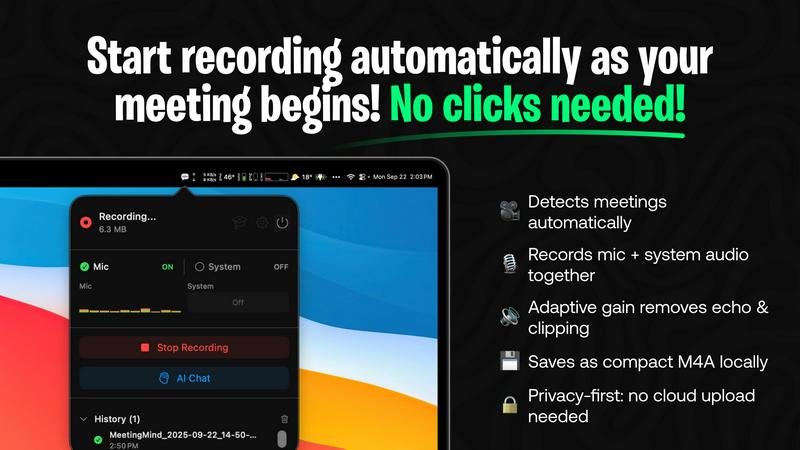
MeetingMind features an automatic detection system that recognizes Zoom meetings without any user clicks. This ensures that users can focus entirely on their discussions without worrying about initiating recordings manually.
AI Assistant
Users have the option to select their preferred AI assistant, choosing between local processing with Ollama models or utilizing the cloud-based capabilities of the OpenRouter API. This flexibility allows users to balance privacy needs with advanced features and insights.
Markdown Export
After a meeting concludes, MeetingMind generates AI-driven summaries and transcriptions saved as formatted markdown files. This allows for easy sharing and integration into various documentation systems, enhancing workflow efficiency.
100% Private
All processing is conducted locally on the user's Mac, meaning that sensitive meeting data, including audio recordings and transcriptions, never leaves the device. This commitment to privacy ensures that users can conduct meetings without concerns about data breaches.
Never Drop
Instant Business Card Scanning
Never Drop allows users to scan business cards within seconds using their smartphones. The app's AI-powered Optical Character Recognition (OCR) technology extracts crucial contact details—name, company, title, phone number, and email—without requiring any manual input. This feature eliminates the hassle of typing and ensures that no information is lost due to misplaced cards.
Automatic Email Enrichment
Understanding that business cards often contain generic or incomplete email addresses, Never Drop enhances the captured profiles by automatically finding verified work emails based on the name and company. This feature removes guesswork and manual searches, ensuring that users have accurate contact information ready for follow-up.
AI-Generated Follow-Up Emails
With Never Drop, users can generate personalized follow-up emails in under two minutes. By utilizing the voice notes and conversation context provided by the user, the app drafts unique emails that reflect the tone and content of the interaction. This feature ensures that every follow-up feels personal and engaging, rather than being a generic template.
Team Collaboration and Management
Never Drop is designed for teamwork, allowing sales representatives to organize scanned leads by event and reassign contacts among team members. The dashboard provides an overview of activity, ensuring that everyone remains aligned and no leads fall through the cracks, even in high-pressure scenarios.
Use Cases
MeetingMind
Remote Team Meetings
MeetingMind is perfect for remote team members who often conduct virtual meetings via Zoom. It captures every detail, allowing team members to refer back to important discussions and decisions made during the meeting.
Project Management
Project managers can utilize MeetingMind to ensure that all action items and deadlines discussed in meetings are accurately recorded. The automatic transcription and summary features make it easier to track project progress and responsibilities.
Consultancy Sessions
Consultants can benefit from MeetingMind by capturing client meetings and discussions in detail. This ensures that they have a clear record of client needs and feedback, which can be referenced in future consultations and proposals.
Executive Briefings
Executives can use MeetingMind to record high-stakes briefings and strategy sessions. The ability to generate concise summaries and action items helps in maintaining clarity and focus on key decisions and objectives.
Never Drop
Trade Shows and Conferences
Sales teams can use Never Drop at trade shows and conferences to capture leads efficiently. By scanning business cards on-site, enriching contact information, and sending personalized follow-ups before leaving the booth, teams can enhance their chances of converting leads into clients.
Networking Events
At networking events, where interactions are fast-paced, Never Drop enables users to quickly scan and manage multiple contacts. The ability to add context and generate immediate follow-ups ensures that connections made during the event are not forgotten.
Business Dinners and Meetings
During business dinners or meetings, sales professionals can utilize Never Drop to capture leads from informal settings. The app allows them to document conversations and follow up with personalized emails, making a lasting impression on potential clients.
Lead Management and Organization
Never Drop serves as a central hub for lead management across various events. Users can categorize leads by event, track interactions, and monitor team activities, ensuring a streamlined approach to nurturing relationships and closing deals.
Overview
About MeetingMind
MeetingMind is an advanced AI-powered meeting assistant specifically designed for macOS users. This innovative application acts as an intelligent recorder, automatically capturing, transcribing, and analyzing virtual meetings, particularly those conducted via Zoom. Its primary value proposition is to eliminate the need for manual note-taking, thereby ensuring that users never miss crucial insights, action items, or details from their discussions. MeetingMind is ideal for professionals, including remote workers, project managers, consultants, and executives, who require reliable and accurate meeting records to enhance accountability and productivity. A standout feature of MeetingMind is its privacy-first architecture, powered by on-device AI processing utilizing Apple Silicon. This ensures that all audio data, transcriptions, and analyses occur locally on the user's Mac, safeguarding sensitive meeting content. With optional integrations like local Ollama models or the OpenRouter API, users can choose between enhanced privacy and advanced cloud-based AI functionalities. The application operates seamlessly from the macOS menu bar, providing automatic meeting detection and recording without requiring any manual intervention, making it an indispensable tool for efficient and secure meeting management.
About Never Drop
Never Drop is a cutting-edge lead-capture application meticulously crafted for sales teams operating in dynamic environments such as trade shows, conferences, and networking events. It revolutionizes the lead management process by enabling users to effortlessly scan business cards using their smartphones. Once a card is scanned, users can enhance the captured data by adding voice notes or text context regarding their interactions, ensuring essential details about each lead are preserved. The app leverages advanced artificial intelligence to generate tailored follow-up emails within two minutes, significantly reducing the chances of leads being overlooked. With seamless integration into popular Customer Relationship Management (CRM) systems like HubSpot, Never Drop maintains a clean and organized sales pipeline, empowering teams to convert leads into successful deals. Say goodbye to lost opportunities and embrace efficient follow-up processes that foster meaningful relationships with potential clients.
Frequently Asked Questions
MeetingMind FAQ
How does MeetingMind ensure my data privacy?
MeetingMind processes all data locally on your Mac, meaning that your audio recordings and transcriptions never leave your device. This architecture is designed to protect sensitive information and maintain user privacy.
Can I use MeetingMind with platforms other than Zoom?
Currently, MeetingMind is optimized for Zoom meetings. However, future updates may expand compatibility with additional conferencing platforms, enhancing its utility for various users.
What if I only need to record short meetings?
MeetingMind offers a free tier that allows 60 minutes of recording per day, which is perfect for short meetings and daily standups. You can upgrade to an unlimited plan when you require more extensive recording capabilities.
Is there a mobile version of MeetingMind?
As of now, MeetingMind is exclusively available for macOS and does not have a mobile version. This focus allows for robust features optimized for desktop use, particularly for professional environments.
Never Drop FAQ
What is Never Drop?
Never Drop is a lead-capture application designed for sales teams attending events. Users can scan business cards, add context, and generate personalized follow-up emails, all while integrating seamlessly with CRMs like HubSpot.
How does business card scanning work?
To scan a business card, users take a photo with the Never Drop mobile app. The app's AI-powered OCR technology quickly extracts essential contact information such as name, company, title, phone number, and email, simplifying the data entry process.
What types of events is Never Drop suitable for?
Never Drop is ideal for various events, including trade shows, conferences, networking events, meetups, and business dinners. It helps users capture and manage leads efficiently in any situation where new contacts are made.
Do I need the mobile app to use Never Drop?
Yes, the mobile app is essential for scanning business cards, recording voice notes, and triggering follow-ups on the go. Additionally, the web dashboard allows users to manage their team, review scans, and configure settings, providing a comprehensive solution for lead management.
Alternatives
MeetingMind Alternatives
MeetingMind is an advanced AI-powered meeting assistant designed for macOS, specializing in capturing, transcribing, and summarizing Zoom meetings with a focus on productivity and management. Users often seek alternatives to MeetingMind due to various factors such as pricing, specific feature sets, or compatibility with different operating systems and communication platforms. As professionals evaluate their options, it’s essential to consider aspects like ease of use, the security of data handling, and the level of automation provided, ensuring that the alternative meets their unique workflow requirements. When choosing an alternative, users should look for features that enhance productivity, such as automatic meeting detection, audio capture quality, and the ability to generate accurate transcriptions. Additionally, considerations around data privacy and the application's integration capabilities will play a crucial role in selecting the best fit for their meeting management needs.
Never Drop Alternatives
Never Drop is an innovative lead-capture app that enhances productivity and management for sales teams, particularly in dynamic environments such as trade shows, conferences, and networking events. It allows users to effortlessly scan business cards with their smartphones, capturing essential contact information while providing tools to enrich this data with contextual notes for better follow-up. Users often seek alternatives to Never Drop due to various factors, including pricing structures, feature sets, and compatibility with existing platforms. When exploring alternative solutions, it is crucial to consider aspects such as ease of use, integration capabilities with popular CRMs, and the effectiveness of lead management and follow-up processes to ensure that the chosen app meets specific sales needs efficiently.