Nabbed vs SupaSidebar
Side-by-side comparison to help you choose the right tool.

Nabbed is a career CRM that helps revenue professionals manage their job search pipeline with AI tools, target tracking, and ATS autofill.
Last updated: April 13, 2026

SupaSidebar
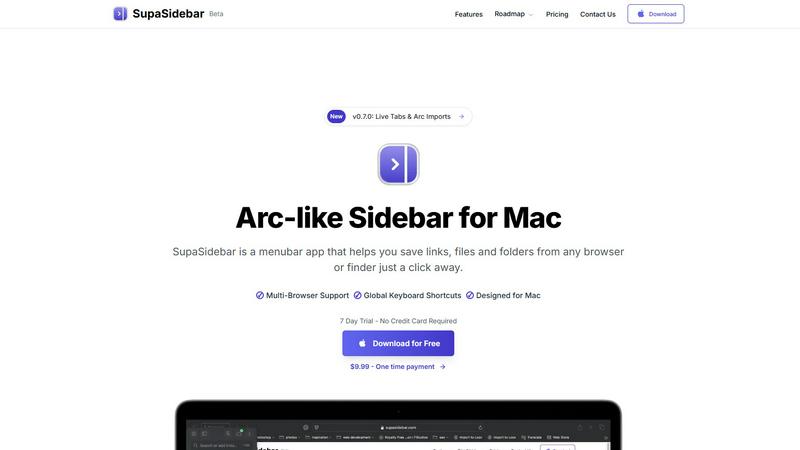
SupaSidebar is a Mac menubar app for instant keyboard access to your saved links, files, and folders, enhancing.
Last updated: February 28, 2026
Visual Comparison
Nabbed

SupaSidebar
Feature Comparison
Nabbed
Dual Sales Pipelines
Nabbed features two distinct, interactive Kanban boards modeled after sales CRMs like HubSpot: one for job applications and one for networking contacts. Users can drag-and-drop opportunities through customizable stages such as "Applied," "Interview," and "Offer," while the networking pipeline manages relationships from "Initial Contact" to "Advocate." This provides clear visual momentum tracking, velocity analytics, and a comprehensive overview of your entire search's health, enabling precise management as you would a sales quota.
AI Career Suite
This integrated suite comprises four specialized AI tools designed to automate and enhance critical job search tasks. It generates tailored cover letters and resume bullet points matching specific job descriptions, provides simulated interview coaching with role-specific questions, and drafts personalized outreach emails. The AI is engineered to write in the user's tone, saving hours of manual preparation while increasing the relevance and impact of application materials and communications.
Chrome Extension with ATS Autofill
The core utility that operationalizes your search directly within the browser. The extension allows one-click saving of job listings from any site, captures contact details from LinkedIn profiles, and features a powerful "Stealth Apply" autofill function. This function automatically populates application fields on over 60 major ATS platforms, pulling data from your pre-built Nabbed profile to drastically reduce application time and eliminate manual data entry errors.
Company Intelligence & Hiring Alerts
Upon saving a job or company, Nabbed automatically enriches the listing with real-time intelligence including latest funding rounds, employee headcount, tech stack, Glassdoor ratings, and open positions. More critically, it monitors these target accounts for "hiring signals" such as rapid headcount growth or new funding announcements, sending proactive alerts. This allows users to time their outreach strategically, mimicking sales prospecting based on trigger events.
SupaSidebar
Quick Access to Resources
SupaSidebar provides users with the ability to save links, files, and folders from any browser or Finder. With just one click, users can store their most important digital resources, ensuring they are always just a shortcut away.
Global Keyboard Shortcuts
Designed with efficiency in mind, SupaSidebar supports global keyboard shortcuts. Users can save URLs with CMD CTRL S and copy current website links using CMD CTRL C, enhancing speed and productivity by eliminating unnecessary mouse clicks.
Recents Tracking
The application features a "Recents" section that automatically tracks and displays every website the user has accessed in the last 48 hours. This ensures that important sites are readily available without needing to search through browser history.
Fast Search Functionality
SupaSidebar includes a fast search feature that allows users to locate any file, folder, website, or application instantly. By pressing CMD CTRL K and typing their query, users can quickly find what they need, significantly speeding up their workflow.
Use Cases
Nabbed
Strategic Career Transition for Sales Leaders
A Chief Revenue Officer (CRO) planning a move can use Nabbed to define a target account list of 50 dream companies. The platform's hiring alerts notify them when a target secures a new funding round, indicating growth and hiring capacity. They can then systematically track outreach to key decision-makers within those companies, log all calls and emails in the Contact CRM, and manage each emerging opportunity through the application pipeline with full visibility into next steps and momentum.
High-Volume Application Management for Individual Contributors
An Account Executive conducting an active search can use the Chrome extension to save 5-10 relevant roles daily from aggregated job boards with one click. The ATS autofill feature allows them to apply to all positions in a fraction of the usual time. All applications are automatically logged in their job pipeline, while the Gmail sync and tracking pixel provide data on which recruiter emails are being opened, informing intelligent follow-up sequences.
Interview Preparation and Performance Optimization
A candidate who lands multiple interview stages can utilize the AI Career Suite for targeted preparation. For each specific role, the AI can generate a set of likely technical and behavioral questions based on the job description. The candidate can practice responses, and the tool can analyze their resume to suggest optimal talking points and weaknesses to address, ensuring they enter every interview with a customized, confident strategy.
Networking Pipeline Development and Maintenance
A professional building their long-term network can use the dedicated Contact CRM to log every new connection, tag them by company or potential value, and schedule follow-up activities. The networking pipeline visualizes relationships moving from "Cold" to "Warm," ensuring no contact is forgotten. Before applying to a company, they can quickly filter their CRM to see all existing connections there to request a warm introduction or intelligence.
SupaSidebar
Efficient Research Management
Researchers can utilize SupaSidebar to organize and access various academic articles, links to studies, and important files effortlessly. The ability to save resources with keyboard shortcuts streamlines the process of gathering information for projects.
Enhanced Study Sessions for Students
Students can benefit from SupaSidebar by keeping all their study materials, including lecture notes, reference websites, and documents, in one place. With quick access to their most-used resources, they can focus more on learning and less on searching.
Streamlined Workflow for Professionals
Professionals who work on multiple projects simultaneously can use SupaSidebar to keep track of essential links, files, and applications. This reduces the time spent switching between tabs and applications, allowing for more efficient task management.
Simplified Content Creation
Content creators can utilize SupaSidebar to manage their research, inspiration links, and files in one accessible location. The fast search and organization capabilities help them gather materials quickly, allowing for a smoother creative process.
Overview
About Nabbed
Nabbed is the first dedicated Career CRM platform engineered specifically for sales, revenue, and go-to-market professionals. It transforms a chaotic job search into a systematic, data-driven pipeline management process, applying the same methodologies used to manage million-dollar sales territories. The core value proposition is to provide revenue operators with a centralized command center to target ideal companies, track every job application and networking interaction, and act on real-time hiring signals. Key capabilities include a visual dual-pipeline Kanban system for managing job applications and networking contacts, AI-powered company intelligence with funding and headcount data, and a powerful Chrome extension that autofills applications across 60+ Applicant Tracking System (ATS) platforms like Greenhouse and Workday. Unique differentiators include Gmail sync with open/click tracking for outreach emails and AI-driven tools for resume tailoring, interview coaching, and email composition. By aggregating searches from 11+ job platforms including LinkedIn, Indeed, and Google Jobs, Nabbed eliminates context switching and provides a professional-grade toolkit to increase offer velocity and quality.
About SupaSidebar
SupaSidebar is a native macOS menubar application designed to serve as a universal productivity sidebar, inspired by modern design principles. It functions as a centralized command hub for macOS, offering immediate access and organizational capabilities for links, files, folders, and applications. This tool is particularly valuable for professionals, researchers, students, and power users who frequently juggle multiple tasks across various web browsers and local file systems. By minimizing context-switching and reducing the clutter of numerous tabs, SupaSidebar enhances digital workflows significantly. It operates seamlessly within the macOS ecosystem, ensuring high performance and a user-friendly experience. Emphasizing data privacy, it stores all information locally on the user's Mac. SupaSidebar is compatible with all major web browsers, including Safari, Chrome, Arc, Firefox, and Brave, making it a versatile solution for users with diverse browsing habits. With its architecture built around global keyboard shortcuts and a powerful command panel, users can swiftly capture, retrieve, and manage their digital assets without interrupting their flow.
Frequently Asked Questions
Nabbed FAQ
How does Nabbed's email tracking work?
Nabbed's Chrome extension integrates with your Gmail account to place a nearly invisible tracking pixel within the body of emails you send through the Gmail interface. When the recipient opens the email, the pixel loads, sending a notification back to your Nabbed dashboard. This provides real-time alerts and analytics on open rates and times, a feature not commonly found in other job search tools, allowing for precisely timed follow-ups.
What ATS platforms does the autofill support?
The Nabbed Chrome extension supports autofill functionality across more than 60 major Applicant Tracking System platforms. This includes widely used enterprise systems such as Greenhouse, Lever, Workday, Jobvite, BambooHR, and SmartRecruiters. The extension detects which ATS is in use on a career page and automatically maps your stored Nabbed profile information to the correct form fields.
Is my data secure with Nabbed?
Yes. Nabbed employs industry-standard encryption protocols for data in transit and at rest. The platform's use of cookies and similar technologies is detailed in its Cookie Policy and Privacy Policy, primarily for analytics, platform functionality, and improving user experience. You can manage consent preferences for non-essential cookies directly within the application interface.
Can I use Nabbed for free?
Nabbed offers a functional free tier that includes core job capture capabilities, basic ATS autofill, and access to the company intelligence dashboard. To unlock advanced features such as full email tracking, the complete AI Career Suite, LinkedIn contact capture, and multi-step outreach sequences, you need to subscribe to the Core plan, which is priced at $19 per month.
SupaSidebar FAQ
Is SupaSidebar a browser extension?
No, SupaSidebar is a standalone macOS menubar application that operates independently of web browsers. It integrates with various browsers to provide a centralized location for all digital assets.
Which browsers does SupaSidebar work with?
SupaSidebar is compatible with all major browsers, including Safari, Chrome, Arc, Firefox, and Brave. This versatility makes it suitable for users who utilize multiple browsers.
What macOS version do I need?
SupaSidebar requires macOS 13 or higher to function correctly. This ensures compatibility with the latest macOS features and optimizations.
Where is my data stored?
All data managed by SupaSidebar is stored locally on the user’s Mac. This approach prioritizes user privacy and ensures that sensitive information remains secure and accessible only to the user.
Alternatives
Nabbed Alternatives
Nabbed is a specialized productivity and management platform designed as a CRM for job seekers and revenue professionals. It integrates job tracking, contact management, and AI-powered intelligence into a single system to streamline the career management process, featuring capabilities like ATS autofill and multi-source job aggregation. Users may seek alternatives to Nabbed for various reasons, including budget constraints, a need for different feature sets, or platform compatibility requirements. Some may require deeper integration with existing enterprise software stacks, while others might prioritize a different balance between automation and manual control in their workflow. When evaluating alternatives, key considerations should include the core functionality of job pipeline visualization, the depth and sources of company intelligence data, the range of supported ATS platforms for autofill, and the robustness of contact CRM features. Security protocols for handling sensitive career data and the flexibility of pricing tiers are also critical decision factors.
SupaSidebar Alternatives
SupaSidebar is a macOS menubar application designed to enhance productivity by providing instant access to saved links, files, folders, and applications. As a universal command hub, it allows users to efficiently manage digital assets without the distractions of multiple open tabs or applications. This category of software targets professionals, students, and power users who thrive on multitasking and seek streamlined workflows. Users often search for alternatives to SupaSidebar for various reasons, including pricing, specific feature sets, or compatibility with different operating systems. When selecting an alternative, it is essential to consider factors such as ease of use, integration capabilities with other tools, and the ability to customize features to suit individual workflow preferences. Evaluating the user experience and performance across different platforms can also help ensure that the chosen solution meets specific productivity needs.