Octopods vs Playwriter
Side-by-side comparison to help you choose the right tool.

Octopods
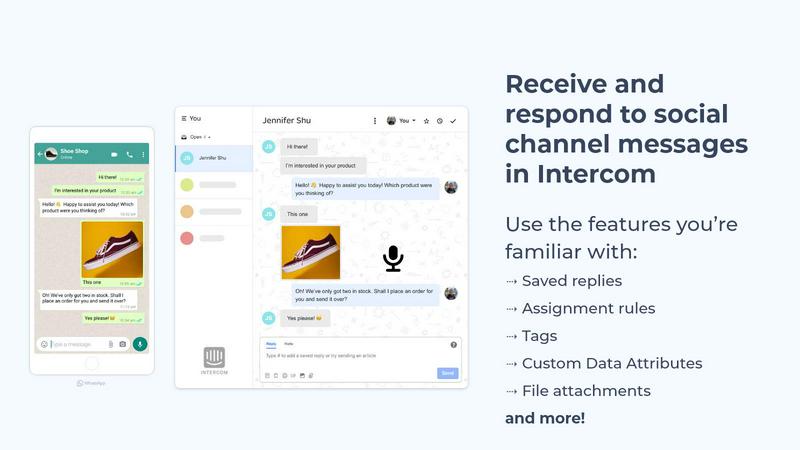
Octopods integrates 15+ messaging channels with Intercom and HubSpot for seamless, centralized customer conversations.
Last updated: February 26, 2026

Playwriter
Playwriter lets AI agents control your existing Chrome browser with full Playwright API access via a simple CLI.
Last updated: March 18, 2026
Visual Comparison
Octopods
Playwriter

Feature Comparison
Octopods
Native Integrations
Octopods delivers native integrations that allow teams to manage all messaging channels from within Intercom and HubSpot. This means that users can utilize existing workflows, tags, and AI capabilities without needing to switch between different applications. The seamless integration ensures that all customer interactions are tracked and managed in one unified location.
Rich Media Support
With Octopods, users can send and receive various media types, including images, videos, audio files, and documents. This rich media support enhances the quality of customer interactions, making it easier for teams to share relevant information and engage customers more effectively across all messaging platforms.
Proactive Outbound Messaging
Octopods includes features for proactive outbound messaging, allowing teams to initiate conversations using customizable templates. This capability helps businesses reach out to customers directly on their preferred messaging channels, enhancing engagement and improving the overall customer experience.
Automatic Contact Matching
To streamline communication and prevent duplicate records, Octopods includes an automatic contact matching feature. This functionality ensures that customer interactions remain organized and that teams can easily track conversations without the risk of redundancy, thus maintaining a clear and efficient workflow.
Playwriter
Your Authenticated Browser Session
Playwriter's foundational feature is granting AI agents access to your actual Chrome browser tab, complete with all existing logins, cookies, local storage, and installed extensions. This eliminates the need for agents to navigate authentication flows manually, bypasses bot detection mechanisms triggered by fresh, headless instances, and ensures the browsing context is identical to a human user's. It also avoids the memory overhead of spawning a separate browser process, as the automation occurs within your already-running Chrome instance.
Full Playwright API via a Single Execute Tool
Unlike systems that define dozens of individual tools (e.g., click_element, extract_text), Playwriter provides agents with one powerful execute tool. This tool accepts any valid Playwright code, granting the agent unrestricted access to the entire Playwright API for browser control. This approach minimizes context window bloat from extensive tool schemas and offers maximum flexibility, allowing agents to perform complex sequences, use advanced selectors, handle frames, and manage dialogs without being constrained by a pre-defined wrapper.
Advanced Debugging and Inspection Suite
Playwriter includes a comprehensive suite of debugging and inspection utilities designed for AI-driven development. This includes a debugger with breakpoints to pause execution, live code editing to modify agent scripts on the fly, and network interception to monitor and mock HTTP requests. Furthermore, it generates highly efficient accessibility snapshots (5-20KB) instead of full screenshots, providing the AI with structured DOM and ARIA data in a compact format, and supports full screen recording of agent sessions for playback and analysis.
Local-First Architecture and Collaboration
The entire Playwriter system runs locally on your machine. The Chrome extension connects to a local WebSocket server (default localhost:19988), and all communication—including Chrome DevTools Protocol commands—stays on your computer. This enables real-time collaboration: you can watch the agent interact with websites live, intervene to solve CAPTCHAs or consent modals, manually correct issues, and then re-enable agent control. The session multiplexing allows multiple CLI instances or agents to interact with different browser tabs simultaneously.
Use Cases
Octopods
Customer Support
Teams can utilize Octopods to provide support across multiple messaging channels without leaving their main customer support platform. This enables agents to respond to inquiries from apps like WhatsApp or Telegram directly within Intercom or HubSpot, resulting in faster and more efficient service.
Sales Engagement
Sales teams can leverage Octopods to engage leads through their preferred messaging channels, ensuring that all conversations are synchronized and accessible. This approach allows for timely follow-ups and a personalized sales experience, increasing the chances of conversion.
Omnichannel Communication
Octopods allows businesses to consolidate all messaging apps into one coherent workflow. This integration reduces the need for additional tools, enabling teams to manage customer interactions consistently and efficiently, regardless of the platform.
Workflow Automation
By integrating messaging channels with Intercom and HubSpot, Octopods enables teams to automate workflows across all communication platforms. This automation includes the use of AI features, bots, and SLA management, ensuring that customer interactions are handled promptly and effectively.
Playwriter
AI-Powered Web Research and Data Extraction
Agents can autonomously conduct in-depth research across multiple websites that require login, such as private forums, subscription news services, or web applications. Using your authenticated session, the agent can navigate complex site structures, handle pagination, consent pop-ups with your assistance, and extract structured data using the full Playwright API, all while operating within your real browser context to avoid blocks.
Automated Testing and QA with Real User Conditions
Developers and QA engineers can use Playwriter to instruct AI agents to perform end-to-end testing on web applications under genuine user conditions. Since the agent uses your browser with your specific extensions and cache, tests can cover scenarios like "user is logged in with specific preferences" or "with ad-blocker enabled," providing more accurate and realistic test results than isolated, clean browser environments.
Complex Workflow Automation and Web Task Delegation
Playwriter enables the delegation of tedious, multi-step web tasks to AI agents. This includes activities like filling and submitting complex forms across several pages, managing content in web admin panels (e.g., CMS updates), monitoring dashboards for changes, or orchestrating workflows that involve moving data between different web services that you are already logged into.
AI-Assisted Development and Debugging
Developers can use Playwriter as a pair-programming tool for web development. An AI agent can be instructed to interact with a web application you are building, profile performance, test specific user journeys, set breakpoints in the automation script, intercept network calls to debug API interactions, and generate visual labels or snapshots to help identify UI elements, all within your development browser.
Overview
About Octopods
Octopods is an advanced integration tool designed to bring together over 18 messaging channels, such as WhatsApp, Telegram, SMS, Instagram, and more, directly into your existing Intercom or HubSpot inbox. This product addresses the common issue teams face when managing customer communications across multiple platforms, which often leads to disjointed workflows and lost context. By creating native conversations within these CRM platforms, Octopods enables support, sales, and operations teams to seamlessly interact with customers without the need for context switching. With features like rich media support, proactive messaging, and automatic contact matching, Octopods enhances customer engagement while maintaining efficient workflows. Ideal for businesses looking to centralize communication, Octopods ensures that teams can leverage their existing tools to provide exceptional customer service.
About Playwriter
Playwriter is a developer-centric tool that provides AI agents with direct, programmatic control over your existing, authenticated Chrome browser session. It solves the fundamental limitation of most browser automation tools for AI, which either spawn a fresh, "clean" browser instance (lacking logins, cookies, and extensions while triggering bot detection) or offer a limited, pre-defined set of actions. Playwriter bridges this gap by exposing the full power of the Playwright automation API to AI agents through a single, unified interface. It operates via a Chrome extension and a local CLI, establishing a WebSocket relay on your machine. This architecture allows agents to execute any Playwright code directly in your browser, leveraging your real sessions, installed extensions, and local settings. Its core value proposition is enabling robust, realistic, and collaborative web automation where the AI handles repetitive tasks within the exact same browser environment a human uses, facilitating seamless human-in-the-loop workflows. It is open-source under the MIT license and integrates with any MCP (Model Context Protocol) client like Cursor, Claude Desktop, and VS Code.
Frequently Asked Questions
Octopods FAQ
What messaging channels does Octopods support?
Octopods connects to more than 18 messaging channels including WhatsApp, Telegram, Instagram, SMS, LINE, Viber, and more, allowing teams to centralize communications effectively.
How does Octopods ensure data security?
Octopods is built on official, fully verified APIs that adhere to enterprise security standards. This commitment to security ensures that all messaging is reliable and compliant, protecting customer data at scale.
Can I customize my messaging templates in Octopods?
Yes, Octopods offers customizable templates for outbound messaging, allowing teams to tailor their communications and engage customers more effectively based on their specific needs.
Is there a trial period available for Octopods?
Yes, Octopods provides a trial period that allows potential users to explore the integration capabilities and see how it can enhance their customer communication processes before committing to a subscription.
Playwriter FAQ
How does Playwriter differ from other browser automation MCP servers?
Other MCP solutions typically either launch a new, isolated Chrome instance (lacking your logins and extensions) or provide a limited set of hard-coded tools. Playwriter is unique because it injects automation into your existing, live Chrome session and provides a single, unrestricted execute tool for the full Playwright API. This combines real-world browser context with maximum programming flexibility for the AI agent.
Is my browsing data secure with Playwriter?
Yes. Playwriter operates on a strict local-first principle. The Chrome extension communicates only with a WebSocket server running on localhost (port 19988 by default). All commands and data, including Chrome DevTools Protocol traffic, remain on your machine. No browsing data, cookies, or session information is transmitted to any remote server. The tool is also open-source, allowing for code audit.
What happens if the agent encounters a CAPTCHA or needs a human decision?
This is a key collaborative feature of Playwriter. Since you are sharing your browser, you see the agent's actions in real-time. If a CAPTCHA or a consent wall appears, you can simply solve or click it yourself. You can then temporarily disable the extension on that tab, perform any necessary manual steps, re-enable control, and the agent can continue its automated task from the new state.
Can I use Playwriter with multiple browser tabs or multiple AI agents simultaneously?
Yes. The local WebSocket relay multiplexes sessions. You can attach the Playwriter extension to multiple Chrome tabs, each representing a separate controllable session. Multiple CLI instances or AI agents (via MCP) can connect to the relay and control different tabs independently, allowing for parallel automation tasks within a single browser window.
Alternatives
Octopods Alternatives
Octopods is an advanced integration platform that consolidates multiple messaging channels, including WhatsApp, Telegram, Instagram, SMS, and more, into a unified inbox for customer communication. It is classified under the customer support category, providing businesses with the tools to manage conversations seamlessly within Intercom or HubSpot. Users often seek alternatives to Octopods due to various reasons such as pricing concerns, specific feature requirements, or compatibility with different platforms. When exploring alternatives, it’s essential to assess the integration capabilities, support for rich media, ease of setup, and whether the platform aligns with your team's operational needs and communication style.
Playwriter Alternatives
Playwriter is an open-source automation tool that provides AI agents with direct, stateful control over a real Chrome browser session. It belongs to the browser automation and AI agent tooling category, enabling complex workflows via CLI or the Model Context Protocol (MCP). Users often seek alternatives for various reasons, including specific budget constraints, the need for different integration points like Selenium or Playwright frameworks, or requirements for non-Chrome browser support or cloud-based execution. When evaluating alternatives, key considerations include the depth of browser integration, whether the solution provides a fresh, isolated session or access to an authenticated one with extensions, and the method of data exchange with the AI. The efficiency of state capture, such as using lightweight accessibility snapshots versus full screenshots, significantly impacts performance and cost. Security model, licensing, and support for debugging features like network interception and breakpoints are also critical differentiators. --- FAQ_SEPARATOR--- [
{"question": "What is Playwriter?", "answer": "Playwriter is an open-source (MIT licensed) tool that allows AI agents to control a real, authenticated Chrome browser session via CLI or the Model Context Protocol (MCP), providing full automation capabilities."},
{"question": "Who is Playwriter for?", "answer": "It is for developers and teams building AI agents that require reliable, stateful web interaction using an existing browser session with logins and extensions, rather than a fresh, isolated instance."},
{"question": "Is Playwriter free?", "answer": "Yes, Playwriter is open source and released under the permissive MIT license, making it free to use and modify."},
{"question": "What are the main features of Playwriter?", "answer": "Key features include automation via a real Chrome session, compact accessibility snapshots, a debugger with breakpoints and live editing, network interception, video recording, and compatibility with any MCP client."}
]