Prompt Builder vs URL to Any
Side-by-side comparison to help you choose the right tool.

Prompt Builder
Prompt Builder allows you to generate, refine, and manage optimized AI prompts for multiple models in one seamless platform.
Last updated: April 13, 2026

URL to Any
URL to Any transforms web content into various formats and languages for seamless accessibility and sharing.
Last updated: March 1, 2026
Visual Comparison
Prompt Builder
URL to Any
Feature Comparison
Prompt Builder
Prompt Generator
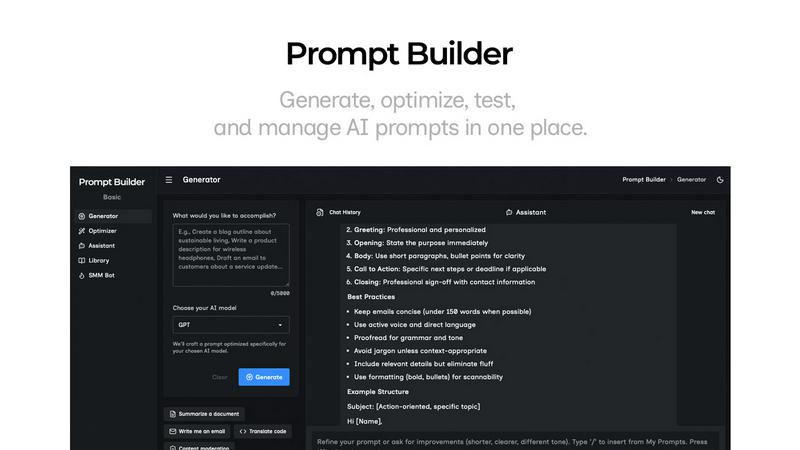
The Prompt Generator feature allows users to describe their ideas and select a target AI model to produce a professional-grade prompt quickly. This tool is designed to optimize prompts according to the specifications of the chosen model, ensuring that users get tailored outputs that meet their needs effectively.
Chat Refinement
The Chat Refinement feature enables users to engage in a dynamic chat with an assistant model, allowing for real-time adjustments to prompts. This iterative process helps in enhancing clarity and specificity, leading to better outputs and reducing the need for multiple revisions.
Prompt Optimizer
With the Prompt Optimizer, users can take existing prompts and enhance them for improved performance. By pasting a prompt or selecting one from the library, the tool provides structured improvements focusing on clarity, constraints, and output format, resulting in a more effective prompt with minimal effort.
Prompt Library
The Prompt Library serves as a personal storage system where users can save, organize, and retrieve their best prompts. It includes community contributions, allowing users to explore a wide range of prompts, filter by category or model, and pin favorites for easy access, ultimately enhancing collaboration and efficiency.
URL to Any
URL to Markdown
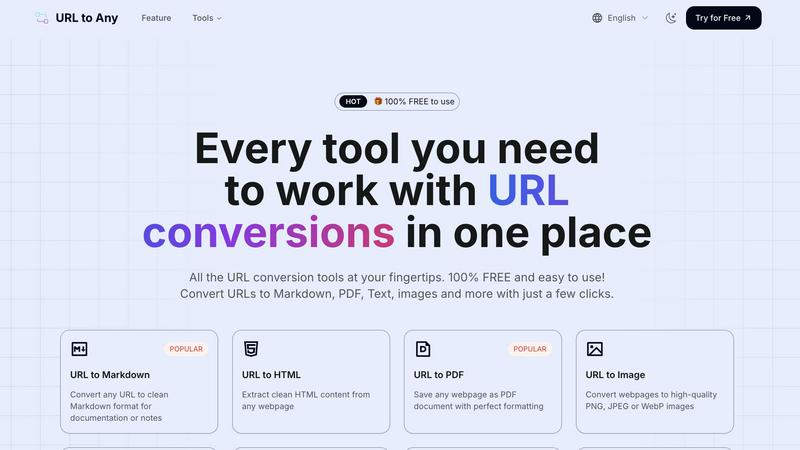
This feature allows users to convert any webpage into clean Markdown format, making it ideal for documentation or personal notes. The output preserves the essential structure of the original content, enabling easy integration into Markdown-based systems.
URL to PDF
With the URL to PDF feature, users can save any webpage as a well-formatted PDF document. This capability is perfect for archiving important content or sharing it in a universally accepted format, ensuring that formatting and layout are preserved.
URL to Image
Users can convert webpages into high-quality images in formats such as PNG, JPEG, or WebP. This feature is particularly useful for capturing visual representations of content, making it easy to share or use in presentations without losing detail.
URL to JSON
This feature transforms webpage content into structured JSON format, facilitating data integration and manipulation for developers and data analysts. The output is organized and ready for immediate use in various applications that support JSON.
Use Cases
Prompt Builder
Content Creation
Content creators can utilize Prompt Builder to generate tailored prompts for writing articles, social media posts, and marketing materials. By refining prompts in a dedicated chat environment, they can produce high-quality content that resonates with their target audience.
Software Development
Developers can leverage Prompt Builder to create prompts for coding assistance or technical documentation. The ability to test and refine prompts tailored for specific AI models ensures accurate and relevant results, improving productivity and reducing errors in programming tasks.
Education and Training
Educators can employ Prompt Builder to generate prompts for quizzes, assignments, or educational materials. The tool's capability to refine and optimize prompts ensures that the content is engaging and aligned with learning objectives, enhancing the educational experience for students.
Research and Data Analysis
Researchers can use Prompt Builder to formulate prompts that extract insights from data or generate hypotheses. The platform's ability to customize prompts for different AI models helps in obtaining precise and relevant information, streamlining the research process and improving outcomes.
URL to Any
Content Creation
Writers and content creators can use URL to Any to quickly convert online articles or resources into formats like Markdown or PDF, streamlining their research and documentation processes.
Academic Research
Researchers can benefit from the tool by converting webpages into structured formats like JSON or XML for data analysis, ensuring that all relevant information is easily accessible and well-organized.
Web Development
Developers can utilize the URL to Any tool to extract clean HTML or JSON from webpages, enabling them to integrate content more effectively into their projects without the hassle of manual extraction.
Social Media Sharing
Marketers and social media managers can convert URLs into images or QR codes for easy sharing on various platforms, enhancing engagement through visually appealing and easily accessible content.
Overview
About Prompt Builder
Prompt Builder is an advanced prompt engineering workspace designed to streamline the process of creating, testing, and saving prompts for various AI models. It serves as an essential tool for content creators, developers, and AI enthusiasts who seek to optimize their interactions with AI models such as GPT, Claude, Gemini, Llama, Mistral, DeepSeek, and Grok. The platform allows users to start with a draft prompt, refine it in a chat interface, save or pin different versions, and execute them at their convenience. This capability not only saves time but also ensures that users can generate high-quality, model-specific prompts without the hassle of rewriting for each AI. With an integrated Optimizer and a community-driven library of reusable prompts, Prompt Builder empowers users to transform their ideas into actionable prompts in mere seconds, making it a valuable asset in the rapidly evolving AI landscape.
About URL to Any
URL to Any is a robust, cloud-based web content conversion engine that empowers users to transform any accessible webpage into multiple practical formats quickly and efficiently. This tool is designed for a diverse user base, including content creators, researchers, developers, and administrative personnel who seek to extract and reformat online information seamlessly. By simply inputting a URL, users can circumvent cumbersome procedures like manual copying or using browser extensions, receiving a converted output in mere seconds. The primary value proposition lies in its comprehensive, no-cost interface that consolidates various conversion tasks into one accessible platform. Users can convert URLs into clean text documents, formatted PDFs, Markdown files for content management systems, high-quality images, and much more, all while maintaining the structural and contextual fidelity of the original content. With its user-friendly design and powerful capabilities, URL to Any serves as an essential utility for anyone needing to archive, edit, or repurpose web content efficiently.
Frequently Asked Questions
Prompt Builder FAQ
What AI models does Prompt Builder support?
Prompt Builder is compatible with various AI models including GPT, Claude, Gemini, Llama, Mistral, DeepSeek, Grok, and Perplexity. This versatility allows users to generate prompts optimized for their specific needs.
How does the Prompt Generator work?
The Prompt Generator allows users to describe their idea and select a target model. It then creates a model-optimized prompt that can be further refined in a chat interface, facilitating a smooth transition from concept to execution.
Can I reuse prompts created in Prompt Builder?
Yes, users can save and organize their best prompts in the Prompt Library. This feature enables easy access to previously created prompts, allowing for efficient reuse across different projects or use cases.
Is there a free trial available for Prompt Builder?
Prompt Builder offers a free plan that includes 25 assistant requests per month without the need for a credit card. This allows potential users to explore the features and capabilities of the tool before committing to a paid plan.
URL to Any FAQ
What formats can I convert a URL to?
You can convert a URL to multiple formats, including Markdown, PDF, text, images, JSON, XML, and more, making it a versatile tool for various tasks.
Is there a limit to the number of URLs I can convert?
There are no specified limits on the number of URLs you can convert. The tool is designed to handle a large volume of conversions, making it suitable for both individual and professional use.
How secure is my data when using URL to Any?
URL to Any processes all data securely and does not store any information on its servers, ensuring user privacy and data protection during conversions.
Do I need to install any software to use URL to Any?
No, URL to Any operates entirely in the cloud, meaning you can access and use all features directly from your web browser without the need for software installation.
Alternatives
Prompt Builder Alternatives
Prompt Builder is an advanced prompt engineering workspace designed to help users generate, optimize, test, and manage AI prompts effectively. This product falls under the category of AI Assistants, providing a seamless environment for crafting prompts tailored to various AI models such as GPT, Claude, and others. Users often seek alternatives to Prompt Builder due to factors like pricing, specific feature sets, or compatibility with different platforms, which can influence their overall experience and satisfaction. When searching for alternatives, it is crucial to evaluate the range of features offered, ease of use, integration capabilities, and community support. A robust alternative should enable users to create and refine prompts effortlessly while providing additional tools for testing and saving versions. Additionally, the availability of a library for reusable prompts can significantly enhance productivity and efficiency in prompt engineering tasks.
URL to Any Alternatives
URL to Any is a cloud-based web content conversion engine that enables users to transform accessible webpages into various formats and languages, facilitating universal accessibility. It fits into the category of AI assistants, particularly those designed for content conversion and data extraction. Users often seek alternatives for several reasons, including pricing models, feature sets, and specific platform requirements that may not align with their needs. When choosing an alternative, it is essential to consider key factors such as the range of supported output formats, the user interface's simplicity, the availability of free services versus paid subscriptions, and the overall reliability of the conversion process. These criteria can significantly influence user experience and the effectiveness of the selected tool for various professional or personal tasks.