
Never Drop vs Refbox
Side-by-side comparison to help you choose the right tool.

Never Drop
NeverDrop captures contacts instantly and drafts personalized follow-ups, ensuring you never lose a lead at events.
Last updated: February 28, 2026

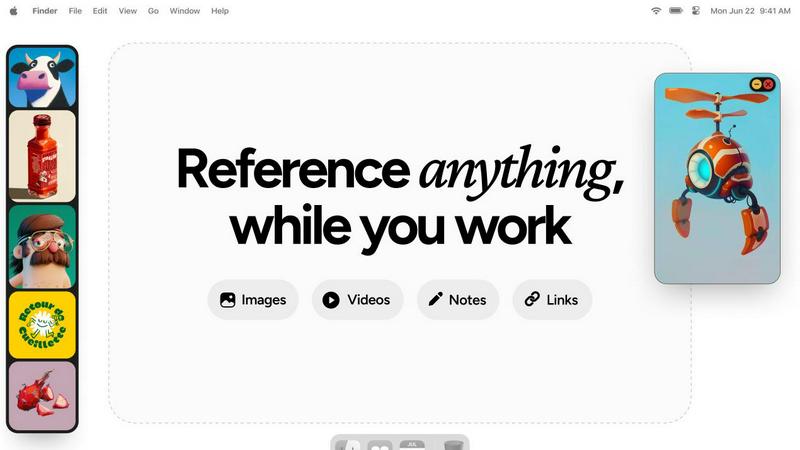
Refbox is a floating desktop app that keeps reference images, videos, and notes visible above your workspace.
Last updated: February 28, 2026
Visual Comparison
Never Drop

Refbox
Feature Comparison
Never Drop
Instant Business Card Scanning
Never Drop allows users to scan business cards within seconds using their smartphones. The app's AI-powered Optical Character Recognition (OCR) technology extracts crucial contact details—name, company, title, phone number, and email—without requiring any manual input. This feature eliminates the hassle of typing and ensures that no information is lost due to misplaced cards.
Automatic Email Enrichment
Understanding that business cards often contain generic or incomplete email addresses, Never Drop enhances the captured profiles by automatically finding verified work emails based on the name and company. This feature removes guesswork and manual searches, ensuring that users have accurate contact information ready for follow-up.
AI-Generated Follow-Up Emails
With Never Drop, users can generate personalized follow-up emails in under two minutes. By utilizing the voice notes and conversation context provided by the user, the app drafts unique emails that reflect the tone and content of the interaction. This feature ensures that every follow-up feels personal and engaging, rather than being a generic template.
Team Collaboration and Management
Never Drop is designed for teamwork, allowing sales representatives to organize scanned leads by event and reassign contacts among team members. The dashboard provides an overview of activity, ensuring that everyone remains aligned and no leads fall through the cracks, even in high-pressure scenarios.
Refbox
Always-on-Top Floating Frames
Refbox's core functionality allows users to pin reference media—including images, GIFs, and videos—in resizable, transparent frames that remain visible above all other application windows. This ensures critical references are perpetually accessible without obstructing the primary workspace in tools like Photoshop or Blender. Frames can be minimized, locked in place to work behind, or auto-hidden to appear only on demand, providing complete control over screen real estate and visual clutter.
Multi-Source Media Aggregation
The application features a centralized sidebar, known as the Box, which serves as a hub for collecting reference material from diverse sources. Users can import content directly from their local file system, drag and drop from web browsers, or paste from the clipboard. This consolidates scattered assets into a single, organized library, eliminating the need to navigate through multiple folders or browser tabs during the creative process.
Advanced Media Viewing & Manipulation
Refbox supports sophisticated handling of various media types beyond simple display. It includes frame-by-frame scrubbing for GIFs and videos, precise pixel rendering for pixel art, and the ability to create website screenshots by pasting a URL. Additional utilities include an integrated color picker for sampling colors from any media, image cropping tools, and support for viewing SVG files as images, all accessible without leaving the application.
Flexible Viewing Modes & Organization
To suit different workflow stages, Refbox offers multiple viewing modalities. The Masonry grid provides an overview of all collected references, individual floating frames allow for precise placement, and a full-screen gallery or slideshow mode facilitates rapid comparison. Media can be organized into instant-swap Collections, and the entire interface can be controlled via customizable keyboard shortcuts for efficient navigation and frame management.
Use Cases
Never Drop
Trade Shows and Conferences
Sales teams can use Never Drop at trade shows and conferences to capture leads efficiently. By scanning business cards on-site, enriching contact information, and sending personalized follow-ups before leaving the booth, teams can enhance their chances of converting leads into clients.
Networking Events
At networking events, where interactions are fast-paced, Never Drop enables users to quickly scan and manage multiple contacts. The ability to add context and generate immediate follow-ups ensures that connections made during the event are not forgotten.
Business Dinners and Meetings
During business dinners or meetings, sales professionals can utilize Never Drop to capture leads from informal settings. The app allows them to document conversations and follow up with personalized emails, making a lasting impression on potential clients.
Lead Management and Organization
Never Drop serves as a central hub for lead management across various events. Users can categorize leads by event, track interactions, and monitor team activities, ensuring a streamlined approach to nurturing relationships and closing deals.
Refbox
3D Modeling and Texturing
For 3D artists working in software like Blender or Maya, maintaining visual consistency is paramount. Refbox allows them to float reference images for character design, material textures, and lighting setups directly beside their viewport. This enables constant visual comparison without window switching, ensuring accurate modeling, UV unwrapping, and texture painting based on precise real-world or conceptual references.
UI/UX and Digital Product Design
Designers in Figma, Sketch, or Adobe XD can use Refbox to pin competitor app screenshots, style guides, mood boards, and user flow diagrams around their canvas. The always-on-top frames keep brand assets and inspiration visible, facilitating adherence to design systems and accelerating the iterative design process by reducing context shifts between reference material and the active design file.
Illustration and Concept Art
Illustrators and concept artists can aggregate inspiration from various sources into Refbox, creating a dynamic mood board that floats over their painting software like Photoshop or Clip Studio Paint. They can scrub through GIFs for motion study, keep color palettes sampled from references handy, and maintain notes on artistic direction—all within a persistent, non-intrusive layer that supports deep creative focus.
Animation and Motion Graphics
Animators can leverage Refbox to study motion reference videos or sprite sheets frame-by-frame while working in timeline-based software. By pinning sequential frames or video tutorials in a floating player, they can meticulously analyze movement and timing without pausing their primary animation software, streamlining the process of translating reference motion into their original work.
Overview
About Never Drop
Never Drop is a cutting-edge lead-capture application meticulously crafted for sales teams operating in dynamic environments such as trade shows, conferences, and networking events. It revolutionizes the lead management process by enabling users to effortlessly scan business cards using their smartphones. Once a card is scanned, users can enhance the captured data by adding voice notes or text context regarding their interactions, ensuring essential details about each lead are preserved. The app leverages advanced artificial intelligence to generate tailored follow-up emails within two minutes, significantly reducing the chances of leads being overlooked. With seamless integration into popular Customer Relationship Management (CRM) systems like HubSpot, Never Drop maintains a clean and organized sales pipeline, empowering teams to convert leads into successful deals. Say goodbye to lost opportunities and embrace efficient follow-up processes that foster meaningful relationships with potential clients.
About Refbox
Refbox is a specialized desktop application engineered to eliminate workflow disruption for visual creatives by providing instant, always-accessible reference material. It functions as a floating utility that pins images, GIFs, videos, and notes in resizable, always-on-top frames directly above your primary working applications like Photoshop, Blender, or Figma. This architecture negates the need for constant alt-tabbing between windows or digging through cluttered folders, allowing artists, designers, and animators to maintain an uninterrupted state of flow. The core value proposition is a significant reduction in cognitive load and context-switching, translating directly to increased productivity and focus. Users can aggregate media from the web, their local computer, or clipboard into a centralized sidebar and then deploy individual references across their desktop workspace. With support for multiple viewing modes—including a Masonry grid, individual floating frames, and a full-screen gallery—Refbox adapts to any workflow. It further enhances utility with features like frame-by-frame GIF scrubbing, Markdown-enabled notes, and clickable bookmarks, consolidating tools that would typically require several separate applications. Designed for professionals in 3D art, animation, UI/UX design, illustration, concept art, motion graphics, photography, and pixel art, Refbox is the essential digital companion for keeping inspiration and critical references persistently at your fingertips.
Frequently Asked Questions
Never Drop FAQ
What is Never Drop?
Never Drop is a lead-capture application designed for sales teams attending events. Users can scan business cards, add context, and generate personalized follow-up emails, all while integrating seamlessly with CRMs like HubSpot.
How does business card scanning work?
To scan a business card, users take a photo with the Never Drop mobile app. The app's AI-powered OCR technology quickly extracts essential contact information such as name, company, title, phone number, and email, simplifying the data entry process.
What types of events is Never Drop suitable for?
Never Drop is ideal for various events, including trade shows, conferences, networking events, meetups, and business dinners. It helps users capture and manage leads efficiently in any situation where new contacts are made.
Do I need the mobile app to use Never Drop?
Yes, the mobile app is essential for scanning business cards, recording voice notes, and triggering follow-ups on the go. Additionally, the web dashboard allows users to manage their team, review scans, and configure settings, providing a comprehensive solution for lead management.
Refbox FAQ
What types of media files does Refbox support?
Refbox supports a wide array of media formats critical for creative workflows. This includes common image formats (JPG, PNG, WEBP, SVG), animated GIFs with frame-by-frame control, various video files for motion reference, and text-based notes with Markdown support for styling and checklists. Users can also capture website screenshots directly by pasting URLs.
How does Refbox handle screen real estate and window management?
Refbox is designed to be minimally intrusive. Floating frames can be resized, set to a locked transparent state to work behind, or minimized to just their title bar. The main sidebar (the Box) can be set to auto-hide, appearing only when you need to access your library. This ensures your primary application remains the focus while keeping references instantly accessible.
Can I use Refbox with multiple monitors?
Yes, Refbox is fully compatible with multi-monitor setups. The application's main interface and the individual floating reference frames can be moved and positioned across any connected display. This allows artists to dedicate one screen entirely to their creative software while using another monitor to host an organized gallery of Refbox references and tools.
Is there a subscription fee for Refbox?
Based on the provided context, Refbox is offered as a one-time purchase license. This means users pay a single, upfront fee to obtain the software for perpetual use on their machine, without recurring monthly or annual subscription charges. This model is often preferred by professionals seeking predictable long-term tooling costs.
Alternatives
Never Drop Alternatives
Never Drop is an innovative lead-capture app that enhances productivity and management for sales teams, particularly in dynamic environments such as trade shows, conferences, and networking events. It allows users to effortlessly scan business cards with their smartphones, capturing essential contact information while providing tools to enrich this data with contextual notes for better follow-up. Users often seek alternatives to Never Drop due to various factors, including pricing structures, feature sets, and compatibility with existing platforms. When exploring alternative solutions, it is crucial to consider aspects such as ease of use, integration capabilities with popular CRMs, and the effectiveness of lead management and follow-up processes to ensure that the chosen app meets specific sales needs efficiently.
Refbox Alternatives
Refbox is a specialized productivity application designed for visual professionals. It functions as a floating desktop utility that pins reference images, videos, and notes in always-on-top windows, eliminating disruptive context switching between applications like Photoshop or Blender. This places it within the niche category of workflow optimization and reference management tools for creatives. Users may seek alternatives to Refbox for various practical reasons. Common motivations include budget constraints, as some users require a free or lower-cost solution. Others may need specific features not present in Refbox, such as advanced collaboration tools or integration with particular cloud storage platforms. Platform compatibility is another key factor, as some professionals work exclusively on operating systems not supported by the primary application. When evaluating an alternative, key criteria should align with your core workflow needs. Essential considerations include the tool's ability to maintain windows above other applications, the range of supported media formats, and the efficiency of its import and organization system. Performance impact on system resources, customization options for the viewing interface, and the overall stability of the software are also critical technical specifications to assess before committing to a solution.