
Seedream 4.0 vs Shrinkpad
Side-by-side comparison to help you choose the right tool.

Seedream 4.0
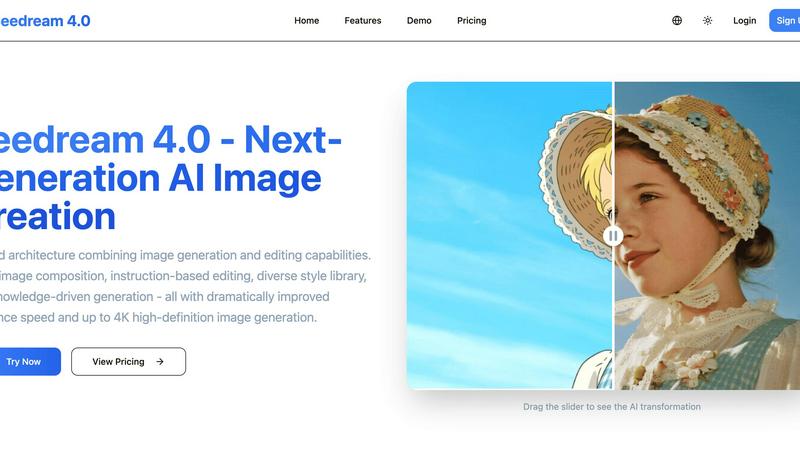
Seedream 4.0 is a unified AI image generator and editor with 4K output and instruction-based editing.
Last updated: March 1, 2026

Shrinkpad
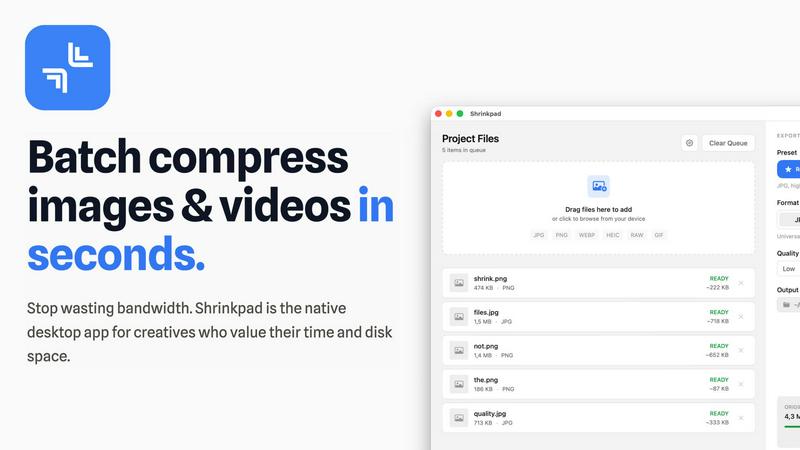
Shrinkpad is a native Mac app that batch compresses images and videos locally with automatic quality optimization.
Last updated: February 28, 2026
Visual Comparison
Seedream 4.0
Shrinkpad
Feature Comparison
Seedream 4.0
Unified Generative Architecture
Seedream 4.0's core innovation is its unified architecture that seamlessly integrates image generation and advanced editing within a single system. This eliminates the traditional workflow friction of switching between separate creation and modification tools. The platform allows for a continuous creative process where an initial text-to-image generation can be immediately followed by complex, instruction-based edits without exporting or changing software, significantly streamlining professional workflows and enhancing productivity.
Multi-Image Composition
This feature enables users to input multiple reference images and achieve a coherent composite output guided by a single textual instruction. It supports batch processing for efficient asset creation, making it ideal for complex visual storytelling, brand asset development, and scenarios requiring the synthesis of multiple visual concepts. The system intelligently analyzes the input visuals and the text prompt to generate a unified image that incorporates elements, styles, or themes from all provided references.
Instruction-Based Editing
Seedream 4.0 implements a powerful "what you say is what you get" editing paradigm. Users can perform precise modifications on any uploaded image by describing the desired changes in natural language. This instruction-based editing allows for transformations such as altering styles, adding or removing objects, changing backgrounds, or adjusting compositions with a high degree of control and accuracy, making sophisticated edits accessible without manual layer-based software expertise.
Knowledge-Driven Generation & 4K Output
The platform leverages rich knowledge and reasoning capabilities to generate accurate and contextually appropriate imagery, which is particularly valuable for creating detailed educational illustrations, technical charts, and professional diagrams. Furthermore, it supports the generation and output of images in resolutions up to 4K UHD (3840x2160), ensuring the visual assets produced are of sufficient quality for high-resolution displays, large-format printing, and other professional media applications.
Shrinkpad
Lightning-Fast Batch Processing
Shrinkpad is architected for speed, leveraging multi-threaded compression and deep optimization for Apple Silicon (M1/M2/M3 chips) to process thousands of image and video files in minutes, not hours. Unlike web-based tools constrained by bandwidth, local processing ensures maximum throughput. The application maintains stability and performance even with massive queues, handling mixed-media batches containing both photos and videos without crashing or significant slowdowns, a common limitation in other utilities.
Intelligent Quality Optimization
The application employs an automatic analysis engine that evaluates the visual complexity of each image to apply a perfect, context-aware compression ratio. This intelligent system targets wasteful file data without introducing visible artifacts, balancing minimal file size with maximum perceptual quality. Users can also manually override this with granular control over compression settings, output formats (e.g., converting PNG to WebP), and selective metadata stripping for further size reduction.
Comprehensive Format Support
Shrinkpad supports over 50 media formats natively, eliminating conversion steps before compression. This includes professional RAW camera files (CR2, NEF, ARW), modern formats like HEIC, WebP, and AVIF, standard JPEGs and PNGs, and video files such as MP4, MOV, and more. Its smart detection system automatically identifies all supported files within a dropped folder, ignoring non-media files to streamline batch creation.
Privacy-First Local Processing
All compression and optimization tasks are executed entirely on the user's Mac. No media files are ever uploaded to external servers or cloud environments. This guarantees complete data privacy and security, which is crucial for professionals working with sensitive, unreleased, or client-owned assets. It also ensures processing speed is not limited by internet upload/download bandwidth.
Use Cases
Seedream 4.0
Professional Marketing & Advertising
Marketing teams and advertising agencies can utilize Seedream 4.0 to rapidly prototype and produce high-quality visual assets for campaigns. The multi-image composition and style library enable quick creation of on-brand imagery, while instruction-based editing allows for fast iterations on concepts based on stakeholder feedback, all while maintaining 4K quality suitable for billboards, digital ads, and print media.
Digital Art & Concept Design
Digital artists and concept designers can leverage the unified workflow to explore creative ideas fluidly. They can generate initial concepts from text prompts and then refine details, lighting, and composition through iterative instruction-based edits. The diverse style library provides immediate access to various artistic genres, from watercolor to cyberpunk, facilitating the creation of unique visual narratives and portfolio pieces.
Educational Content Creation
Educators and instructional designers can use the knowledge-driven generation feature to produce accurate, visually engaging educational materials. This includes detailed scientific diagrams, historical scene recreations, complex chart illustrations, and custom imagery that enhances learning materials, textbooks, and online course content with precision and clarity.
E-commerce & Product Visualization
E-commerce businesses can enhance their online presence by generating high-quality lifestyle images, creating alternative product backgrounds, or visualizing products in different settings using multi-image composition. Instruction-based editing allows for quick updates to product catalogs, such as changing colors or styles in photos, creating a vast array of marketing visuals from a limited set of base product photographs.
Shrinkpad
Web Development and Optimization
Developers and webmasters use Shrinkpad to batch-compress entire directories of website assets (hero images, product photos, icons, promotional videos) to reduce their overall footprint. This directly improves Core Web Vitals metrics like Largest Contentful Paint (LCP), with users reporting significantly faster load times. The ability to strip metadata and convert to modern formats like WebP/Avif in bulk is integral to modern web performance workflows.
Photographic Workflow Management
Photographers, especially those shooting in RAW formats, utilize Shrinkpad to create optimized, web-ready versions of their portfolios or client delivery galleries from hundreds of high-resolution originals. The batch processing saves hours over manual export in Lightroom or Photoshop, while the quality-preserving compression ensures images look pristine online without consuming excessive storage or bandwidth.
Application and Game Asset Preparation
Software and game developers employ Shrinkpad to minimize the size of application bundles and game asset packages. By compressing all textures, interface images, and video cutscenes in a single batch operation, they can reduce download sizes for end-users, decrease storage requirements, and potentially improve in-app loading performance, all while maintaining the necessary visual fidelity.
Content Creation and Social Media Management
Content creators, marketers, and social media managers process large volumes of screenshots, edited videos, and graphics for platforms like YouTube, Instagram, and TikTok. Shrinkpad allows them to quickly prepare batches of content to meet specific platform file size and format requirements without sacrificing quality, streamlining the publishing pipeline from editing software to final upload.
Pricing Comparison
Seedream 4.0
Seedream 4.0 offers tiered subscription plans billed monthly or annually, with annual subscriptions offering a 20% discount. The Basic plan is $7.99/month ($95.90/year) and includes 1200 credits/year, 50 high-quality images per month, all style templates, standard generation speed, and basic support. The Pro plan at $19.99/month ($239.90/year) is the most popular, offering 4800 credits/year, 200 images/month, priority queue and support, WebP downloads, and upcoming video tools. The Max plan for teams is $55.99/month ($671.90/year), providing 14400 credits/year, 600 images/month, premium styles, fastest generation, a dedicated account manager, batch processing, upcoming professional video tools, and API access.
Shrinkpad
Shrinkpad offers a simple, one-time payment pricing model with three tiers, free from subscriptions. The Free Starter plan is $0 and includes standard compression with a limit of 10 files per batch, support for common formats (JPG, PNG), and a maximum 1GB file size. The Personal license, priced at a one-time payment of $14, is the recommended plan for individual creators, adding unlimited batch processing, support for all formats (RAW, HEIC, WEBP, AVIF), mixed image & video batches, and no file size limit for use on 1 device. The Team license, at a one-time payment of $35, includes all Personal features, extends the license for use across 10 devices, and provides priority customer support.
Overview
About Seedream 4.0
Seedream 4.0 is a next-generation, AI-powered platform engineered for professional-grade image creation and editing. It represents a significant architectural advancement by unifying generative and editing capabilities within a single, cohesive system. This integration eliminates the need for disparate tools, allowing users to seamlessly transition from creating an initial image from a text prompt to performing complex, instruction-based modifications on existing visuals. The platform is designed for a wide user base, including digital artists, graphic designers, marketing professionals, content creators, and educators who require high-fidelity, customizable visual assets for both digital and print media. Its core value proposition lies in delivering a powerful, all-in-one workflow with dramatically improved computational efficiency and inference speed. Key technical specifications include support for generating and outputting images in resolutions up to 4K Ultra High Definition (UHD). By combining a diverse style library, knowledge-driven generation for accuracy, and multi-image composition tools, Seedream 4.0 positions itself as a comprehensive solution for accelerating and enhancing creative production pipelines while maintaining professional-grade quality standards.
About Shrinkpad
Shrinkpad is a native macOS application engineered for high-performance, batch compression of images and videos directly on your local machine. It is a definitive desktop solution for photographers, designers, content creators, and developers who require efficient media optimization without compromising privacy, control, or workflow speed. The core value proposition is built on three pillars: unparalleled processing speed through local execution and optimization for Apple Silicon, complete data privacy with no cloud uploads, and intelligent, robust batch handling for massive volumes of files. Utilizing native macOS frameworks, Shrinkpad can reduce media file sizes by up to 90% while meticulously preserving visual quality through intelligent, automatic analysis. It supports an extensive range of over 50 media formats, including professional RAW images, HEIC, WebP, AVIF, MP4, and MOV, eliminating the need for tedious pre-conversion. Users can drag and drop hundreds of files or entire folders for processing in seconds, maintaining granular control over compression parameters, output formats, metadata preservation, and file naming conventions. This tool is essential for reclaiming significant disk space, reducing application bundle sizes for development, and critically improving website load times through automated asset optimization.
Frequently Asked Questions
Seedream 4.0 FAQ
How does Seedream 4.0 work?
Seedream 4.0 operates on a unified AI architecture that combines diffusion-based generative models with advanced language understanding. Users provide input either as a text prompt for generation or as an image plus an editing instruction. The system interprets the textual input using its knowledge base and reasoning capabilities, then processes the visual data to either create a new image from noise or modify an existing one according to the specified instructions, all while optimizing for computational efficiency and high-resolution output.
What makes Seedream 4.0 different from other AI image tools?
The primary differentiator is its unified architecture for generation and editing within one system, enabling a seamless workflow. Additionally, its multi-image composition capability, focus on knowledge-driven generation for accuracy, support for up to 4K resolution output, and dramatically improved inference speed set it apart. It is designed as an all-in-one professional tool rather than a collection of separate, disjointed features.
What image formats are supported?
Seedream 4.0 supports downloading generated and edited images in standard professional formats including JPG and PNG across all plans. Higher-tier plans, such as Pro and Max, additionally offer WebP format downloads and batch processing capabilities, providing flexibility for web optimization and handling large volumes of assets.
Can I use the generated images commercially?
Yes, subject to the terms of the applicable subscription plan. Users typically retain the rights to use the images they create with Seedream 4.0 for commercial purposes, including in advertising, product packaging, and digital media. It is always recommended to review the specific Terms of Service for detailed licensing information and any usage restrictions.
Shrinkpad FAQ
What file formats does Shrinkpad support?
Shrinkpad supports an extensive range of over 50 image and video formats natively. This includes common formats like JPEG, PNG, GIF, and BMP; modern formats like HEIC, WebP, and AVIF; professional RAW formats from Canon, Nikon, Sony, and others; and video formats including MP4, MOV, AVI, and more. A complete list is available on the official website.
Does Shrinkpad support video compression?
Yes, Shrinkpad provides robust batch compression for videos alongside images. You can mix video files (e.g., MP4, MOV) with image files in the same processing queue. The application applies optimal, efficient compression settings specifically tailored for video content, allowing for significant file size reduction while maintaining playback quality.
Are my files uploaded to the cloud during processing?
No. Shrinkpad operates on a strict privacy-first principle. All compression and optimization processes are executed 100% locally on your Mac. Your original files, processed files, and any metadata never leave your device, ensuring complete security and privacy, which is essential for sensitive or proprietary work.
How many files can I process at once?
Shrinkpad is designed for unlimited batch processing in its paid tiers. You can drag and drop hundreds or even thousands of files, or entire folders containing thousands of assets, into the application queue. It is engineered to handle these massive batches efficiently without crashing, a key advantage over many web-based or lighter desktop tools.
Alternatives
Seedream 4.0 Alternatives
Seedream 4.0 is a professional-grade AI image generation and editing platform. It operates within the AI-powered image and photo software category, distinguished by its unified architecture that combines text-to-image creation with instruction-based editing in a single workflow. This integration is designed for users who require a seamless process from initial concept to final, editable 4K asset. Users may seek alternatives to Seedream 4.0 for various practical reasons. Common considerations include subscription pricing models, specific feature requirements not covered by the unified toolset, or the need for a platform compatible with a different operating system or existing software ecosystem. Some workflows may prioritize standalone, best-in-class tools for generation or editing over an all-in-one solution. When evaluating alternatives, key criteria should include core technical capabilities such as maximum output resolution, the quality and control offered by the image generation model, and the depth of editing functionalities. Other important factors are the platform's performance and inference speed, its learning curve and user interface design, and how it handles asset management and batch processing for team or high-volume use cases.
Shrinkpad Alternatives
Shrinkpad is a native macOS application for high-performance, batch compression of images and videos. It belongs to the media optimization category, focusing on local processing to ensure data privacy and workflow speed. Users often seek alternatives for various reasons, including budget constraints, the need for cross-platform compatibility on Windows or Linux, or specific feature requirements not covered by a single tool. When evaluating alternatives, key criteria include the processing architecture—whether it's cloud-based or local for privacy—and the range of supported input and output formats. Performance metrics like batch handling capabilities, compression speed, and the degree of user control over quality settings are also critical differentiators. The ideal solution should align with your specific volume, format, and security needs. --- FAQ_SEPARATOR--- [
{"question": "What is Shrinkpad?", "answer": "Shrinkpad is a native macOS application engineered for high-performance, batch compression of images and videos directly on your local Mac, utilizing native frameworks for speed and privacy."},
{"question": "Who is Shrinkpad for?", "answer": "It is designed for photographers, designers, content creators, and developers who need to efficiently optimize large volumes of media files locally without using the cloud."},
{"question": "What are the main features of Shrinkpad?", "answer": "Core features include local privacy-first processing, intelligent batch compression with folder mode support, and multi-format compatibility for over 50 image and video types."},
{"question": "Why choose Shrinkpad?", "answer": "Shrinkpad is chosen for its unparalleled local processing speed, complete data privacy with no cloud uploads, and intelligent batch handling for massive file volumes."}
]