StatPecker vs TrafficClaw
Side-by-side comparison to help you choose the right tool.

StatPecker
StatPecker uses AI to analyze data and create instant, shareable insights and infographics from your CSV files.
Last updated: March 1, 2026

TrafficClaw
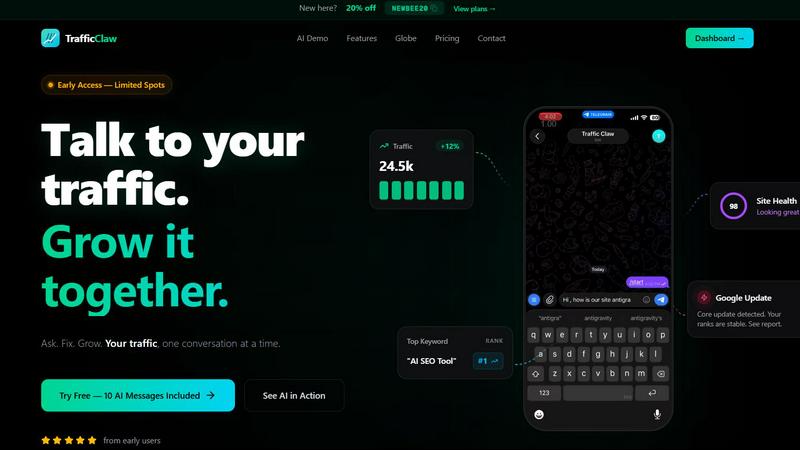
TrafficClaw is an AI analyst that converses with your live SEO and analytics data to deliver actionable growth verdicts.
Last updated: April 13, 2026
Visual Comparison
StatPecker

TrafficClaw
Feature Comparison
StatPecker
Ask Your Query
StatPecker allows users to obtain instant insights by querying data in natural language. This feature eliminates the need for complex tools, enabling users to simply ask questions and receive validated answers quickly and efficiently.
Publish & Embed
With StatPecker, users can make their visuals interactive and easily integrate them into blogs, articles, and websites. This feature ensures that data storytelling is not only engaging but also accessible to a wider audience.
Upload & Analyze CSVs
Users can upload CSV files of up to 50 MB and conduct analyses without the hassle of traditional spreadsheet software. This feature allows for local analysis, ensuring that sensitive data remains private and secure while providing insightful visualizations.
Download & Use Anywhere
StatPecker facilitates the export of infographics as images, which can be utilized in reports, presentations, and more. This flexibility allows users to leverage their visual data storytelling across various formats and platforms.
TrafficClaw
AI Chat Analyst
The AI Chat Analyst is the core interactive engine of TrafficClaw. It processes natural language queries to analyze your connected GA4 and Search Console data in real-time. Unlike static reports or generic blogs, it delivers specific verdicts with supporting evidence, such as identifying ranking drops due to content cannibalization or pinpointing referral traffic loss. The AI can generate charts, list affected pages, and provide direct, actionable recommendations for fixes, transforming complex data analysis into a simple conversation.
SEO Intelligence Suite
This feature provides automated, ongoing SEO analysis beyond basic rank tracking. It proactively identifies keyword gaps by comparing your content against competitor rankings and search demand. It detects content decay by monitoring pages losing traffic over time and alerts you to keyword cannibalization issues where multiple pages compete for the same terms. Furthermore, it includes an AEO (Answer Engine Optimization) engine designed to optimize content for AI-powered search experiences, ensuring your site is prepared for evolving search paradigms.
Integrated Analytics Dashboard
TrafficClaw unifies critical metrics into a single, configurable dashboard. It displays real-time visitor counts, geographic distribution, traffic trends over time, bounce rates, and conversion funnel performance. This consolidation eliminates the need to switch between GA4 and other tools, providing a holistic, real-time overview of site health and user behavior from one centralized location, complete with an interactive 3D globe visualizing live visitor activity.
Automated Site Audit & Content Tools
The platform conducts deep, page-level technical SEO audits, generating performance scores based on Core Web Vitals, mobile usability, and indexing status. It provides auto-fix suggestions for identified issues. Complementing this, the content tools suite includes an AI-powered schema markup generator, a blog post writer informed by your keyword research, an internal linking optimizer, and a keyword researcher, creating a full cycle for content optimization and creation within the ecosystem.
Use Cases
StatPecker
Content Creation
Content creators can leverage StatPecker to transform complex data into visually appealing infographics that enhance their articles and blog posts. This capability allows for improved audience engagement and comprehension of data-driven narratives.
Market Research
Researchers and analysts can use StatPecker to quickly visualize market trends and comparisons. By uploading CSV files and asking targeted questions, they can extract insights that inform strategic decisions and business planning.
Educational Applications
Educators and students can utilize StatPecker to create compelling visual aids for presentations and assignments. The ability to produce professional-quality infographics quickly enhances the learning process and facilitates better communication of ideas.
Marketing Campaigns
Marketing professionals can employ StatPecker to generate visually engaging content for campaigns. By leveraging instant insights and interactive visuals, they can effectively communicate key messages and data to their target audiences.
TrafficClaw
Diagnosing Sudden Traffic Drops
When a website experiences an unexpected traffic decline, a marketer can directly ask the AI Analyst "Why did my traffic drop last Tuesday?". The AI cross-references GA4 traffic data with Search Console ranking data, potentially identifying a specific Google core update impact, a lost backlink, a technical crawl error, or cannibalization between articles, providing a clear, data-driven root cause and steps for remediation.
Proactive Content Gap Analysis
A content manager planning their editorial calendar can use the SEO Intelligence suite to run a keyword gap analysis. The system compares the site's current rankings against a defined competitor set and search volume data to surface high-opportunity, relevant keywords the site is not currently targeting, providing a direct list of topics for new content creation to capture unmet demand.
Real-Time Performance Monitoring
A website owner or developer can use the integrated Analytics Dashboard and live visitor globe to monitor site health and user engagement in real-time. They can instantly see current active users, their geographic origins, the pages they are visiting, and referral sources, allowing for immediate observation of campaign launches or detection of anomalous traffic patterns.
Streamlining Technical SEO Audits
Instead of manually running scattered audits with various tools, a developer can trigger TrafficClaw's Site Audit feature. It automatically crawls the site, evaluates Core Web Vitals (LCP, FID, CLS), checks for mobile-friendliness and indexation blocks, and compiles a prioritized list of technical issues with specific fix suggestions, all within the same platform used for performance analysis.
Overview
About StatPecker
StatPecker is an advanced AI-powered data visualization and storytelling platform designed to convert raw and unstructured data into visually appealing, publication-ready infographics in a matter of seconds. This innovative platform serves as an automated alternative to traditional report generation methods, significantly reducing both time and financial costs associated with data communication. StatPecker democratizes data visualization, making sophisticated graphical representations accessible to users without technical expertise in complex spreadsheet tools or graphic design software. The platform is tailored for a diverse range of users, including content creators, journalists, data analysts, researchers, marketing professionals, business strategists, educators, and students. By leveraging artificial intelligence, StatPecker empowers users to extract instant insights from both natural language queries and structured CSV data files. Users can simply upload datasets, ask questions in plain language, and receive accurate, visually engaging outputs that can be downloaded, published, or seamlessly embedded into digital content. This streamlining of the workflow from data analysis to visual presentation enhances the clarity and impact of data-driven narratives across various applications such as reports, articles, campaigns, and educational materials.
About TrafficClaw
TrafficClaw is an AI-powered analytics and SEO command center designed to eliminate the guesswork from website growth. It directly addresses the core frustration faced by website owners, marketers, and developers: disparate data sources like Google Analytics 4 (GA4) and Google Search Console provide raw metrics and graphs but lack immediate, actionable interpretation. TrafficClaw solves this by integrating these data sources into a single intelligent interface where users can converse with their data using natural language. The platform's core value proposition is its AI Analyst, which provides specific, data-backed verdicts rather than generic advice. By connecting your GA4 and Search Console accounts, TrafficClaw enables you to ask direct questions like "Why did my traffic drop?" or "What are my top keyword opportunities?" and receive instant analysis, visualizations, and prescribed fixes derived from your live data. It consolidates real-time analytics dashboards, deep SEO intelligence, automated site audits, and content generation tools into one workflow, significantly reducing the time spent on data triangulation and increasing the speed of actionable insight generation for sustainable traffic growth.
Frequently Asked Questions
StatPecker FAQ
How does StatPecker ensure data privacy?
StatPecker utilizes a local SQL agent for on-device analysis, meaning that data uploaded by users remains on their devices and is not shared with external servers. This approach prioritizes user privacy and data security.
Can I use StatPecker for free?
Yes, StatPecker offers a free tier that allows users to create unlimited projects and embeds, conduct a limited number of AI queries, and upload CSV files. This tier provides a cost-effective way to access essential features of the platform.
What types of files can I upload to StatPecker?
Users can upload structured CSV files of up to 50 MB for analysis. This functionality allows users to extract insights from their data without the complexity of traditional spreadsheet software.
Is there customer support available?
StatPecker provides customer support through various channels, ensuring that users can receive assistance with any inquiries or issues they may encounter while using the platform.
TrafficClaw FAQ
How does TrafficClaw access and use my data?
TrafficClaw uses secure, read-only Google OAuth to connect to your Google Analytics 4 and Search Console accounts. This means the platform can only view your data; it cannot edit, delete, or modify anything within your Google accounts. Your data is processed to generate insights within TrafficClaw and is not sold or shared with third parties. You can revoke access at any time.
What makes the AI advice better than generic SEO tips?
The AI Analyst is fundamentally different because it grounds its responses in your proprietary live data. Instead of offering broad best practices, it analyzes your specific traffic patterns, keyword rankings, and page performance to deliver tailored verdicts. For example, it won't just say "improve page speed"; it will identify which specific pages have degraded Core Web Vitals and estimate their impact on your traffic.
Is there a code or widget I can add to my website?
Yes, TrafficClaw offers a free, embeddable 3D interactive globe widget. This single iframe code snippet can be added to any website or CMS. It displays a real-time visualization of your GA4 visitor data, showing active user locations and a live activity feed without requiring any additional tracking scripts, serving as both a monitoring tool and an engagement element for your site visitors.
What is the setup process and time required?
Setup is designed for immediate use. You sign in with Google, and TrafficClaw automatically detects your available GA4 properties and Search Console sites. You grant read-only permissions, and the system begins syncing your historical data. The entire process typically completes in under 30 seconds, with your dashboard and AI Chat becoming fully functional immediately after, requiring zero technical configuration.
Alternatives
StatPecker Alternatives
StatPecker is an advanced AI-powered data visualization and storytelling platform that transforms raw, unstructured data into publication-ready infographics in just seconds. It is designed to serve a diverse range of users, from content creators to business strategists, by automating the process of report generation that traditionally involves manual efforts and technical expertise. Users often seek alternatives to StatPecker for various reasons, including pricing, specific feature sets, or compatibility with their existing platforms. When selecting an alternative, it is crucial to consider the user interface, ease of data integration, the quality of visualizations produced, and the level of customer support offered. Additionally, features like natural language querying and automated analysis can significantly enhance the user experience, making the choice of an alternative even more critical.
TrafficClaw Alternatives
TrafficClaw is an AI-powered analytics assistant that operates within the SEO and data analytics category. It integrates directly with platforms like Google Analytics 4 and Google Search Console to provide conversational, data-driven answers to complex performance questions, moving beyond static reports. Users may seek alternatives for various reasons, including budget constraints, specific feature requirements not met by the core offering, or the need for integration with a broader or different set of data sources and marketing platforms. The search often stems from a need for more specialized functionality or different pricing models. When evaluating an alternative, key considerations should include the depth and breadth of data source integrations, the sophistication of the AI's analytical and natural language processing capabilities, the specificity and actionability of the insights generated, and the overall security and compliance framework governing data handling.