Prompt Builder vs SVG to 3D
Side-by-side comparison to help you choose the right tool.

Prompt Builder
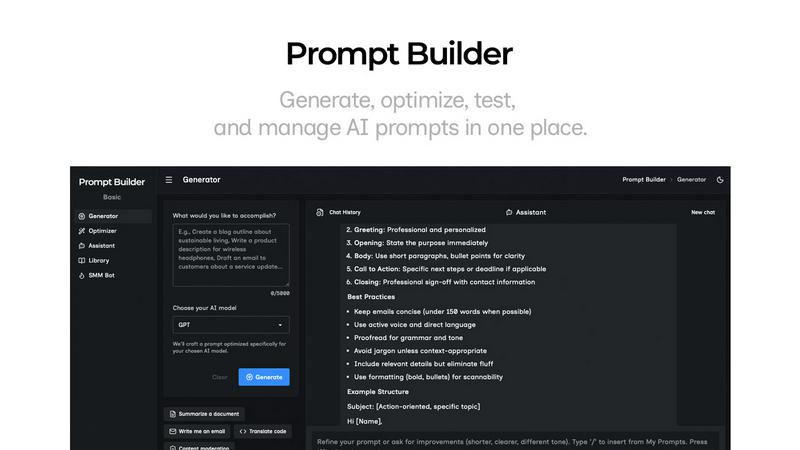
Prompt Builder allows you to generate, refine, and manage optimized AI prompts for multiple models in one seamless platform.
Last updated: April 13, 2026

SVG to 3D
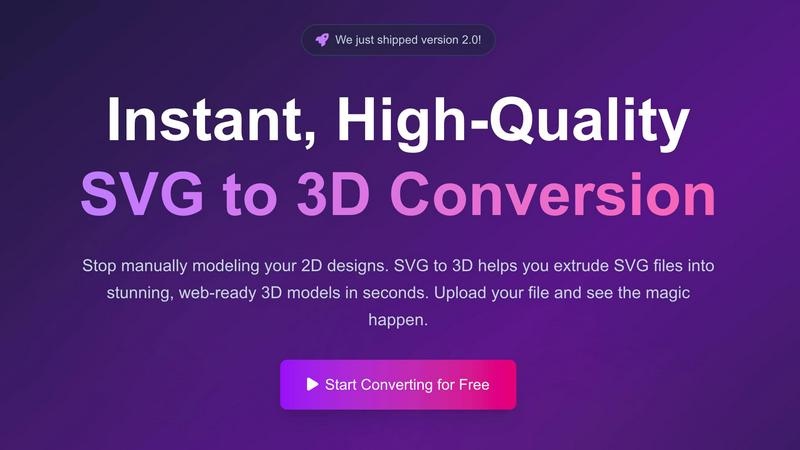
Effortlessly convert SVG files into high-quality 3D models with advanced controls and instant processing in your.
Last updated: February 26, 2026
Visual Comparison
Prompt Builder
SVG to 3D
Feature Comparison
Prompt Builder
Prompt Generator
The Prompt Generator feature allows users to describe their ideas and select a target AI model to produce a professional-grade prompt quickly. This tool is designed to optimize prompts according to the specifications of the chosen model, ensuring that users get tailored outputs that meet their needs effectively.
Chat Refinement
The Chat Refinement feature enables users to engage in a dynamic chat with an assistant model, allowing for real-time adjustments to prompts. This iterative process helps in enhancing clarity and specificity, leading to better outputs and reducing the need for multiple revisions.
Prompt Optimizer
With the Prompt Optimizer, users can take existing prompts and enhance them for improved performance. By pasting a prompt or selecting one from the library, the tool provides structured improvements focusing on clarity, constraints, and output format, resulting in a more effective prompt with minimal effort.
Prompt Library
The Prompt Library serves as a personal storage system where users can save, organize, and retrieve their best prompts. It includes community contributions, allowing users to explore a wide range of prompts, filter by category or model, and pin favorites for easy access, ultimately enhancing collaboration and efficiency.
SVG to 3D
One-Click to GLB for the Web
This feature allows users to export their 3D models as lightweight GLB files optimized specifically for web applications. Developers can seamlessly integrate these files into projects using Three.js or React Three Fiber, enhancing user experiences with interactive 3D elements.
3D-Print Ready
SVG to 3D supports clean STL exports, making it easy for users to take their 3D models directly into 3D printing software. This feature simplifies the workflow, allowing creators to produce tangible items from their digital designs without needing complex CAD software.
Advanced Material System
Users can apply realistic PBR (Physically Based Rendering) materials, custom textures, and professional lighting effects to their 3D models, enabling them to stand out in any project. This advanced material system enhances the visual quality and realism of the final output.
Lightning-Fast Processing
SVG to 3D utilizes optimized algorithms to deliver rapid conversion times, allowing users to transform their SVG files into 3D models in seconds rather than minutes. This efficiency is crucial for professionals who need to iterate quickly and meet tight deadlines.
Use Cases
Prompt Builder
Content Creation
Content creators can utilize Prompt Builder to generate tailored prompts for writing articles, social media posts, and marketing materials. By refining prompts in a dedicated chat environment, they can produce high-quality content that resonates with their target audience.
Software Development
Developers can leverage Prompt Builder to create prompts for coding assistance or technical documentation. The ability to test and refine prompts tailored for specific AI models ensures accurate and relevant results, improving productivity and reducing errors in programming tasks.
Education and Training
Educators can employ Prompt Builder to generate prompts for quizzes, assignments, or educational materials. The tool's capability to refine and optimize prompts ensures that the content is engaging and aligned with learning objectives, enhancing the educational experience for students.
Research and Data Analysis
Researchers can use Prompt Builder to formulate prompts that extract insights from data or generate hypotheses. The platform's ability to customize prompts for different AI models helps in obtaining precise and relevant information, streamlining the research process and improving outcomes.
SVG to 3D
Create Interactive 3D Logos and Icons for Web
Web developers and designers can easily convert SVG logos and icons into 3D models ready for interactive web applications. This use case enhances brand identity and adds depth to user interfaces, making websites more engaging.
From Digital Design to Physical Object
The tool enables users to convert their 2D designs into 3D printable models. This functionality is essential for artists and designers who wish to create physical representations of their digital artwork or prototypes without the need for complex modeling software.
Enhance Your UI/UX Designs
Designers can utilize SVG to 3D to add depth and realism to UI components. By integrating 3D elements into mockups, they can present their ideas more effectively to clients and stakeholders, improving the overall design review process.
Streamline Game Development
Game developers can quickly generate 3D assets from SVG graphics, optimizing their workflow by avoiding the lengthy modeling processes typically required. This use case is ideal for creating unique 3D elements in games, saving time and resources.
Overview
About Prompt Builder
Prompt Builder is an advanced prompt engineering workspace designed to streamline the process of creating, testing, and saving prompts for various AI models. It serves as an essential tool for content creators, developers, and AI enthusiasts who seek to optimize their interactions with AI models such as GPT, Claude, Gemini, Llama, Mistral, DeepSeek, and Grok. The platform allows users to start with a draft prompt, refine it in a chat interface, save or pin different versions, and execute them at their convenience. This capability not only saves time but also ensures that users can generate high-quality, model-specific prompts without the hassle of rewriting for each AI. With an integrated Optimizer and a community-driven library of reusable prompts, Prompt Builder empowers users to transform their ideas into actionable prompts in mere seconds, making it a valuable asset in the rapidly evolving AI landscape.
About SVG to 3D
SVG to 3D is a powerful online tool designed to effortlessly convert 2D SVG vector graphics into stunning high-quality 3D models. This innovative solution was developed to address the common frustrations of designers, developers, and 3D printing enthusiasts who often find traditional software like Blender or Cinema 4D cumbersome and time-consuming. With SVG to 3D, users can quickly upload their SVG files and transform them into professional-grade 3D models in mere seconds. This tool is perfect for web developers looking to enhance their projects with interactive 3D elements, as well as for those in the 3D printing community who need precise models ready for fabrication. The main value proposition lies in its user-friendly interface, advanced customization options, and lightning-fast processing capabilities, all while maintaining a focus on privacy and security by keeping files processed locally in the browser.
Frequently Asked Questions
Prompt Builder FAQ
What AI models does Prompt Builder support?
Prompt Builder is compatible with various AI models including GPT, Claude, Gemini, Llama, Mistral, DeepSeek, Grok, and Perplexity. This versatility allows users to generate prompts optimized for their specific needs.
How does the Prompt Generator work?
The Prompt Generator allows users to describe their idea and select a target model. It then creates a model-optimized prompt that can be further refined in a chat interface, facilitating a smooth transition from concept to execution.
Can I reuse prompts created in Prompt Builder?
Yes, users can save and organize their best prompts in the Prompt Library. This feature enables easy access to previously created prompts, allowing for efficient reuse across different projects or use cases.
Is there a free trial available for Prompt Builder?
Prompt Builder offers a free plan that includes 25 assistant requests per month without the need for a credit card. This allows potential users to explore the features and capabilities of the tool before committing to a paid plan.
SVG to 3D FAQ
How does SVG to 3D work?
SVG to 3D works by allowing users to upload SVG files and then applying advanced algorithms to convert these 2D graphics into 3D models. Users can adjust settings like thickness and bevels in real-time before exporting their models.
What file formats can I export my 3D models in?
You can export your models in multiple formats, including GLB, GLTF, OBJ, and STL. This versatility ensures compatibility with various 3D software and applications, whether for web development or 3D printing.
Is my data secure when using SVG to 3D?
Yes, SVG to 3D prioritizes user privacy and security. Files are processed locally in your browser whenever possible, which means your designs are not uploaded to external servers, keeping them safe and secure.
Can I use SVG to 3D for commercial projects?
Absolutely. SVG to 3D is designed for both personal and commercial use. Whether you are a freelancer, a small business, or a large corporation, you can utilize this tool to create and export 3D models for your projects.
Alternatives
Prompt Builder Alternatives
Prompt Builder is an advanced prompt engineering workspace designed to help users generate, optimize, test, and manage AI prompts effectively. This product falls under the category of AI Assistants, providing a seamless environment for crafting prompts tailored to various AI models such as GPT, Claude, and others. Users often seek alternatives to Prompt Builder due to factors like pricing, specific feature sets, or compatibility with different platforms, which can influence their overall experience and satisfaction. When searching for alternatives, it is crucial to evaluate the range of features offered, ease of use, integration capabilities, and community support. A robust alternative should enable users to create and refine prompts effortlessly while providing additional tools for testing and saving versions. Additionally, the availability of a library for reusable prompts can significantly enhance productivity and efficiency in prompt engineering tasks.
SVG to 3D Alternatives
SVG to 3D is a specialized tool designed for transforming 2D SVG vector graphics into high-quality 3D models. It falls under the category of AI Assistants, catering primarily to developers, designers, and 3D printing enthusiasts who seek efficient solutions for model creation. Users often seek alternatives due to various reasons such as pricing constraints, feature limitations, or specific platform requirements that may not be met by existing tools. When searching for an alternative, it is essential to consider factors such as ease of use, export capabilities, and the range of features offered. Users should evaluate whether an alternative can accommodate their workflow needs while providing the necessary quality and customization options for their projects.