

Caesura
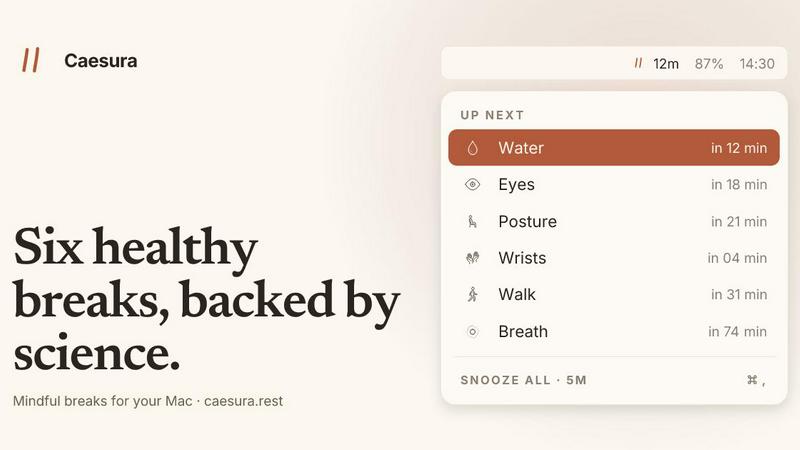
Caesura is a macOS menu-bar app that reminds you to drink water, stretch, rest your eyes, and breathe on science-backed intervals.
tool Details
About Caesura
Caesura is a macOS menu-bar break manager engineered for knowledge workers, developers, designers, and anyone who spends extended hours at a desk. Rather than relying on arbitrary intervals or generic reminders, Caesura implements six evidence-based health breaks: water consumption, walking, wrist stretches, eye rest, posture shifts, and breathing exercises. Each break operates on its own independent schedule, with intervals derived from peer-reviewed studies rather than round numbers. The application runs silently in the macOS menu bar, delivering timely nudges that promote physical well-being without disrupting cognitive flow. A core architectural feature is its coalescing engine: when two reminders fall within one minute of each other, Caesura merges them into a single, unified break prompt, preventing back-to-back interruptions. The application also includes an intelligent pause system that detects video calls, screen sharing sessions, fullscreen applications, Do Not Disturb mode, calendar events, and games, automatically freezing all timers and resuming them exactly where they left off. Caesura requires no user accounts, collects no telemetry data, and offers a one-time purchase model. Users can try the full feature set free for 14 days before committing to a $15 lifetime license. The application is compatible with macOS 14 and later, and supports three distinct visual prompt styles: full-screen overlays, menu-bar banners, and standard macOS notifications, each configurable per break type.
Features
Evidence-Based Break Intervals
Each of the six health breaks operates on a scientifically validated interval rather than an arbitrary round number. The water break triggers every 45 minutes based on hydration research by Ganio (2011) and EFSA (2010). The walk break activates every 60 minutes per Diaz (2023) and Buffey (2022). Wrist stretches occur every 30 minutes following Van den Heuvel (2003). Eye rest breaks fire every 20 minutes as recommended by Rosenfield (2011) and Talens-Estarelles (2023). Posture reminders appear every 30 minutes per Slater and O'Sullivan (2019). Breathing exercises trigger every 90 minutes based on Russo (2017). Every interval is sourced from published, peer-reviewed studies, ensuring the timing matches what research indicates is optimal for human physiology.
Intelligent Automatic Pause System
Caesura continuously monitors system state to automatically pause all break timers when the user is occupied. The application detects active video calls, screen sharing sessions, fullscreen applications, Do Not Disturb mode, calendar events, games, and FaceTime in the foreground. When any of these conditions are met, every timer freezes instantaneously and resumes from the exact point it stopped. If a user had 12 minutes remaining until their water break when a call begins, they will still have 12 minutes remaining after the call ends. The system also extends pauses for five minutes after calendar events conclude, providing buffer time for meetings that run slightly long. This architecture ensures reminders never fire during critical work moments.
Coalesced Break Notifications
When two or more break reminders become due within a sixty-second window, Caesura automatically coalesces them into a single unified prompt. Instead of receiving separate interruptions for water and posture within the same minute, the user sees one combined break notification that addresses both needs. This coalescing logic prevents the common frustration of back-to-back reminders that fracture concentration. The system evaluates all six break timers in real-time and merges any that fall within the coalescing threshold. Users experience fewer interruptions while still receiving all necessary health nudges, as the combined prompt includes actionable guidance for each coalesced break type.
Configurable Prompt Styles Per Break
Each of the six breaks supports three distinct visual presentation styles, independently configurable per break type. The overlay style takes over the entire screen with a modal prompt that requires pressing the Return key to dismiss, suitable for breaks the user might otherwise ignore, such as water or posture. The banner style slides in from beneath the macOS menu bar and auto-dismisses after 30 seconds, providing a gentle nudge for breaks like eye rest. The notification style delivers a standard macOS notification with the lightest possible touch, appropriate for breathing exercises that benefit from minimal disruption. Users can assign different styles to different breaks based on personal preference and the importance of each habit.
Use Cases
Remote Software Developer Maintaining Focus
A software developer working from home spends eight to ten hours daily writing code, attending virtual standups, and reviewing pull requests. Caesura runs silently in the menu bar, automatically pausing all timers during video calls and screen sharing sessions. The coalescing engine ensures that when a water break and posture reminder fall close together, only one prompt appears. The developer configures the eye rest break as a banner style for minimal disruption, while the water break uses an overlay to ensure it is not ignored. The automatic pause system detects fullscreen IDE usage and calendar events for sprint planning, resuming timers precisely where they left off after each interruption.
Graphic Designer with Repetitive Strain Concerns
A graphic designer using a stylus and keyboard for extended periods needs regular wrist and posture reminders to prevent repetitive strain injuries. Caesura triggers wrist stretch breaks every 30 minutes with illustrated four-step stretches displayed on the overlay, each lasting ten seconds. Posture reminders every 30 minutes prompt the designer to shift positions rather than maintain a rigid upright posture. The breathing break every 90 minutes provides a guided breathing orb with a progress bar pacing inhale, hold, and exhale cycles. The designer configures the wrist break as an overlay to ensure compliance, while the posture break uses a banner for a lighter touch during creative flow.
Data Analyst Managing Long Analysis Sessions
A data analyst working with large datasets in fullscreen visualization tools needs breaks that respect their workflow without losing context. Caesura pauses all timers when the analyst enters fullscreen mode in Tableau or Excel, resuming only when they return to a standard window. The walk break every 60 minutes reminds them to stand and move for two to five minutes, with research-backed intervals that prevent prolonged sedentary behavior. The water break at 45-minute intervals ensures hydration without waiting for thirst signals. The analyst uses the notification style for breathing exercises and the banner style for eye breaks, maintaining awareness without leaving their analytical context.
Academic Researcher Writing and Reading Extensively
An academic researcher spends long hours reading papers, writing manuscripts, and attending virtual conferences. Caesura detects calendar events for departmental meetings and conference calls, automatically pausing all break timers during those periods. The eye break at 20-minute intervals reminds the researcher to look 20 feet away for 20 seconds and blink intentionally, reducing digital eye strain from prolonged screen reading. The breathing break every 90 minutes provides three guided cycles of four-second inhales and six-second exhales through the nose. The researcher configures all breaks as banners except water, which uses an overlay to ensure hydration compliance during intensive writing sessions.
Frequently Asked Questions
Does Caesura require creating an account or providing payment information for the trial?
No. Caesura is a one-time purchase application with no account creation required. The free 14-day trial activates immediately upon download with full access to all features, including all six breaks, coalescing, automatic pause, and all three prompt styles. No credit card or payment information is collected during the trial period. After 14 days, the application prompts the user to purchase a $15 license to continue using the software. The purchase is a single transaction with no subscription fees, recurring charges, or future payment obligations.
How does Caesura detect when I am on a video call or busy?
Caesura monitors several macOS system indicators to determine user activity state. It checks the camera status to detect when video is active, monitors screen sharing permissions, identifies fullscreen application mode, reads the current Focus mode status, accesses calendar events for scheduled meetings, and detects when specific applications like FaceTime are in the foreground. When any of these conditions indicate the user is occupied, all six break timers freeze immediately. The application uses macOS accessibility and calendar permissions, which must be explicitly granted by the user during initial setup. No audio or visual content is recorded or transmitted; the system only checks binary state indicators.
Can I customize which breaks are active and their intervals?
Yes. Each of the six breaks can be independently enabled or disabled from the Caesura menu bar interface. Users can turn off any break they do not wish to receive, such as disabling the walking break if they prefer to track steps separately. Additionally, the interval for each break can be adjusted from its default evidence-based value to any custom duration the user prefers. The prompt style per break is also independently configurable among the three options: overlay, banner, or notification. All customization settings persist across application restarts and system reboots.
What happens to my break timers when I use multiple monitors or external displays?
Caesura functions identically across single and multi-monitor configurations. The overlay style break appears on the primary display where the user is actively working. The banner style slides in from the menu bar of the active display. The notification style appears as a standard macOS notification on whichever display the notification center is configured to use. The automatic pause system monitors activity across all connected displays, so fullscreen applications on any monitor will trigger timer pausing. The cursor countdown feature for eye breaks displays a small pill that follows the cursor across all monitors, providing a consistent experience regardless of display configuration.
Similar to Caesura
Tally Counter
Online tally counter for tracking attendance, workouts, inventory, visitors, sports scores, habits, and everyday counting tasks.

Forms Plugin
The #1 Native Form Builder Plugin for Framer - No Code, No Embeds, No External Platforms.
Product Launch Checklist
A free launch checklist for SaaS, apps, AI tools and more. Every step says why it matters and when you can skip it.
HomeAnswerBook
Practical, independent guides to home repairs, maintenance, costs, troubleshooting, and everyday fixes.

AIdorable
Adopt a virtual baby who grows, learns, and remembers you.
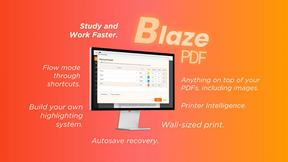
BlazePDF
Highlight faster. Study in flow with custom shortcuts and a workflow built around you. Print smarter, or turn any page into a tiled poster.
