

EditTextImage
EditTextImage seamlessly replaces text in images online while preserving font, color, lighting, and perspective in under 30 seconds.
tool Details
Explore More
Alternatives
About EditTextImage
EditTextImage is an online AI-powered tool designed to replace text within image files while preserving the original typography, color, layout, lighting, and perspective. The core technology samples the typeface directly from the pixels of the uploaded image, eliminating the need for source design files, installed fonts, or manual editing software. Users upload an image in PNG, JPEG, or WebP format up to 10 MB, specify the original text string and the replacement text string, and the AI processes the edit in approximately 10 to 12 seconds, outputting a 2K resolution result. This tool is intended for professionals and individuals who need to modify text in finished visuals such as posters, screenshots, product labels, documents, and advertising creative assets. The primary value proposition is speed and accuracy: it bypasses traditional design workflows that require locating source files, matching fonts, and manually compositing edits. EditTextImage is particularly useful for scenarios where the original design file is lost or inaccessible, or where rapid iteration across multiple text variations is required, such as A/B testing headlines or localizing app screenshots into multiple languages. The platform operates on a credit-based system with a free first edit for new users, no subscription required, and credits that never expire. Commercial use is included in the credit purchase, and the service explicitly prohibits editing certain sensitive document types, with clear acceptable use policies and enforcement mechanisms.
Features
Pixel-Perfect Font and Style Preservation
The AI engine analyzes the pixel data around the target text to extract the exact typeface, weight, size, color, drop shadow, and any perspective distortion. This means paid fonts, custom hand-lettering, and stylized typography are handled without requiring the user to upload or possess the original font files. The surrounding background pixels are reconstructed seamlessly, ensuring no smearing, color bleeding, or layout shifts occur after the text replacement.
Rapid Processing and High-Resolution Output
The average processing time to complete a text edit is approximately 10 to 12 seconds, making it suitable for quick fixes and production workflows alike. All output images are generated at 2K resolution, providing sufficient detail for digital publishing, social media, and print applications. This eliminates the need for manual resizing or quality adjustments after the edit is performed.
No Software Installation or Subscription Required
EditTextImage operates entirely through a web browser interface. Users do not need to download, install, or maintain any software applications. There are no monthly or annual subscription fees. The service uses a one-time credit purchase model: the first edit is free with no credit card required, and additional credits are available as a single $9.90 payment for 30 edits. Credits never expire and include commercial usage rights.
Integrated Text Replacement and Translation Workflow
The interface provides two primary modes: direct text replacement and translation. In the replacement mode, users input the exact original text and the desired replacement. In translation mode, users can specify the source language and target language, allowing the AI to replace text with translated content while preserving the original visual style. This dual workflow streamlines localization tasks and eliminates the need for separate translation and design tools.
Use Cases
Document Corrections and Updates
Professionals working with scanned documents, PDF exports, or screenshots of contracts and invoices can correct typos, update dates, change invoice numbers, or fix other textual errors without accessing the original source file. The AI preserves the document's font and layout, making the edit appear native to the document. This is particularly valuable for administrative staff, legal professionals, and accountants who frequently need to amend digital records quickly.
Poster and Flyer Revisions for Events
Event organizers and marketing teams often need to update dates, times, venues, or speaker names on finished promotional materials after a designer has gone offline or the source file is unavailable. EditTextImage allows them to upload the final poster image, specify the old and new text elements, and receive an updated version that matches the original design's typography and layout. This reduces turnaround time and avoids expensive redesign fees.
App Screenshot Localization for App Store Listings
Developers and product managers preparing app store listings for international markets need to produce screenshots in multiple languages. Instead of rebuilding each UI mockup in a design tool for every language, they can use EditTextImage to swap the text on existing screenshots. The AI preserves the app's UI font, button styles, and overall screen composition, enabling rapid localization of visual assets across ten or more languages without design overhead.
E-Commerce Product Image Updates
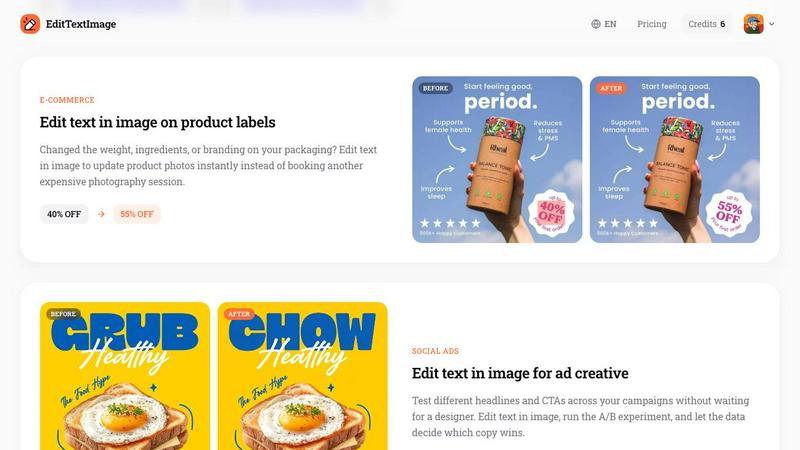
Online retailers and brand managers frequently update product packaging due to changes in weight, ingredients, pricing, or promotional offers. EditTextImage enables them to edit text directly on product photos, such as updating a discount percentage from 40% to 55% or changing a product label's ingredient list. This eliminates the need for costly reshoots or graphic design sessions, allowing for rapid iteration on product visuals for A/B testing or seasonal campaigns.
Pricing
EditTextImage operates on a straightforward credit-based pricing model. New users receive one free credit to try the service, with no credit card required for sign-up. After the free trial, users can purchase a pack of 30 credits for a one-time payment of $9.90. There are no subscription fees, recurring charges, or hidden costs. Credits never expire, so users can use them at their own pace. Commercial use of edited images is included with all credit purchases. The pricing structure is designed to be accessible for occasional users needing a single fix as well as professionals requiring batch edits across multiple projects.
Frequently Asked Questions
What file formats and sizes does EditTextImage support?
EditTextImage accepts PNG, JPEG, and WebP file formats with a maximum file size of 10 MB. Users can upload images directly from their device or drag and drop them into the designated upload area. The output is provided in the same format as the input, but always at a minimum resolution of 2K to ensure high-quality results suitable for both digital and print use.
How does the AI preserve fonts that are not installed on my computer?
The AI engine analyzes the pixel data surrounding the text area to extract the typeface characteristics, including letter shapes, spacing, weight, color, drop shadows, and perspective distortions. It does not require the actual font file to be present on your system. This means paid fonts, custom hand-drawn lettering, and unique stylized text are all handled accurately by sampling the visual properties directly from the image pixels.
Is there a limit on how many times I can edit the same image?
There is no inherent limit on the number of edits you can perform on a single image, provided you have available credits. Each edit operation consumes one credit, regardless of whether it is a new image or a subsequent modification of a previously edited file. Credits are purchased in a pack of 30 for $9.90, and they never expire, so you can use them over time as needed.
What types of images are prohibited from being edited on this platform?
EditTextImage prohibits the processing of identification documents such as IDs, passports, visa support letters, official government seals, bank statements, and tampered receipts. Additionally, the platform forbids edits intended to deceive third parties, including falsified visa or immigration submissions, fake refund or transaction proofs, and altered email or chat screenshots that change sender identity, content, or timestamps. Violations of these policies result in account termination without refund, and request logs may be shared with law enforcement authorities.
Similar to EditTextImage
Sprite Sheet Maker
A free browser-based toolkit for creating, cutting, converting, and previewing sprite sheet animations.


Ideogram Studio
Create text-rich logos, posters, ads, packaging, and ecommerce visuals with Ideogram 4 AI workflows.
Vynzo
AI image and video studio. Generate from a prompt, animate stills, swap faces, restyle clips and edit — one credit pool, no subscription.

Try This Skill
One-click AI photo stylization for e-commerce & portraits
Vismuse
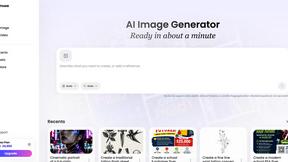
Create polished AI images and videos from prompts or references for social posts, ads, flyers, album covers, and campaigns.
GPT Image 2 API
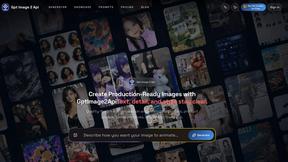
Generate and edit production-ready images with GPT Image 2 API, detailed prompts, reference images, clear text, and developer-friendly workflows.