

HomeDesignsAI
HomeDesignsAI uses a single photo to deliver high-fidelity AI redesigns of interiors, exteriors, and gardens in under 30 seconds.
tool Details
Explore More
Alternatives
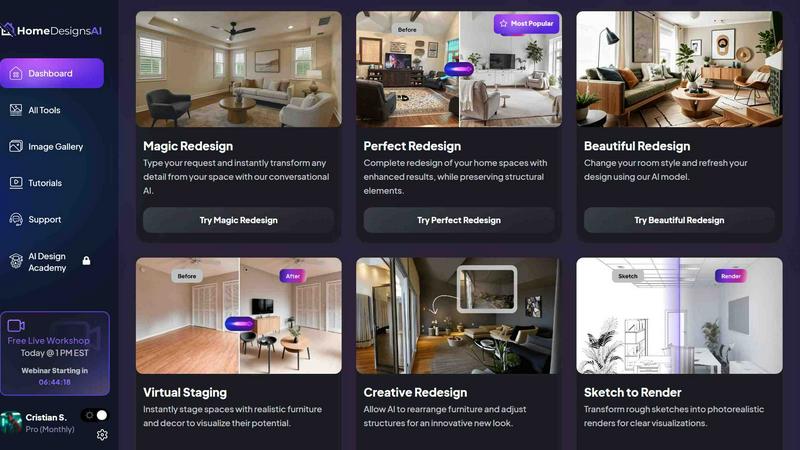
About HomeDesignsAI
HomeDesignsAI is a comprehensive, AI-powered home design platform that enables users to transform interiors, exteriors, and gardens from a single uploaded photograph. The system leverages advanced generative AI models to produce photorealistic redesigns in under 30 seconds, requiring zero design skills or prior experience. The platform supports over 200 distinct design styles, including Scandinavian, Japandi, Modern Farmhouse, Bohemian, Quiet Luxury, Mediterranean, and Industrial, and can process more than 120 different space types ranging from living rooms and bathrooms to outdoor kitchens, hotel lobbies, and Airbnb units. Trusted by over 2.6 million homeowners and professionals across 170 countries, HomeDesignsAI has facilitated more than 7.68 million completed projects. The platform is designed for a broad user base including real estate agents, home improvement contractors, interior designers, landscapers, home builders, architects, and individual homeowners. Its core value proposition lies in eliminating the traditional barriers of cost, time, and expertise associated with home design, providing instant, customizable, and highly realistic visualizations. The system operates entirely via a web-based interface, requiring no software installation, and offers a scalable API for businesses seeking to integrate AI design capabilities into their own workflows. Key technical capabilities include automatic virtual staging for empty rooms, texture and color customization, weather simulation for exterior shots, and direct shopping links for furniture and decor items featured in generated designs. The platform is consistently rated top-notch across over 1,300 user reviews, with users praising its ease of use, output quality, and speed of generation.
Features
200+ Design Styles and 120+ Space Types
HomeDesignsAI provides an extensive library of over 200 distinct design styles, ranging from popular contemporary aesthetics like Japandi and Quiet Luxury to classic options such as Mediterranean and Industrial. The platform supports over 120 different space types, ensuring comprehensive coverage for virtually any residential or commercial environment. This includes standard rooms like living rooms, bedrooms, and kitchens, as well as specialized spaces such as outdoor kitchens, hotel lobbies, and vacation rental units. Users can apply any combination of style and space type to their uploaded photo, enabling highly specific and tailored design outcomes. The system continuously updates its style library based on emerging design trends and user demand, with custom style requests available for professional users. This breadth of options ensures that both homeowners seeking a single room refresh and professionals managing diverse property portfolios can find appropriate design solutions within a single platform.
Fill The Room Auto-Furnishing for Virtual Staging
The "Fill The Room" feature is an advanced AI capability designed specifically for virtual staging of empty or sparsely furnished spaces. When a user uploads a photo of an unfurnished room, the AI automatically analyzes the spatial dimensions, lighting conditions, and architectural features to generate a fully furnished, photorealistic version of that space. The system intelligently places furniture, decor, and accessories that are appropriate for the chosen design style and room type, creating a natural and livable arrangement. This feature is particularly valuable for real estate professionals who need to present vacant properties in their best light to potential buyers or renters. The auto-furnishing process considers scale, proportion, and functional layout, ensuring that the generated furniture arrangement is both aesthetically pleasing and physically plausible. Users can further refine the auto-generated results using the platform's customization tools, adjusting individual pieces or changing the overall style without restarting the process.
Texture Swap, Color Customization, and Weather Changes
HomeDesignsAI offers granular control over the visual elements of generated designs through its texture swap, color customization, and weather change capabilities. The texture swap function allows users to replace surface materials such as flooring, wall finishes, countertops, and upholstery with alternative options from the platform's material library. Color customization enables precise adjustment of paint colors, fabric hues, and accent tones to match existing decor or personal preferences. For exterior and garden designs, the weather change feature simulates different atmospheric conditions including sunny, overcast, rainy, or snowy environments, altering lighting, shadows, and overall mood accordingly. These tools operate on a per-element basis, giving users the ability to modify individual components of a design rather than accepting a wholesale transformation. The AI maintains photorealism and spatial coherence throughout all modifications, ensuring that texture swaps and color changes appear natural and integrated with the original lighting and perspective of the uploaded image.
Custom AI Instructions and Adjustable Intervention Levels
The platform provides advanced users with the ability to guide the AI generation process through custom text instructions and adjustable intervention levels. Custom AI instructions allow users to specify particular design requirements, such as "add a fireplace on the left wall" or "use only sustainable materials," which the system interprets and incorporates into the generated design. The adjustable AI intervention levels control how closely the system adheres to the original photo's structure versus how freely it can modify the space. Lower intervention levels result in designs that preserve the original layout and architectural features while updating finishes and decor, ideal for minor renovations or color scheme changes. Higher intervention levels allow the AI to reconfigure room layouts, change window placements, or even alter structural elements, suitable for major remodels or conceptual design exploration. This flexibility ensures that both conservative users seeking subtle updates and creative professionals requiring dramatic transformations can achieve their desired outcomes with appropriate control over the AI's creative latitude.
Use Cases
Real Estate Virtual Staging and Property Marketing
Real estate agents and property marketers utilize HomeDesignsAI to transform vacant or outdated properties into visually appealing, staged homes for listing photographs and virtual tours. By uploading photos of empty rooms, agents can generate fully furnished, stylish interiors that help potential buyers visualize the space's potential. The platform's 200+ design styles allow agents to tailor the staging to match the property's architectural character or target buyer demographic, whether that means modern farmhouse for suburban family homes or minimalist urban aesthetics for city condos. The "Fill The Room" feature automatically furnishes empty spaces with appropriate furniture arrangements, eliminating the cost and logistics of physical staging. Generated images can be used across multiple listing platforms, social media marketing campaigns, and printed brochures, providing a consistent, high-quality visual presentation. The speed of generation, under 30 seconds per design, enables agents to iterate through multiple style options quickly and respond to client feedback in real time during property consultations.
Interior Design Concept Development and Client Presentation
Professional interior designers employ HomeDesignsAI as a rapid prototyping tool for developing design concepts and presenting options to clients. Designers can upload photos of a client's existing space and generate multiple design variations in different styles, allowing clients to compare aesthetics before committing to a direction. The platform's custom AI instructions enable designers to specify exact requirements such as "add built-in shelving" or "use a neutral color palette with blue accents," ensuring generated designs align with client preferences and project constraints. The texture swap and color customization features allow for detailed material selections, enabling designers to test different flooring options, countertop materials, and paint colors within the same base design. This capability significantly reduces the time spent on manual rendering and mood board creation, accelerating the design approval process. Designers can also use the platform to generate photorealistic renderings for client presentations, contractor briefings, and permit applications, providing a unified visual reference throughout the project lifecycle.
Homeowner Renovation Planning and Visualization
Individual homeowners use HomeDesignsAI to plan and visualize renovation projects before committing to construction or purchasing materials. By uploading photos of their current living spaces, homeowners can experiment with different design styles, color schemes, and furniture arrangements to determine what best suits their taste and lifestyle. The platform's zero-design-skill requirement makes it accessible to users with no formal design training, enabling them to explore professional-quality design options independently. Homeowners can test major changes such as kitchen remodels, bathroom renovations, or room additions, as well as smaller updates like repainting, new flooring, or furniture replacement. The generated designs serve as a reference when consulting with contractors, helping homeowners communicate their vision more effectively and avoid costly misunderstandings. Additionally, the shopping links feature connects users directly to retailers where they can purchase furniture and decor items featured in their generated designs, streamlining the transition from visualization to implementation.
Landscape Architecture and Garden Design
Landscapers, garden designers, and homeowners use HomeDesignsAI to reimagine outdoor spaces including gardens, patios, terraces, and full property landscapes. The platform supports exterior and garden design modes that account for outdoor lighting conditions, vegetation, and topographical features present in uploaded photos. Users can apply style transformations such as tropical, Mediterranean, English cottage, or modern minimalist garden designs, with the AI intelligently placing plants, hardscaping elements, and outdoor furniture. The weather change feature is particularly valuable for landscape design, allowing users to see how their garden will appear in different seasons or lighting conditions, from sunny summer afternoons to snowy winter mornings. Landscape professionals can generate multiple design iterations for client presentations, showing how different plant selections, patio configurations, or water features would alter the outdoor space. The platform also supports integration with existing architectural elements, ensuring that garden designs complement the home's exterior style and structural features for a cohesive overall property aesthetic.
Frequently Asked Questions
What types of photos can I upload to HomeDesignsAI?
HomeDesignsAI accepts standard image formats including JPEG, PNG, and WEBP. The platform works best with clear, well-lit photographs that show the full room or space from a straight-on angle with minimal obstructions. For interior spaces, photos taken from a corner or doorway that capture at least two walls provide the most accurate results. For exteriors and gardens, photos that show the full facade or entire garden area from a reasonable distance yield optimal transformations. The AI can process photos with existing furniture, empty rooms, or partially furnished spaces. While the system can work with lower-quality images, higher resolution photos (at least 1080p) produce more detailed and photorealistic results. The platform automatically analyzes the uploaded image to identify spatial boundaries, architectural features, and lighting conditions before applying the selected design transformations.
How long does it take to generate a design?
HomeDesignsAI generates photorealistic redesigns in under 30 seconds for standard requests. The exact generation time depends on several factors including the complexity of the selected design style, the resolution of the uploaded photo, and the current server load. Simple style changes on standard room photos typically complete within 10 to 15 seconds, while more complex transformations involving significant structural changes or high-intervention levels may take up to 30 seconds. The platform processes designs on cloud-based GPU infrastructure, ensuring consistent performance regardless of the user's local hardware capabilities. Users can submit multiple design requests simultaneously and view results as each generation completes. The system provides real-time progress indicators during generation, allowing users to monitor the process. For business users utilizing the API, generation times are comparable and can be optimized through request batching and priority queuing options available in higher-tier plans.
Can I use HomeDesignsAI for commercial projects?
Yes, HomeDesignsAI is explicitly designed for commercial use and is trusted by over 70,000 professional users including real estate agents, interior designers, home builders, architects, and landscapers. The platform offers specific professional and business plans that include commercial usage rights, allowing professionals to use generated designs for client presentations, marketing materials, listing photographs, and project documentation. The scalable API enables businesses to integrate AI design capabilities directly into their own applications, websites, or workflows, supporting high-volume generation for property portfolios or design firms. Professional users benefit from priority processing, custom style requests, and dedicated support. The platform's output quality meets professional standards for photorealistic visualization, making it suitable for use in architectural proposals, real estate listings, and design portfolios. Commercial users should ensure they select an appropriate plan that includes commercial licensing, as free or personal plans may have restrictions on commercial application.
How does the AI handle privacy and data security for uploaded photos?
HomeDesignsAI implements standard data security practices for uploaded photos and generated designs. User-uploaded images are processed temporarily on secure servers and are not stored indefinitely unless the user explicitly saves them to their account. The platform does not use user-uploaded photos to train or improve its AI models without explicit consent. Generated designs are stored in the user's account and can be deleted at any time. The platform uses encrypted connections (HTTPS) for all data transmission and follows industry-standard security protocols for data storage and access control. For business users with sensitive property images, the platform offers additional data handling options including automated deletion schedules and restricted access controls. Users retain full ownership rights to their uploaded photos and generated designs, and the platform does not claim any intellectual property rights over user content. Detailed privacy policies and data processing agreements are available on the website for users requiring specific compliance documentation for their jurisdiction or industry regulations.
Similar to HomeDesignsAI

ArchOne AI
All-in-one AI spatial design visualization platform for interior, exterior and landscape design.

RoofReport
RoofReport provides free AI-powered tools to visualize shingle colors on your house, compare brands, and match styles with no signup required.
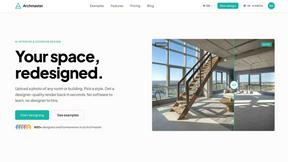
archmaster
Archmaster uses AI to transform uploaded photos of rooms or facades into photorealistic redesigns with 20 style presets in under 60 seconds.
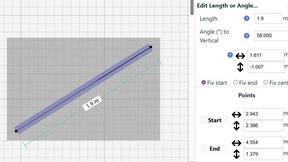
SimpleDraw
SimpleDraw is a free online tool for creating precise floor plans and scale drawings without any software installation.