

retroshelf
Retroshelf automatically tracks your retro handheld gaming sessions, logging games and trends while connecting you with fellow players.
tool Details
Explore More
Alternatives
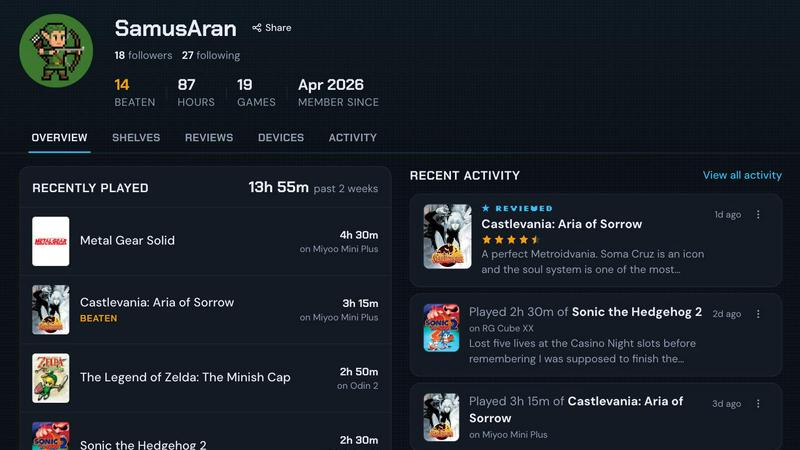
About retroshelf
retroshelf is a groundbreaking play-tracking and discovery application designed specifically for retro handheld gaming enthusiasts. By providing a public shelf, retroshelf allows users to showcase the games they are currently engaged with, those they have completed, and games they are reviewing or replaying. This innovative platform alleviates the burden of tracking gaming sessions across various platforms, apps, or simple memory, enabling users to access a comprehensive log of their gaming experiences. The core feature of retroshelf is its automatic logging functionality, facilitated by a small plugin that operates seamlessly on supported handheld devices. This plugin captures vital data such as game titles, playtime, and the specific device used, creating a browsable history of gaming sessions. With retroshelf, players can reflect on their gaming journeys, connect with fellow gamers, and discover trending titles within the community. This tool is ideal for retro gaming enthusiasts seeking to enhance their gaming experience and maintain a detailed record of their play history.
Features
Automatic Game Logging
retroshelf utilizes a tiny plugin that integrates effortlessly with your handheld device. This plugin automatically captures essential details of each gaming session, including the game title, total playtime, and the specific device used. This feature ensures that every gaming experience is documented without requiring manual input, allowing users to focus on gameplay rather than data entry.
Public Game Shelf
Users can create a public shelf that displays the games they are currently playing, have completed, or are reviewing. This feature not only serves as a personal log but also as a community showcase, allowing gamers to explore what others are playing and gain insights into trending games within the retro gaming community.
Device-Specific Reviews
retroshelf enhances the review process by associating star ratings with the specific handheld device on which the game was played. This context ensures that users understand how performance may vary across different devices, making it easier to choose games based on their preferred hardware.
Timeline of Sessions
The application organizes gaming sessions into a browsable timeline, allowing users to reflect on their gaming history. This feature provides a chronological view of what games were played, where they were played, and the notes left during each session, enriching the overall gaming experience.
Use Cases
Reflecting on Gaming Progress
Players can utilize retroshelf to track their gaming progress over time. By reviewing their timeline of sessions, they can identify patterns in their gaming habits, understand which games they enjoy the most, and even revisit old favorites based on past experiences.
Discovering New Games
The public shelf feature enables users to explore what games are currently popular within the community. By viewing the games other players are picking up, finishing, or replaying, individuals can discover new titles that may interest them, enhancing their gaming library.
Enhancing Social Interaction
retroshelf fosters community engagement by allowing users to connect with fellow gamers. Users can see who is playing what games and how long they are playing, which can spark discussions, recommendations, and friendships based on shared gaming interests.
Providing Feedback and Reviews
By enabling users to leave reviews alongside their gaming sessions, retroshelf encourages constructive feedback within the community. This feature allows players to share their thoughts on games, providing valuable insights to others who may be considering similar titles.
Frequently Asked Questions
What devices are supported by retroshelf?
retroshelf currently supports popular retro handheld devices running muOS and OnionOS. Users can easily integrate the plugin with these systems to start logging their gaming sessions automatically.
How does the automatic logging feature work?
The automatic logging feature operates through a small plugin that users place on their device's SD card. Once linked, this plugin captures data about each gaming session, including the game title, playtime, and device used, without any required manual input.
Is there a community aspect to retroshelf?
Yes, retroshelf emphasizes community engagement by allowing users to share their public shelves. This enables players to see what others are playing, fostering discussions and connections among retro gaming enthusiasts.
How can I join the beta testing phase?
To join the closed beta of retroshelf, interested users can sign up on the official website. The beta is being rolled out in waves, targeting retro handheld players who wish to contribute to shaping the community from its inception.
Similar to retroshelf

wery.ai
Wery is an AI-powered virtual creative studio for entertainment content.

Snapkin
Snapkin is a calorie tracker you use by photographing your plate.

AIdorable
Adopt a virtual baby who grows, learns, and remembers you.

Peekviewer
Anonymous Instagram viewer. Browse profiles, stories, and posts without an account or leaving a trace.
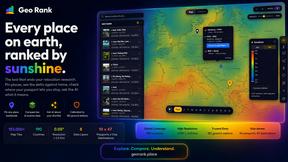
GeoRank
GeoRank combines 9 calibrated data layers covering 190 countries with AI analysis to rank locations by crypto capital gains tax and compare them.

AI Fruit
AI Fruit uses advanced AI models like Kling and Veo to generate viral talking fruit, ASMR cuts, and surreal hybrid videos in 1080p from a prompt or.

Caesura
Caesura is a macOS menu-bar app that reminds you to drink water, stretch, rest your eyes, and breathe on science-backed intervals.