

Easymotion - AI Motion Graphic Generator
Easymotion uses AI to transform static images, data sheets, and ideas into professional motion graphics and map animations in minutes.
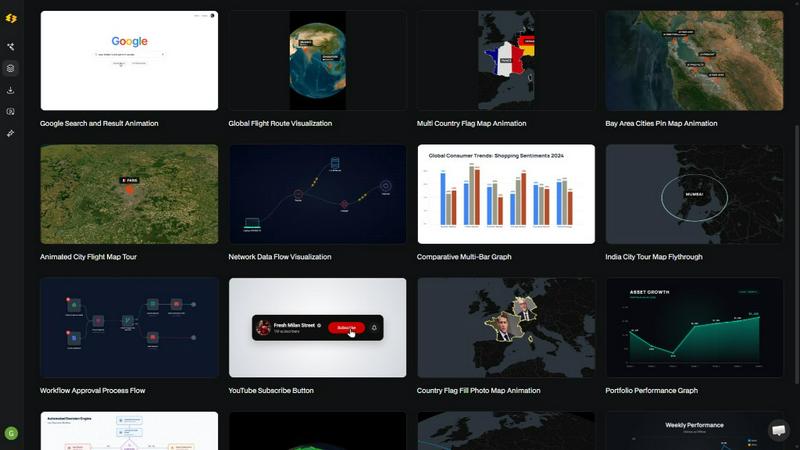
About Easymotion - AI Motion Graphic Generator
Easymotion is an AI-powered motion graphics generator and map animation platform designed for content creators, video editors, founders, marketers, and data storytellers who need to produce professional animated videos quickly. The platform eliminates the need for complex timeline-based editing software like Adobe After Effects by allowing users to generate animations through natural language prompts, file uploads, or template customization. Easymotion supports a broad spectrum of motion graphics formats including SaaS product promos, flowcharts, animated charts, UI explainers, quizzes, and other visual storytelling formats. It also functions as a dedicated map animation maker for flight routes, location pins, flag fill highlights, and geographic storytelling visuals. Users can initiate projects from a text description, or convert static images, spreadsheets in CSV or XLSX format, and PDFs into animation-ready scenes. After generation, users can refine their animations by chatting with the AI to adjust colors, pacing, labels, layout, and visual style. The platform includes a premium template library organized by categories such as Maps, Charts, Interface, and Social Media, allowing users to start from proven motion graphics layouts and customize them for brand, campaign, or client content. Export options include MP4 and MOV formats, with support for transparent background videos that integrate directly into editing workflows. Aspect ratio support covers 16:9 for YouTube and landscape content, 9:16 for TikTok and Instagram Reels, 1:1 for square social posts, and 4:5 for feed-friendly vertical formats. Easymotion is built entirely in the browser, requiring no software installation, and is trusted by over 10,000 creators who produce videos in under five minutes each.
Features
AI-Powered Motion Graphics Generation from Text Prompts
Users can describe their desired animation in plain English, and the AI interprets the request to generate fully animated scenes with appropriate motion curves, transitions, and visual elements. This feature eliminates the need for manual keyframing and complex timeline editing, reducing production time from hours to minutes. The AI handles animation logic for various content types including product promos, flowcharts, and social media videos.
Static Image to Animation Conversion
The platform allows users to upload static images and have the AI automatically apply intelligent motion effects, bringing still visuals to life with smooth animations. This capability is particularly useful for transforming product screenshots, infographics, or brand assets into engaging video content without requiring manual animation skills or third-party software.
Data File to Animated Visualization
Easymotion supports direct upload of CSV and XLSX spreadsheet files, which the AI processes to create animated data visualizations including bar charts, line graphs, and other chart types. Users can transform raw data into compelling animated visuals that are optimized for social media, presentations, and reports, with the ability to adjust colors, labels, and pacing through chat commands.
Map Animation Creator with Geographic Features
The platform includes specialized tools for creating map animations such as flight routes with animated paths, location pins with reveal effects, flag fill highlights for country-level data, and globe fly-through sequences. Users can generate geographic storytelling visuals for travel content, business presentations, or data journalism without needing GIS software or manual animation of map elements.
Use Cases
Social Media Video Production for Creators and YouTubers
Content creators can rapidly produce platform-specific videos for YouTube, TikTok, and Instagram Reels using Easymotion's aspect ratio presets of 16:9, 9:16, 1:1, and 4:5. The AI generates motion graphics such as animated channel milestones, subscribe button animations, travel reels, and chat interface recreations, enabling creators to post more frequently and grow their audience without spending hours in After Effects.
Marketing Campaign Asset Creation for Teams
Marketing professionals can independently create and iterate on branded video assets without waiting for designers or engaging in lengthy back-and-forth email chains. The platform supports same-day campaign production by allowing marketers to generate product promos, animated charts for reports, and social media videos that maintain brand consistency through customizable colors, logos, and visual styles.
Data Storytelling and Visualization for Analysts and Educators
Data storytellers can convert static charts and spreadsheet data into animated visualizations that capture viewer attention on social media and in presentations. With video posts achieving five times more engagement than static images, users can transform bar charts, line graphs, and flowcharts into compelling narrative animations that effectively communicate insights and stop the scroll.
Geographic Content Creation for Travel and Business Presentations
Users can create professional map animations for travel routes, flight path visualizations, global business operations, and geographic data presentations. The map animation maker supports multi-stop travel routes with animated paths, location pin reveals, and country-level flag highlights, making it ideal for travel vloggers, logistics companies, and business analysts presenting regional data.
Pricing
Easymotion offers a free tier that allows users to explore the platform without requiring a credit card. Specific pricing plans, tiers, and costs are not detailed in the provided content. Users are directed to the Easymotion website for current pricing information.
Frequently Asked Questions
What is Easymotion?
Easymotion is an AI-powered motion graphics generator that enables users to create professional animated videos simply by chatting with the AI. The platform supports map animations, static image animation, data visualization from spreadsheets, and social media video creation. It eliminates the need for complex software like Adobe After Effects and operates entirely in the browser.
How does AI motion graphics generation work in Easymotion?
The process involves three steps. First, users describe the animation they want in plain English or upload a file such as an image, CSV, or PDF. Second, users refine the result using chat commands to adjust colors, timing, map styles, or assets. Finally, users export the completed video as MP4 or with a transparent background. The AI handles all keyframes, animation curves, and transitions automatically.
What types of videos can I create with Easymotion?
Users can create a wide variety of motion graphics including SaaS product promos, flowcharts, animated charts, UI explainers, quizzes, map animations for flight routes and location pins, social media videos for YouTube, TikTok, and Instagram, data visualizations from spreadsheets, and branded content from templates. The platform supports multiple aspect ratios for different platforms.
What export formats and aspect ratios does Easymotion support?
Easymotion supports export in MP4 and MOV formats, including videos with transparent backgrounds (alpha channel) for direct use in editing software. Aspect ratio options include 16:9 for YouTube and landscape content, 9:16 for TikTok and Instagram Reels, 1:1 for square social posts, and 4:5 for feed-friendly vertical formats. This ensures compatibility across all major social media platforms and video editing workflows.
Similar to Easymotion - AI Motion Graphic Generator
ImageAgent
Create and edit AI images through conversation, using text or reference images and refining results in chat.

CloneWebsite
Clone any webpage pixel-perfect, export HTML/CSS/ZIP or React/Vue components.

GenX
All-in-one AI workspace to generate images, videos, and audio with multiple leading AI models.

Bloom
An adaptive AI tutor that turns topics or your materials into courses, lessons, and answers tailored to how you learn.

AppIconGenerator
Generate iOS and Android app icons from any image and export all platform sizes for free.
Typebar
Every key you press lights up on an on-screen keyboard, and each shortcut is named. For screen recordings, demos and learning shortcuts.

Nano AI
Create and edit AI images, generate videos, and compare models in one creative workbench.
ogimagegenerator.dev
Paste a URL and AI designs on-brand Open Graph images from your page's colours, fonts and logo. Free, no sign-up.