Imgezy
Imgezy is an AI photo editor that effortlessly removes objects and changes backgrounds for stunning.
tool Details
Explore More
Alternatives
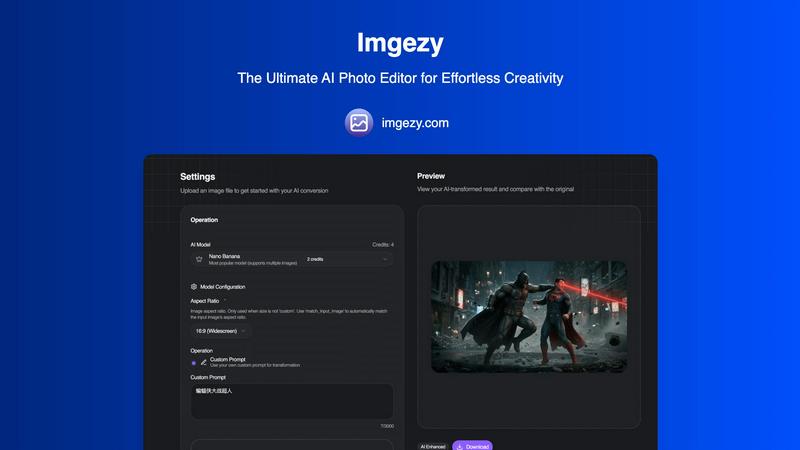
About Imgezy
Imgezy is an innovative AI-powered photo editing platform that revolutionizes the way users manipulate images. Designed to be user-friendly, it allows individuals, regardless of their technical skills, to perform professional-grade edits through simple, text-based commands. This all-in-one solution caters to a diverse audience including e-commerce retailers, social media influencers, photographers, and casual users who require high-quality visuals without the extensive learning curve associated with conventional software like Photoshop. Imgezy’s primary value proposition is its advanced artificial intelligence, which interprets natural language instructions to execute complex tasks such as object removal, background changes, and photo enhancement in mere seconds. The platform supports batch processing capabilities and delivers high-resolution outputs, ensuring that edited images retain their quality for various applications. By making sophisticated editing accessible, Imgezy stands out as a smart and essential tool for anyone looking to enhance their visual content effortlessly.
Features
Object Removal
Imgezy’s object removal feature leverages advanced AI algorithms to identify and eliminate unwanted elements from photos with pixel-perfect accuracy. Whether it is a photobomber, a stray object, or distracting background elements, users can simply describe what they want to remove, and the AI takes care of the rest, reconstructing the background seamlessly.
Background Replacement
With Imgezy, changing the background of an image is as easy as typing a command. Users can replace dull or unappealing backdrops with vibrant, high-quality alternatives in an instant. The AI processes the request and integrates the new background, allowing for creative freedom without the need for extensive editing skills.
Photo Enhancement
Imgezy automatically enhances images by adjusting colors, lighting, and sharpness, making photos more visually appealing. This feature ensures that even average shots can be transformed into stunning visuals, perfect for sharing on social media or for professional use.
Batch Processing
Imgezy supports batch processing, enabling users to edit multiple images simultaneously. This feature is particularly beneficial for photographers and businesses that need to process large quantities of images quickly and efficiently, saving significant time compared to manual editing.
Use Cases
E-commerce Product Photography
E-commerce retailers can leverage Imgezy to create stunning product images by removing distracting elements and replacing backgrounds with clean, professional settings. This enhances product visibility and appeal, ultimately driving sales.
Social Media Content Creation
Social media influencers can utilize Imgezy to produce eye-catching visuals in seconds. Whether it is for Instagram posts or promotional materials, the platform allows creators to maintain a professional aesthetic without the need for advanced editing skills.
Personal Photography Projects
Casual users can take advantage of Imgezy for personal photography projects, such as family portraits or travel photos. The ability to easily remove unwanted objects and enhance image quality makes it accessible for anyone looking to improve their personal images.
Marketing Campaigns
Marketing teams can use Imgezy to quickly edit visuals for campaigns, ensuring high-quality images that resonate with target audiences. Whether creating ads or social media posts, the platform’s features streamline the editing process, allowing for rapid turnaround times.
Frequently Asked Questions
How does Imgezy work?
Imgezy utilizes advanced AI technology to interpret user commands typed in natural language. Users upload images and describe the edits they want, and the AI processes these requests to deliver high-quality results in seconds.
Is any prior editing experience required to use Imgezy?
No, Imgezy is designed to be user-friendly, allowing individuals without any prior editing experience to achieve professional-quality results simply by describing their desired edits.
What types of images can I edit with Imgezy?
Imgezy supports all major image formats, including JPG, PNG, and WebP. Users can edit a wide range of images, from personal photos to commercial product images.
Can I edit multiple images at once with Imgezy?
Yes, Imgezy offers batch processing capabilities, enabling users to edit multiple images simultaneously. This feature is particularly useful for those handling large projects or bulk image uploads.
Similar to Imgezy
Speechyou
AI transcription for voice notes, meetings, and audio files in 1,700 languages, with AI summaries and subtitle export and unlimited chat ai usage.
ProspectHalo
AI sales agent that finds qualified leads, runs outreach, follows up automatically, creates content, and helps book more meetings.

benchmark.directory
An independent directory of 145 AI tools across 20 categories. Every listing was paid for, set up and used on real work. No sponsored placements, ever
Tools Network
saasgrow.ai lists SaaS growth tools that founders actually use. Listing is free, screened on submission, and goes live the moment you verify our badge


Built2WinWeb AI SEO
Custom PHP websites, AI Indexing Pack ($599 one‑time), and WebAgentScan SaaS ($9/mo). MCP, A2A, llms.txt, full ownership.

saasgrow.ai
saasgrow.ai is a curated directory of SaaS growth tools where every listing is screened before it goes live and placement can't be bought.