

Budgeting App
Walleta is an AI-powered iOS budget planner that scans receipts, sets monthly limits, and tracks expenses on-device.
tool Details
Explore More
Alternatives
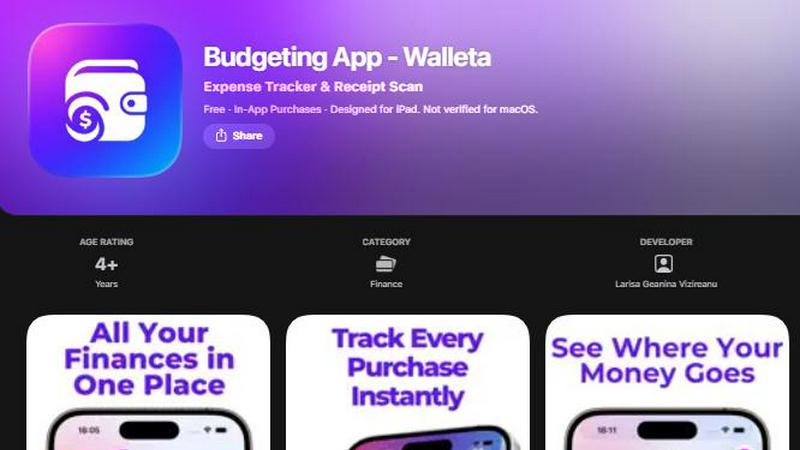
About Budgeting App
Budgeting App, also known as Walleta, is a free iOS budget planner and AI expense tracker available on the App Store for iPhone and iPad. It is designed for users who require detailed monthly spending limits, receipt capture, and category analytics without the need to link a bank account or create an online account. The application processes all data on-device, meaning no cloud sync, email signup, or ad tracking pixels are involved. Walleta’s core functionality revolves around on-device AI that reads merchant names, totals, dates, and categories directly from receipt photos. Users verify the extracted information before saving, ensuring accuracy. The application supports manual one-tap logging across fourteen predefined categories, including food, groceries, transport, shopping, health, rent, bills, subscriptions, coffee, travel, and fun. For users who prefer visual analysis, Walleta provides pie charts, bar graphs, calendar day views, multi-currency codes, and a comprehensive spending history archive for weekly, monthly, and yearly review. The target audience includes travelers, expats, students, and privacy-first households who want to avoid cloud-based finance synchronization. The free tier includes three AI receipt scans for trial purposes, and Walleta Pro unlocks unlimited AI scans via in-app purchase. The application is optimized for iOS 18.2 and above, and it is not intended for tax, investment, or business accounting purposes.
Features
AI Receipt Scanning with On-Device Processing
Walleta’s AI receipt scanning capability operates entirely on-device, extracting merchant name, total amount, date, and category from receipt photos. The system is designed to process clear, readable receipts where all required details are visible. Users simply point their camera at a receipt, and the AI reads the data in seconds. After extraction, users must verify the details before saving to ensure accuracy. Free users receive three AI scans to test the feature, while Walleta Pro subscribers gain unlimited scans. This feature eliminates manual data entry for most transactions, significantly reducing the time required to log expenses.
One-Tap Category Logging and Monthly Budget Caps
The application provides a streamlined logging interface where users can record an expense with a single tap across fourteen built-in categories: food, groceries, transport, shopping, health, rent, bills, subscriptions, coffee, travel, and fun. Each category can be assigned a monthly budget cap, and the app displays real-time progress bars showing how much of the budget has been used. When spending approaches or exceeds the defined limit, Walleta sends alerts to help users avoid overspending. This feature is particularly useful for individuals who want to enforce strict spending discipline without manual calculations.
Comprehensive Analytics and Visualization Tools
Walleta offers multiple visual representations of spending patterns to support financial analysis. Users can access pie charts that show category distribution, bar graphs for comparing spending across periods, and a calendar day view that displays expenses for each date in a month. The analytics engine supports weekly, monthly, and yearly timeframes, allowing users to identify trends and adjust their budgets accordingly. The spending history archive preserves past cycles, enabling users to review historical data without losing current entries. These tools are entirely dependent on the expenses users manually log or scan into the application.
Multi-Currency Support and Calendar View
The application includes built-in multi-currency support, automatically detecting the device’s local currency or allowing manual selection of any currency code. This feature is essential for travelers and expats who deal with multiple currencies. The calendar view provides a day-by-day breakdown of all logged expenses for a given month, showing exactly what was spent on any date. This granular view complements the aggregate analytics, giving users both macro and micro perspectives on their financial behavior. The calendar also supports archiving, so users can reset active expenses without losing historical data.
Use Cases
Privacy-Conscious Households Managing Daily Expenses
Households that prioritize data privacy and do not want their financial information stored on cloud servers or shared with third parties can use Walleta to track all daily expenses. The application works entirely offline, with no bank connection, email signup, or tracking pixels. Every receipt scan and manual entry remains on the device. Users can set monthly budgets for categories like groceries and bills, monitor progress in real time, and receive alerts when limits are approached. This use case is ideal for families who want full control over their financial data without compromising on functionality.
Travelers and Expats Tracking Spending in Multiple Currencies
Travelers and expatriates who deal with different currencies can leverage Walleta’s multi-currency support to log expenses in the local currency of each transaction. The app auto-detects the device’s currency or allows manual override. Users can scan receipts from restaurants, transport, and accommodations abroad, and the AI extracts the relevant details. The calendar view and category analytics provide a clear picture of spending patterns across different locations and currencies. This helps travelers stay within budget while abroad without needing to convert currencies manually or use multiple apps.
Students Managing Tight Budgets with Limited Features
Students with limited income can use Walleta’s free tier to track their spending without any financial commitment. The free version includes manual one-tap logging across all fourteen categories and three AI receipt scans to test the scanning feature. Students can set monthly budgets for essentials like food, transport, and subscriptions, and receive alerts when they are close to exceeding limits. The pie charts and bar graphs provide visual feedback on spending habits, helping students identify areas where they can cut costs. The lack of bank linking and cloud sync ensures their financial data remains private.
Freelancers and Gig Workers Tracking Business Expenses
Freelancers and gig workers who need to separate personal and business expenses can use Walleta to log work-related purchases under specific categories. The app’s manual logging and receipt scanning capabilities allow users to capture receipts for equipment, travel, and supplies. The spending history archive enables users to review past cycles and export data for personal record-keeping. While Walleta does not provide tax or business accounting advice, its detailed category tracking and calendar view help users organize their expenses for later review. The multi-currency support is beneficial for freelancers working with international clients.
Frequently Asked Questions
Does Budgeting App require a bank connection or account creation?
No. Walleta does not connect to any bank account, nor does it require an email signup or online account creation. All data is stored locally on the user’s device. There is no cloud sync, no tracking pixels, and no third-party data sharing. The application is designed for users who want complete privacy and control over their financial information.
How many AI receipt scans are included in the free version?
The free version of Walleta includes three AI receipt scans to allow users to test the feature. After these three scans are used, users must upgrade to Walleta Pro to access unlimited AI receipt scanning. Manual one-tap logging remains free and unlimited for all users, regardless of subscription status.
What happens if a receipt is faded or illegible?
The AI receipt scanning feature works best with clear, readable receipts where the merchant name, total amount, date, and category clues are visible. If a receipt is faded, crumpled, or otherwise illegible, the AI may not extract accurate information. In such cases, users should use the manual one-tap logging feature to enter the expense details by hand. The application relies entirely on user-verified data for budget calculations and analytics.
Which iOS versions are supported by Budgeting App?
Walleta requires iOS 18.2 or later to function properly. The application is designed for iPhone and iPad and is not verified for macOS. Users running older versions of iOS will not be able to install or use the app. The application size is 11.1 MB, and it supports the English language interface.
Similar to Budgeting App


Money Tracker App
Money Tracker App is a private iOS expense tracker using AI receipt scanning and on-device data with no signup or bank link.
CalcFi
CalcFi provides over 500 cited financial calculators for mortgages, taxes, and retirement with live data and instant PDF reports, no signup required.
kill the sub
Kill the Sub is an AI tool that finds forgotten subscriptions in your statements and provides direct cancel links for a one-time $3 fee.
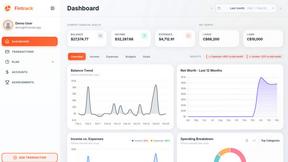
Fintrack
Fintrack is an AI-powered financial copilot that provides comprehensive spending visibility and automatically uncovers hidden savings opportunities.

Redbark
Redbark automates syncing your Australian bank and brokerage data to Google Sheets, YNAB, and more with real-time.

Ricco - Financial Literacy Game
Ricco is an engaging financial literacy game that teaches budgeting and investing through real-life scenarios and.